

Days Timetable
Chaleepa Mallawa Productivity iPhoneiPadiPod touch
Days Timetable is a free Productivity app for iPhone and iPad by Chaleepa Mallawa. Requires iOS 17.0. Updated May 5, 2026.
- Price
- Free
- on the App Store
- Size
- 6 MB
- Age 4+
- Updated
- May 5
- 2026 · v1.0
Screenshots
About Days Timetable
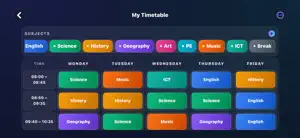
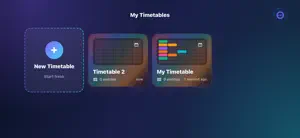
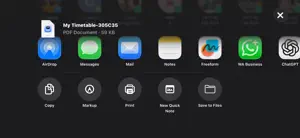
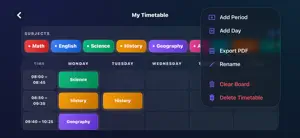
Days Timetable is a beautifully simple weekly planner built for the way classrooms actually run. Drag a colour-coded subject into a slot, watch your week fill up, and you have a clean visual schedule you can read at a glance — from the back row of class or the front of the staff room. Every screen is designed for landscape on iPhone and iPad, so you always get the full week on one page: days across, periods down, every subject vibrant and easy to spot. THE WEEKLY GRID • Tap a subject, tap a slot — the cell fills with the subject's colour • Add or remove periods (rows) and days (columns) from one menu • Empty cells stay clean with a soft dashed outline • Built landscape-first on iPhone and iPad — full week always visible VIBRANT, CUSTOM SUBJECTS • Ten ready-made subjects in bold colours: Math, English, Science, History, Geography, Art, PE, Music, ICT, Break • Add your own subjects with the colour picker — any name, any colour • Long-press a subject to remove it from the palette EXPORT & SHARE • One tap exports your timetable as a print-ready PDF (Pro) • AirDrop, message, save to Files, or print straight from the share sheet MULTIPLE TIMETABLES (PRO) • Keep one for school, one for after-school clubs, one for the new term • Free version saves a single timetable; Pro unlocks unlimited DAYS TIMETABLE PRO — ONE TIME, $1.99 A single in-app purchase unlocks everything. There are no subscriptions and no recurring charges: • Unlimited timetables • Beautiful PDF export & print • Removes every banner and interstitial ad — permanently PRIVACY-FIRST • No account, no sign-up, no email required • No camera, microphone, photo library, location, or contacts access • Your timetables are stored on your device; iCloud Key-Value Store can sync them between your own devices if iCloud is signed in • Free version uses Google AdMob with full Apple App Tracking Transparency support: choose "Ask App Not to Track" and ads stay non-personalised PERFECT FOR • Students planning a school week or revision schedule • Teachers building class timetables to print and share • Parents organising kids' weekly activities • Anyone who likes a colourful weekly grid they can read at a glance
App privacy
The developer, Chaleepa Mallawa, reported these privacy practices to Apple.
Data Used to Track You
The following data may be used to track you across apps and websites owned by other companies:
- Location: Coarse Location
- Identifiers: Device ID
- Usage Data: Advertising Data
Data Linked to You
The following data, which may be collected and linked to your identity, may be used for the following purposes:
- Location: Coarse Location
- Identifiers: Device ID
- Usage Data: Advertising Data
- Purchases: Purchase History
Used for: Third-Party Advertising, App Functionality
Alternatives to Days Timetable
Looking for apps like Days Timetable? Here are 6 similar apps on the App Store. The highest rated is 24 Block: Day Planner (5.0/5), and all 6 are free to download.
-
 Whisper | Speech To Text
4.7
Whisper | Speech To Text
4.7
-
 Simple Block Planner: TimeTone
-
 Time Block Planner - DayBlock
-
 Weeklane: Weekly To-Do Planner
4.7
Weeklane: Weekly To-Do Planner
4.7
-
 24 Block: Day Planner
5.0
24 Block: Day Planner
5.0
-
 WhisperDirect:AI Meeting Notes
| App | Rating | Price | Last updated | Compare |
|---|---|---|---|---|
| Days Timetable | – | Free | May 5, 2026 | |
| Whisper | Speech To Text | 4.7 / 5 (6) | Free | Jul 18, 2026 | Compare |
| Simple Block Planner: TimeTone | – | Free | Oct 1, 2026 | Compare |
| Time Block Planner - DayBlock | – | Free | Oct 26, 2026 | Compare |
| Weeklane: Weekly To-Do Planner | 4.7 / 5 (3) | Free | Oct 27, 2026 | Compare |
| 24 Block: Day Planner | 5.0 / 5 (3) | Free | Oct 9, 2026 | Compare |
| WhisperDirect:AI Meeting Notes | – | Free | Oct 10, 2026 | Compare |
Compare Days Timetable with the top alternatives: ratings, updates, ASO score and keyword gaps →