

Snapledgr: Schedule C Taxes
Dennis Harrington Finance iPhoneiPadiPod touch
Snapledgr: Schedule C Taxes is a free Finance app for iPhone and iPad by Dennis Harrington. Requires iOS 17.0. Updated September 24, 2026.
- Price
- Free
- on the App Store
- Size
- 7 MB
- Age 4+
- Updated
- Sep 24
- 2026 · v1.0.2
Screenshots


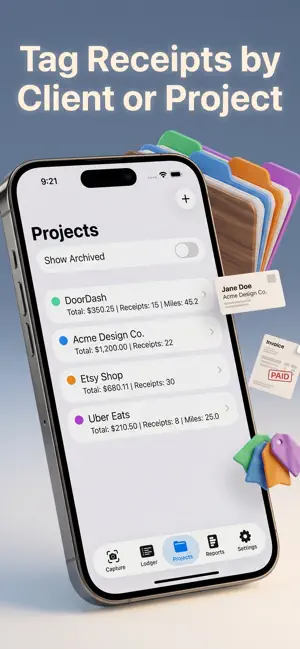
About Snapledgr: Schedule C Taxes
Snapledgr is the receipt scanner and mileage tracker built for self-employed work — 1099 contractors, freelancers, gig workers, small business owners filing Schedule C. Snap a receipt, the app reads the merchant, total, date, and the right IRS tax category. Confirm with one tap. At tax time, export a clean CSV or PDF report and you're done. No accounting jargon. No bank linking. No overcomplicated dashboards built for corporate finance teams. Just the tools a 1099 filer actually uses. WHAT SNAPLEDGR DOES • Receipt capture with AI — Snap a receipt, get the merchant, total, tax, tip, and date pre-filled. Suggested IRS Schedule C category, ready to confirm. • Schedule C from day one — Every receipt maps to a real IRS tax line (Office Expense, Travel, Meals, Supplies, all 22 categories). Your ledger is already organized the way the tax form is organized. • Mileage log — Add trips manually with the current IRS mileage rate auto-applied, or use Pro's GPS auto-track to record miles as you drive. • Projects and clients — Tag receipts and trips to a project. See exactly what each client cost you to serve. (Pro) • Ledger view — Every receipt and trip in one searchable list. Filter by date range, category, or project. Running totals at the top. • Receipt vault — Long-term searchable storage of every scanned receipt. IRS recommends keeping records for 7 years. Snapledgr keeps them for you. • CSV and PDF export — One tap to export. Send the CSV to your accountant for their software. Print the PDF and hand it over as a clean folder. (Pro) • Annual AI summary — A plain-English summary of your year for the front of the PDF report. Top categories, top merchants, total deductible. (Pro) • How to Use — A built-in guide that explains every Schedule C category in plain language. No accounting degree needed. FREE TIER • 15 AI receipt scans every month — plenty for testing whether Snapledgr fits your workflow before you commit • Manual entries, always free (never burns a scan) • Mileage entries, always free • Full ledger, search, and receipt vault — no caps, no expiring data • Built-in How to Use guide PRO ($4.99/month or $29.99/year) • Full access to AI receipt scans • GPS auto-track for mileage trips • Project and client tagging • CSV export to Numbers, Excel, or your accountant's software • PDF tax-prep report — cover page, category breakdown, mileage section, receipt image appendix • Annual AI summary • All future Pro features at no extra cost WHO SNAPLEDGR IS FOR Anyone filing Schedule C. Freelance designers, writers, consultants, photographers, contractors, electricians, plumbers, hair stylists, delivery drivers, rideshare drivers, online sellers, short-term rental hosts, real estate agents, tutors, nannies, trainers, coaches, therapists in private practice. If you get a 1099 and file a Schedule C, Snapledgr is built for you. WHAT WE DON'T DO • We don't give tax advice. Snapledgr organizes your records — your CPA files your taxes. We're upfront about that everywhere in the app. • We don't sell your data. Snapledgr does not have user accounts. There is no advertising network, no analytics broker, no third party marketing tracker. • We don't read your bank account. No linked accounts, no plaid, no account number ever requested. PRIVACY Receipt photos are sent to Google Gemini for OCR and category suggestion. That's it — no account info, no location data on receipts, no merchant list ever leaves your device. GPS mileage tracking happens entirely on your device. The app's full AI consent screen explains exactly what is sent and why before any AI feature runs. --- Snapledgr is built by Pearlcity LLC, a small App Factory studio. We make focused apps for specific jobs. Snapledgr's job is to hand you a clean folder for your accountant. Privacy Policy: https://pub-3970a22e7da04af9ba2fa4ec1f1ad7b3.r2.dev/Snapledgr/privacy-policy.html Terms of Use: Apple's Standard EULA — https://www.apple.com/legal/internet-services/itunes/dev/stdeula/
What’s new
Version 1.0.2 · Updated September 24, 2026
What's new in 1.0.2: - A security update that keeps Snapledgr's AI receipt scanning working reliably. - Your ledger is better protected: the app never clears your saved data if it has trouble opening it. - More consistent tax-category suggestions. - After your first scanned receipt is saved, Snapledgr may ask once if you'd like to rate it. You can dismiss it anytime.
App privacy
The developer, Dennis Harrington, reported these privacy practices to Apple.
Data Not Linked to You
The following data, which may be collected but is not linked to your identity, may be used for the following purposes:
- Financial Info: Other Financial Info
- User Content: Photos or Videos, Other User Content
- Identifiers: Device ID
Used for: App Functionality
Alternatives to Snapledgr: Schedule C Taxes
Looking for apps like Snapledgr: Schedule C Taxes? Here are 6 similar apps on the App Store. The highest rated is SavMoney: Budget & Credit Tool (5.0/5), and all 6 are free to download.
-
 SavMoney: Budget & Credit Tool
5.0
-
 Rental Log: Expense Tracker
5.0
-
 WriteOffGenie
-
 Tabby: AI Bookkeeper,Tax-Ready
5.0
-
 looch · Business Super App
5.0
-
 Crunch : Money Manager
4.2
| App | Rating | Price | Last updated | Compare |
|---|---|---|---|---|
| Snapledgr: Schedule C Taxes | – | Free | September 24, 2026 | |
| SavMoney: Budget & Credit Tool | 5.0 / 5 (2) | Free | May 2, 2026 | Compare |
| Rental Log: Expense Tracker | 5.0 / 5 (4) | Free | Jun 22, 2026 | Compare |
| WriteOffGenie | – | Free | May 30, 2026 | Compare |
| Tabby: AI Bookkeeper,Tax-Ready | 5.0 / 5 (3) | Free | Dec 30, 2025 | Compare |
| looch · Business Super App | 5.0 / 5 (15) | Free | Oct 18, 2026 | Compare |
| Crunch : Money Manager | 4.2 / 5 (11) | Free | Oct 22, 2026 | Compare |