

TypePress: Typewriter Writing
Ezgi Acar Productivity iPhoneiPadiPod touchMac
TypePress: Typewriter Writing is a free Productivity app for iPhone and iPad by Ezgi Acar. Rated 2.5/5 from 2 ratings. Requires iOS 17.0.
- Rating
- 2.5
- 2 ratings
- Price
- Free
- on the App Store
- Size
- 149 MB
- Age 4+
- Updated
- Oct 15
- 2026 · v1.7
Screenshots

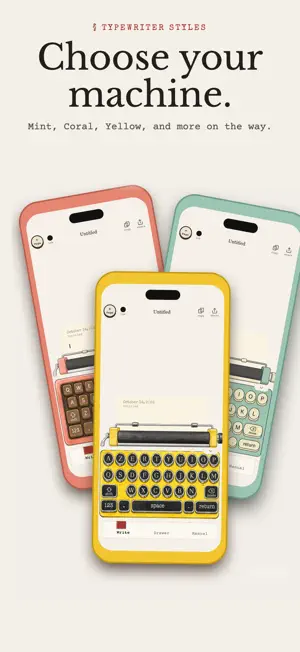


About TypePress: Typewriter Writing
Write like it’s 1962. A typewriter for your words, on iPhone, iPad and Mac. TypePress puts a typewriter on your iPhone and iPad and lets you write on it. Press a key and it sinks. The type bar swings up and strikes the ribbon. The carriage slides with every letter, the paper creeps upward, and the bell rings near the end of the line. Pull the lever or turn the knob and the page feeds up one line. No notifications, no toolbars, no autocorrect. Just you, a sheet of paper and the sound of your own words landing. A KEYBOARD THAT FEELS LIKE KEYS On iPhone, a touch typewriter keyboard sits under the paper, so every thought is a few taps from the page. On iPad, the machine fills the bottom of the screen and its round keys are tappable right on the illustration. Using a hardware keyboard? The matching key dips under your fingers. Swipe the carriage either way to return it, or grab the knob and roll the paper yourself. FIVE MACHINES, DRAWN BY HAND Classic, Mehano, Mint, Coral and Hermes, with more on the way. Each one has its own keys, lever, knobs and personality, and every part moves on its own. You write on the machine, not beside it. INK THAT BEHAVES LIKE INK Black, red and blue ribbons. Switch colors mid-sentence and only the letters you type next change. Set the ink heavy, normal or light, crisp or soft, and change it for a single word whenever you like. Light ink fades unevenly from word to word, the way a tired ribbon really does. Make a mistake and type over it, or strike a letter through and keep it on the page as part of the story. PAPER YOU WANT TO TOUCH Vintage, Modern and Minimal come free. With Pro, six textured stocks join them. Cotton, Laid, Onionskin, Aged 1962, Kraft and Handmade, each with its own grain and fibre, carried right into your PDF exports. Set the left and right margins in centimetres or inches with a tap, choose how wide the line runs, and the page follows. NINE TYPEFACES Courier Prime and Special Elite for the classic look. Cutive Mono, Anonymous Pro, IBM Plex Mono, JetBrains Mono and Lekton for clean monospace. Cutive for an elegant serif and Limelight for Art Deco headlines. Every page remembers its own font. SOUNDS THAT MAKE YOU WANT TO WRITE Four key sounds rotate so no two strokes are identical. The bell rings, the carriage return slides, the paper feed rolls. All of it is synthesized, warm and analog. Prefer silence? Turn it off. ARCHIVE, FOLDERS AND TAGS Every page is saved as you write. Press and hold a page to pin it, put it in a folder or give it a tag, then find anything with search. Deleted pages wait 30 days in Recently Deleted. Your stats keep a quiet count of pages and words, and never a streak. YOURS, EVERYWHERE Turn on iCloud Sync and your pages, folders and tags follow you across iPhone, iPad and Mac. No account, no server, just your own iCloud. Lock the app with Face ID, Touch ID or your passcode. Both stay off until you switch them on. EXPORT AND SHARE Export a page as a PDF or as plain text and send it anywhere from the share sheet, or save it straight to Files. Your first export is free. TYPEPRESS PRO After your free export, Pro unlocks unlimited exports, extra sounds, typewriter machines, textured papers and wide pages. · Monthly, $2.99 · Yearly, $19.99 (save 44%) · Lifetime, $49.99 one time One purchase works on your iPhone, iPad and Mac. Manage or cancel anytime in your Apple ID settings. WHO IT IS FOR Journalers who want a ritual instead of an app. Poets who want constraint. Novelists doing morning pages. Students who would like their tabs to stop watching. Anyone who has ever thought, I just want to write. TypePress does not suggest, correct or nag. It gives you a machine, a page and a reason to keep going. Start typing. Terms of Use: https://www.apple.com/legal/internet-services/itunes/dev/stdeula/
What’s new
Version 1.7 · Updated October 15, 2026
Now on iPhone. Capture a thought on the go with the touch typewriter, and find it waiting on your iPad and Mac through iCloud Sync. Organize with folders and tags. A lamp-lit page for late hours, with five warmth settings. It follows your device or stays under your control. Send any page to the Galley shelf and read it like a book, in Serif, Typewriter or Sans, at the size you like. It remembers where you stopped. The first page is free, a full shelf comes with Pro. Click a letter, use the arrow keys or slide the carriage, and the machine stops right there. Overtype it or delete a single letter, the way you would on a real typewriter, minus the correction fluid. Ink Density now has five steps, so you decide how heavy the ribbon hits.
App privacy
The developer, Ezgi Acar, reported these privacy practices to Apple.
Data Not Collected
The developer does not collect any data from this app.
Alternatives to TypePress: Typewriter Writing
Looking for apps like TypePress: Typewriter Writing? Here are 6 similar apps on the App Store. The highest rated is Falken Writer (5.0/5), and all 6 are free to download.
-
 Typewright - Typewriter
-
 Retrotype
3.9
Retrotype
3.9
-
 Tsuzuriple - Novel Plot Writer
-
 Leaffold
4.2
Leaffold
4.2
-
 Falken Writer
5.0
Falken Writer
5.0
-
 Inki: Quick Capture for Notion
| App | Rating | Price | Last updated | Compare |
|---|---|---|---|---|
| TypePress: Typewriter Writing | 2.5 / 5 (2 ratings) | Free | October 15, 2026 | |
| Typewright - Typewriter | – | Free | Aug 25, 2026 | Compare |
| Retrotype | 3.9 / 5 (19) | Free | Mar 5, 2026 | Compare |
| Tsuzuriple - Novel Plot Writer | – | Free | Sep 2, 2026 | Compare |
| Leaffold | 4.2 / 5 (5) | Free | Sep 4, 2026 | Compare |
| Falken Writer | 5.0 / 5 (1) | Free | Sep 30, 2026 | Compare |
| Inki: Quick Capture for Notion | – | Free | Sep 16, 2026 | Compare |