

Dual Flip Clock
路 林 Utilities iPhoneiPadiPod touchMac
Dual Flip Clock is a free Utilities app for iPhone and iPad by 路 林. Rated 5.0/5 from 2 ratings. Requires iOS 17.0. Updated October 20, 2026.
- Rating
- 5.0
- 2 ratings
- Price
- Free
- on the App Store
- Size
- 18 MB
- Age 4+
- Updated
- Oct 20
- 2026 · v1.7
Screenshots
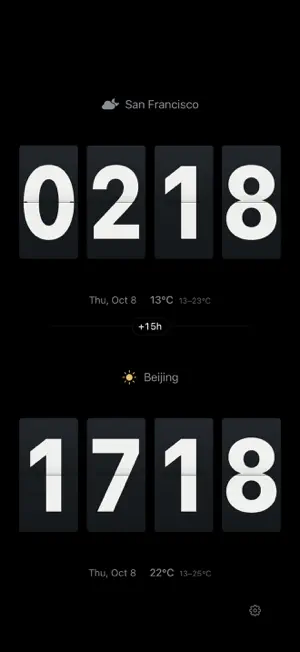


About Dual Flip Clock
I'm in Beijing. My family is in Vancouver. I used to do the math on my fingers, or open the world clock twice. Now I turn the phone sideways onto the charging stand and both cities stand there side by side. I just look up. TWO CITIES, ONE SCREEN Two clocks, stacked or side by side, each on its own city's time. No more counting hours. FOUR LOOKS Flip, for the mechanical clack of a split-flap board. Glass, when you want it clean. City Day & Night, to see at a glance whether it's light over there. Single City, when you only care about one. WHAT'S THE WEATHER THERE Each clock carries the current conditions and temperature. Faster than asking "is it cold where you are?" IT DIMS WHEN IT GETS DARK THERE Night brightness follows the city on screen, not your phone. When it's night on their side, that half dims and the stars come out. Easy on the eyes at 3am. IT FINDS THE PLACE A built-in worldwide city database that also includes universities and high schools - search "Stanford University" and it's there. Anything missing is looked up online, and saved only if you pick it. Cities you use often float to the top. LOCK SCREEN AND HOME SCREEN WIDGETS Small, medium, large, extra large. The larger sizes show dates and weather for both cities at once. LANDSCAPE, ALWAYS ON The screen won't lock while the app is open - it's built to sit on a desk, a nightstand, a charging stand. Works in both landscape directions, so it's upright however you set it down. PRIVACY Location is optional. It's used only when you turn on GPS mode, to show the time and temperature where you are.
What’s new
Version 1.7 · Updated October 20, 2026
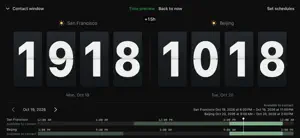
Version 1.7 introduces contact windows for easier connections across time zones. • Set weekday and weekend schedules for each city, including multiple and overnight time ranges. • See shared contact hours and jump to a suggested time. • Drag the timeline to preview both local times, change days or return to now. • Larger, centered clocks in preview, with improved landscape layouts for small iPhones and iPad. • Improved localized text in contact windows and schedule settings.
App privacy
The developer, 路 林, reported these privacy practices to Apple.
Data Not Collected
The developer does not collect any data from this app.
Alternatives to Dual Flip Clock
Looking for apps like Dual Flip Clock? Here are 6 similar apps on the App Store. The highest rated is Studio Clock - Studio Uhr (5.0/5), and all 6 are free to download.
-
 Studio Clock - Studio Uhr
5.0
Studio Clock - Studio Uhr
5.0
-
 Zulu Time Military Clock
4.8
Zulu Time Military Clock
4.8
-
 A Flip Clock
5.0
A Flip Clock
5.0
-
 AlwaysOn: Standby Clock
4.6
AlwaysOn: Standby Clock
4.6
-
 Minimal Digital Clock: StandBy
4.5
Minimal Digital Clock: StandBy
4.5
-
 SFClock
4.5
SFClock
4.5
| App | Rating | Price | Last updated | Compare |
|---|---|---|---|---|
| Dual Flip Clock | 5.0 / 5 (2 ratings) | Free | October 20, 2026 | |
| Studio Clock - Studio Uhr | 5.0 / 5 (1) | Free | Feb 19, 2025 | Compare |
| Zulu Time Military Clock | 4.8 / 5 (10) | Free | Apr 20, 2026 | Compare |
| A Flip Clock | 5.0 / 5 (2) | Free | Feb 16, 2026 | Compare |
| AlwaysOn: Standby Clock | 4.6 / 5 (14) | Free | Oct 21, 2026 | Compare |
| Minimal Digital Clock: StandBy | 4.5 / 5 (17) | Free | Oct 9, 2026 | Compare |
| SFClock | 4.5 / 5 (4) | Free | Sep 12, 2024 | Compare |
Compare Dual Flip Clock with the top alternatives: ratings, updates, ASO score and keyword gaps →