

What I Did - Done Diary
SiU Ahn Productivity iPhoneiPadiPod touch
What I Did - Done Diary is a free Productivity app for iPhone and iPad by SiU Ahn. Rated 1.0/5 from 1 ratings. Requires iOS 15.0. Updated September 11, 2026.
- Rating
- 1.0
- 1 ratings
- Price
- Free
- on the App Store
- Size
- 36 MB
- Age 4+
- Updated
- Sep 11
- 2026 · v1.4.1
Screenshots

About What I Did - Done Diary
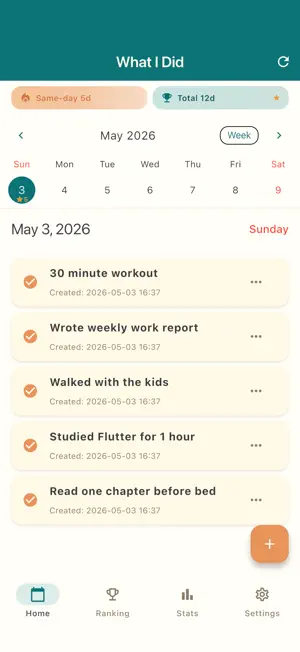
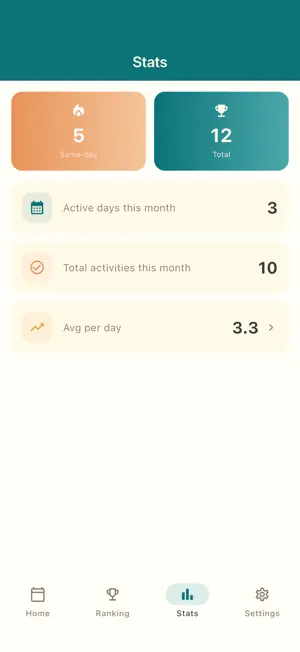
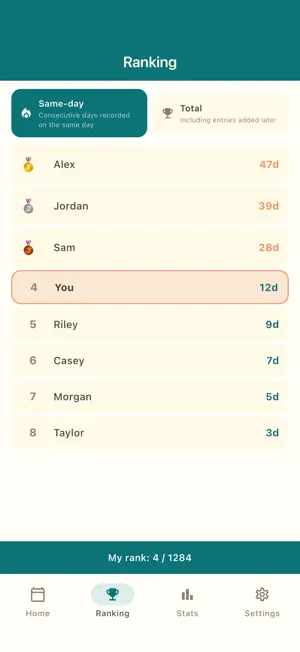
What I Did is the opposite of a to-do list. Instead of tracking what you have to do, you log only what you actually accomplished each day. Every entry is a small win. [Why this is different] Traditional to-do apps track tasks you must do. When the day ends with half the list undone, you feel guilty and lose motivation. The list itself becomes a source of stress, not a tool. What I Did flips the script. You only log what you ACTUALLY DID. Every entry is a small win. Every screen is a record of accomplishment, not a punch list of unfinished work. Looking back at past days feels good, not stressful. There are no deadlines, no priorities, no "incomplete" status to nag you. The app cannot judge you. It only remembers what you got done. [Who this is for] - Anyone who feels burned out by traditional to-do apps - Students who want to track what they actually studied each day - Freelancers and remote workers who need a record of what they shipped, for billing or self-review - Parents managing the invisible work of running a household - Anyone in recovery, therapy, or rebuilding their routine — small wins matter - People who want to look back at the end of a week, month, or year and remember what they actually did with their time [How it works] - Pick a date on the calendar - Tap "+" to log what you did, in one line - Add an optional memo if you want more detail - Browse past days to see everything you have done - Get a daily reminder at a time you choose, so you remember to log [A daily ritual that takes 2 minutes] The app is built around a simple evening (or morning) habit. Right before bed, or right after coffee, open the app and log what you did. That's it. Two or three lines. After a week you have a complete picture of where your time went. After a month you have proof of how much you actually got done — even on days that felt unproductive. [What you can capture] - Work tasks shipped, problems solved, meetings held - Things studied, books read, exercises completed - Errands run, household tasks finished, meals cooked - Conversations had, emails sent, decisions made - Moments of rest, walks taken, time with family - Anything you want to remember a year from now [Key features] - Calendar view to navigate by date with at-a-glance counts per day - Quick add, edit, swipe to delete - Optional memo field for additional context - Korean and English language support, switch any time without restart - Daily reminder notifications at a time you choose - Sign in with Apple, Google, Kakao, Naver, or email - Account deletion in Settings, with all your records permanently removed [Privacy & ads] Activity records are stored on our backend, tied only to your account. Email and provider account IDs are stored for authentication. The app shows ads via Google AdMob, and the App Tracking Transparency prompt is requested for ad personalization only. We do not sell your personal data to third parties. Account deletion in Settings removes all of your records permanently — no questions asked. --- Stop tracking what you have to do. Start remembering what you got done.
What’s new
Version 1.4.1 · Updated September 11, 2026
• Fixed an issue where signing in or loading your activities could fail. Everything the app sends to our server is now encrypted over HTTPS. • Made ads load more reliably on screen.
App privacy
The developer, SiU Ahn, reported these privacy practices to Apple.
Data Used to Track You
The following data may be used to track you across apps and websites owned by other companies:
- Identifiers: Device ID
- Usage Data: Product Interaction, Advertising Data
- Diagnostics: Crash Data, Other Diagnostic Data
Data Linked to You
The following data, which may be collected and linked to your identity, may be used for the following purposes:
- Contact Info: Email Address
- User Content: Other User Content
- Identifiers: User ID
Used for: App Functionality
Data Not Linked to You
The following data, which may be collected but is not linked to your identity, may be used for the following purposes:
- Identifiers: Device ID
- Usage Data: Product Interaction, Advertising Data
- Diagnostics: Crash Data, Other Diagnostic Data
Used for: Third-Party Advertising, Analytics, App Functionality
Alternatives to What I Did - Done Diary
Looking for apps like What I Did - Done Diary? Here are 6 similar apps on the App Store.
-
 ToDoMelon
-
 Feats: Calm To-Do List
-
 GentleMe - Gentle Reminders
-
 Sagely - Calm To-Dos
-
 Swipe Calendar
-
 Recollecto
| App | Rating | Price | Last updated | Compare |
|---|---|---|---|---|
| What I Did - Done Diary | 1.0 / 5 (1 rating) | Free | September 11, 2026 | |
| ToDoMelon | – | Free | Jul 15, 2026 | Compare |
| Feats: Calm To-Do List | – | Free | Sep 1, 2026 | Compare |
| GentleMe - Gentle Reminders | – | Free | Sep 21, 2026 | Compare |
| Sagely - Calm To-Dos | – | Free | May 25, 2026 | Compare |
| Swipe Calendar | – | Free | Aug 18, 2026 | Compare |
| Recollecto | – | Free | Aug 16, 2025 | Compare |