

Nonne · To-Do List & Planner
Pedro Conchas Burelo Productivity iPhoneiPadiPod touch
Nonne · To-Do List & Planner is a free Productivity app for iPhone and iPad by Pedro Conchas Burelo. Requires iOS 16.4. Updated September 29, 2026.
- Price
- Free
- on the App Store
- Size
- 62 MB
- Age 4+
- Updated
- Sep 29
- 2026 · v1.0.1
Screenshots

About Nonne · To-Do List & Planner
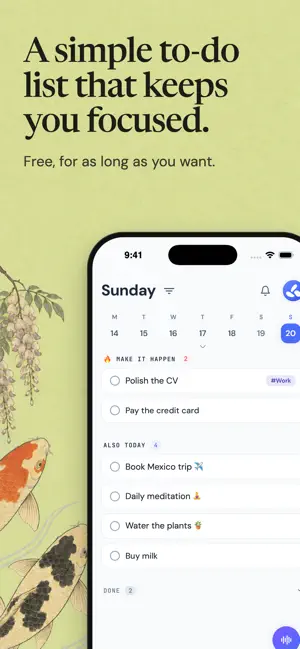
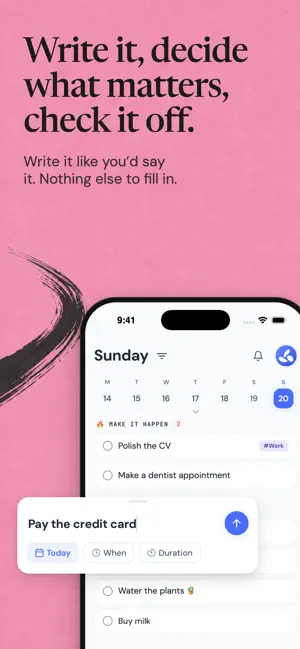
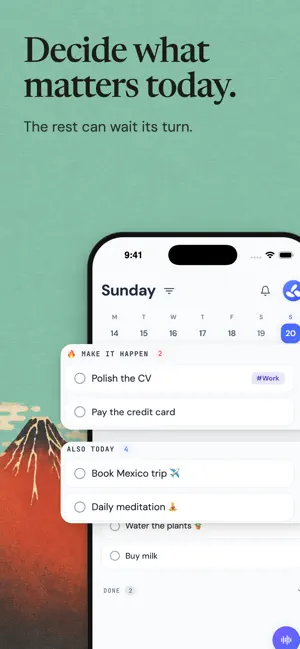
nonne is a simple to-do list that keeps you focused. Write your tasks down, pick what matters today and check it off. Nothing to set up, and nothing turns red when you miss a day. WRITE IT, DECIDE, CHECK IT OFF Write a task the way you'd say it: "Pay the credit card." A title is enough. Mark what has to happen today in Make it happen, and the rest can wait its turn. Check it off when it's done. NOTHING TURNS RED Didn't get to something? It moves to tomorrow on its own. Nothing gets deleted and nobody keeps score. Want a nudge? Turn on the rollover counter, and nonne can move a task that keeps sliding to Later and let you know. OR JUST SAY IT Call the dentist, buy milk, send the CV before five. Say it out loud and Helena turns it into task drafts with dates, times and tags. You approve them before nonne creates anything. Prefer another voice? Switch to Luc in Settings. Inside a task, Helena can also rewrite the title, add context and organize subtasks. You decide what changes. nonne processes your voice live. It doesn't store the audio or a transcript, and nobody uses it to train models. NEED MORE THAN A LIST? nonne can be your daily planner. Turn on what helps and leave the rest off. • Keep it simple or I like the details: one clean line per task, or durations, notes and tags on every card • Daily plan: each morning, pick your priorities and give your tasks a time • A daily limit that shows how full your day gets as you add tasks • Later for tasks without a date, Pinned for the ones you keep coming back to • Agenda and Calendar for your schedule, with reminders and attachments • Connect Google or Apple Calendar: your events show up in nonne, and your scheduled tasks show up in your calendar • Focus sessions that track your time, and your week in numbers • Share a task with someone in your Circle ON IPHONE, IPAD AND THE WEB Sign in with the same account and your list stays in sync. On the web, Board gives you another way to organize the same plan. FREE INCLUDES • Unlimited tasks, subtasks and history • Reminders and attachments with 500 MB of storage • Sync between iPhone, iPad and the web • 10 Helena voice sessions each month • Today, Agenda and Calendar, plus Board on the web • Durations, time tracking and a daily limit • Up to 5 tags and 1 Circle member PREMIUM ADDS • Unlimited Helena sessions • Smart autofill for tags and durations • Recurring tasks • Google and Apple calendar connections, both ways • Deeper Stats insights and exportable hours reports • Unlimited tags and up to 5 Circle members • 25 GB of storage with files up to 100 MB Every new account starts with 14 days of Premium. No card required. When the trial ends you stay on Free, with nothing to pay. Start today. It's free. Terms of Use: https://nonne.today/terms Privacy Policy: https://nonne.today/privacy Support: https://nonne.today/support
What’s new
Version 1.0.1 · Updated September 29, 2026
A new look, now on iPad. • nonne now runs on iPad. • Your scheduled tasks now show up in your Google or Apple calendar. Turn it on for each account in Settings › External calendars. • New app icon. • Daily plan: each morning, pick your priorities and give your tasks a time. Turn it on in Preferences. • Backlog is now Later. • Writing a task asks only for the title. Notes live inside the task. • Change your account email and manage how you sign in: email, Apple or Google. See your active sessions in Settings. • If a connected calendar loses access, nonne tells you and helps you reconnect it. • Moving a running task to another day pauses its timer. • Fixes and polish across the app.
App privacy
The developer, Pedro Conchas Burelo, reported these privacy practices to Apple.
Data Linked to You
The following data, which may be collected and linked to your identity, may be used for the following purposes:
- Purchases: Purchase History
- Location: Coarse Location
- Identifiers: User ID, Device ID
- Usage Data: Product Interaction
- Contact Info: Email Address, Name
- Contacts: Contacts
- User Content: Emails or Text Messages, Photos or Videos, Audio Data, Other User Content
- Diagnostics: Crash Data
Used for: Analytics, App Functionality
Alternatives to Nonne · To-Do List & Planner
Looking for apps like Nonne · To-Do List & Planner? Here are 6 similar apps on the App Store.
-
 ToDoMelon
-
 GentleMe - Gentle Reminders
-
 Swipe Calendar
-
 Recollecto
-
 Feats: Calm To-Do List
-
 Sagely - Calm To-Dos
| App | Rating | Price | Last updated | Compare |
|---|---|---|---|---|
| Nonne · To-Do List & Planner | – | Free | September 29, 2026 | |
| ToDoMelon | – | Free | Jul 15, 2026 | Compare |
| GentleMe - Gentle Reminders | – | Free | Sep 21, 2026 | Compare |
| Swipe Calendar | – | Free | Aug 18, 2026 | Compare |
| Recollecto | – | Free | Aug 16, 2025 | Compare |
| Feats: Calm To-Do List | – | Free | Sep 1, 2026 | Compare |
| Sagely - Calm To-Dos | – | Free | May 25, 2026 | Compare |