

KanKan: AI Weekly Planner
TAEHYEON KOO Productivity iPhoneiPadiPod touchMac
KanKan: AI Weekly Planner is a free Productivity app for iPhone and iPad by TAEHYEON KOO. Requires iOS 26.0. Updated October 15, 2026.
- Price
- Free
- on the App Store
- Size
- 10 MB
- Age 4+
- Updated
- Oct 15
- 2026 · v2.0.4
Screenshots


About KanKan: AI Weekly Planner
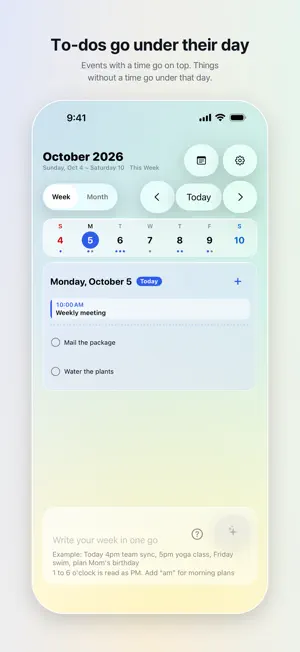
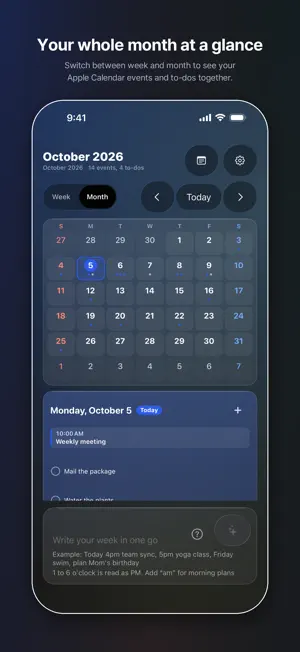
KanKan has its own week and month calendar. It has its own Home Screen widgets too. And it works with Apple Calendar: events you add in KanKan go into Apple Calendar, and events already in Apple Calendar show up in KanKan. Write your plans for the week in one go, and on-device AI sorts them for you. Events with a time go into Apple Calendar. Things without a time become a checklist under that day. Ideas without a date become sticky notes. Think of it less as an event-entry app and more as a planner that takes dictation. How it works 1. Write your week in one go, one plan per line, like "Dentist Tuesday 2pm", "Thursday 3-5pm study group", "Wednesday groceries" and "look into a new suitcase". 2. Check the confirm card. Anything KanKan had to guess is highlighted, so you only fix what's wrong. Or just rewrite it. 3. Tap Add All. Timed events go on top, untimed to-dos sit under their day, and undated ideas go on the sticky note board. What's different Its own calendar. Switch between week and month and see your Apple Calendar events and your KanKan to-dos on one screen. Saturdays are blue, Sundays and holidays are red. Its own widgets. Today, This Week, Sticky Notes and Calendar, so you can check your plans without opening the app. Works with Apple Calendar. Events go straight into Apple Calendar, so they look the same in the Calendar app. One go. Not one line at a time. Your whole week at once. To-dos under the day. KanKan doesn't invent a time for things that don't have one. With a time it's an event, without one it's a to-do. Sticky notes. Keep undated ideas on the board and move them onto a day when you're ready. One date per line. Write "Thursday: laundry, meal prep, call grandma" and all three go on Thursday. Weekdays are counted from today. On-device. What you write is processed on your device by Apple Intelligence. No subscription. Ads. On iPhone and iPad a small banner ad appears at the bottom of the screen. Ads are not personalized. There are no ads on Mac. Also: tap to edit, quick add, iCloud sync, Liquid Glass design, Dark Mode. Requires: iPhone 15 Pro or iPhone 16 and later, Apple silicon Mac, iPad with M1 or later or iPad mini (A17 Pro or later), iOS 26 / iPadOS 26 / macOS 26, and Apple Intelligence turned on.
What’s new
Version 2.0.4 · Updated October 15, 2026
What's new in this update. • KanKan asks once which calendar to add events to. Choose an iCloud calendar to see the same events on iPhone, iPad and Mac. • Settings now show each calendar's account (iCloud, Google and so on), and KanKan events in other calendars can be moved to iCloud. • Choose a size for each sticky note: Small, Medium or Large. • On iPad, drag the edge between the week and the sticky board to change the board's width. • While you write, hide the keyboard with Done above it or by tapping outside. • Today now moves to the next day right after midnight.
App privacy
The developer, TAEHYEON KOO, reported these privacy practices to Apple.
Data Linked to You
The following data, which may be collected and linked to your identity, may be used for the following purposes:
- Location: Coarse Location
- Identifiers: Device ID
- Usage Data: Product Interaction, Advertising Data
Used for: Third-Party Advertising, Developer’s Advertising or Marketing, Analytics, App Functionality
Data Not Linked to You
The following data, which may be collected but is not linked to your identity, may be used for the following purposes:
- Diagnostics: Performance Data, Other Diagnostic Data, Crash Data
Used for: Third-Party Advertising, Developer’s Advertising or Marketing, Analytics, App Functionality
Alternatives to KanKan: AI Weekly Planner
Looking for apps like KanKan: AI Weekly Planner? Here are 6 similar apps on the App Store. The highest rated is Weeklo: Weekly Planner & ToDo (4.4/5), and all 6 are free to download.
-
 WadeNote - 안전한 개인 노트
-
 Plandy: Calendar & Tasks
-
 Greyer - Smart AI Assistant
3.9
Greyer - Smart AI Assistant
3.9
-
 스플리 - 나만의 똑똑한 학습 플래너
-
 Weeklo: Weekly Planner & ToDo
4.4
Weeklo: Weekly Planner & ToDo
4.4
-
 타이피 - 언제든 이어 쓰는 글쓰기 앱
3.7
타이피 - 언제든 이어 쓰는 글쓰기 앱
3.7
| App | Rating | Price | Last updated | Compare |
|---|---|---|---|---|
| KanKan: AI Weekly Planner | – | Free | October 15, 2026 | |
| WadeNote - 안전한 개인 노트 | – | Free | Jun 30, 2026 | Compare |
| Plandy: Calendar & Tasks | – | Free | Oct 20, 2026 | Compare |
| Greyer - Smart AI Assistant | 3.9 / 5 (15) | Free | Oct 15, 2026 | Compare |
| 스플리 - 나만의 똑똑한 학습 플래너 | – | Free | Oct 22, 2026 | Compare |
| Weeklo: Weekly Planner & ToDo | 4.4 / 5 (30) | Free | Oct 21, 2026 | Compare |
| 타이피 - 언제든 이어 쓰는 글쓰기 앱 | 3.7 / 5 (3) | Free | Sep 28, 2026 | Compare |