

JeemBeam: Edit & Share Audio
JeemBeam LLC Music iPhoneiPadiPod touch
JeemBeam: Edit & Share Audio is a free Music app for iPhone and iPad by JeemBeam LLC. Requires iOS 18.0. Updated October 19, 2026.
- Price
- Free
- on the App Store
- Size
- 20 MB
- Age 12+
- Updated
- Oct 19
- 2026 · v1.1.1
Screenshots


About JeemBeam: Edit & Share Audio
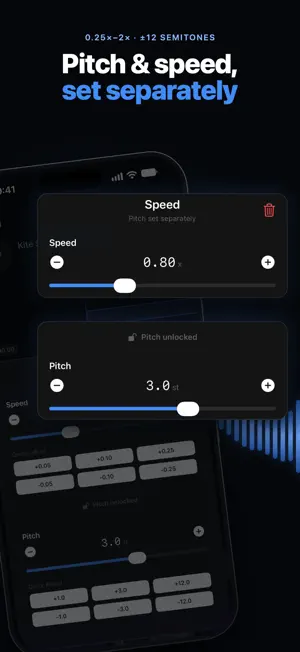
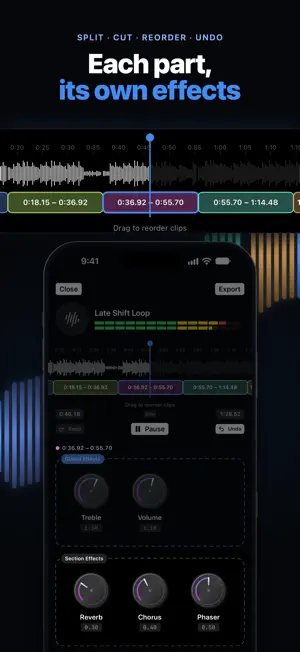
Shape your sound on iPhone and iPad. JeemBeam is an audio editor for your tracks: one-tap presets, effects for every part of a track, and a Studio on your device that keeps your edits organized. One-tap presets: Slowed + Reverb, Nightcore, Lo-Fi, Daycore, Slowed Down, Sped Up, Club, Live and Old-Radio. Tap one, listen, then fine-tune it. Effects for every part: spilt a track into sections and give each one its own effects, or apply effects to the whole track. Choose from reverb, bass, treble, chorus, phaser, flanger, wah, muffle, telephone, lo-fi and more. Cut out a section or drag sections into a new order. Undo and redo anything. Speed and pitch, separately: change the speed from 0.25x to 2x and the pitch up to 12 semitones up or down, together or independently. Your Studio, on your device: import audio files from the Files app, or start with the built-in demo track. Organize your Studio in folders, drag to rearrange, search everything, and play or shuffle any folder. Your audio stays on your device unless you share or upload it. Studio audio isn't included in device backups, so keep a copy of anything important. Share your edit: export over the original or save a new copy, then tap Share File to send the file to Messages, Airdrop, Files or another app, no account needed. Want a link instead? Tap Upload to put it on JeemBeam (uploading needs an account). Uploads start as unlisted, so only people with the link can hear them. No account needed: the editor and the Studio work fully without one.
What’s new
Version 1.1.1 · Updated October 19, 2026
What's new in version 1.1.1 - Share the file or get a link: after you export, tap Share File to send your edit to Messages, Airdrop, Files or another app, or Upload to put it on JeemBeam and get a link. Uploads start as Unlisted, so only people with the link can hear them. - Click-free splits: sped-up, slowed or pitch shifted parts now play straight through, and reordered parts join smoothly. - Cleaner sound: Treble brightens and darkens clearly, Vibrato is one smooth wobble, and parts with no effects sound exactly like the original. - Delay now gives a clear echo. - Small fixes and improvements.
App privacy
The developer, JeemBeam LLC, reported these privacy practices to Apple.
Data Linked to You
The following data, which may be collected and linked to your identity, may be used for the following purposes:
- Usage Data: Product Interaction
- Contact Info: Email Address, Name
- User Content: Photos or Videos, Audio Data, Other User Content
- Search History: Search History
- Identifiers: User ID
Used for: Analytics, App Functionality
Data Not Linked to You
The following data, which may be collected but is not linked to your identity, may be used for the following purposes:
- Location: Coarse Location
- Identifiers: Device ID
- Diagnostics: Other Diagnostic Data
Used for: Analytics
Alternatives to JeemBeam: Edit & Share Audio
Looking for apps like JeemBeam: Edit & Share Audio? Here are 6 similar apps on the App Store. The highest rated is Self Made Master (5.0/5), and 5 of the 6 are free to download.
-
 Self Made Master
5.0
Self Made Master
5.0
-
 HD Music Player
-
 Podora: AI Podcast Player
-
 VocalBox: AI Song & Music
-
 Fretforge: Fretboard Theory
-
 Stemio: Music & Vocal Remover
5.0
Stemio: Music & Vocal Remover
5.0
| App | Rating | Price | Last updated | Compare |
|---|---|---|---|---|
| JeemBeam: Edit & Share Audio | – | Free | October 19, 2026 | |
| Self Made Master | 5.0 / 5 (1) | 9.99 USD | Jul 21, 2026 | Compare |
| HD Music Player | – | Free | Aug 15, 2026 | Compare |
| Podora: AI Podcast Player | – | Free | Aug 13, 2026 | Compare |
| VocalBox: AI Song & Music | – | Free | Sep 9, 2026 | Compare |
| Fretforge: Fretboard Theory | – | Free | Oct 12, 2026 | Compare |
| Stemio: Music & Vocal Remover | 5.0 / 5 (3) | Free | Oct 15, 2026 | Compare |