

CloudPhotos Photo Backup
Ronan Fraser Photo & Video iPhoneiPadiPod touch
CloudPhotos Photo Backup is a free Photo & Video app for iPhone and iPad by Ronan Fraser. Requires iOS 26.2. Updated July 16, 2026.
- Price
- Free
- on the App Store
- Size
- 5 MB
- Age 4+
- Updated
- Jul 16
- 2026 · v1.2
Screenshots


About CloudPhotos Photo Backup
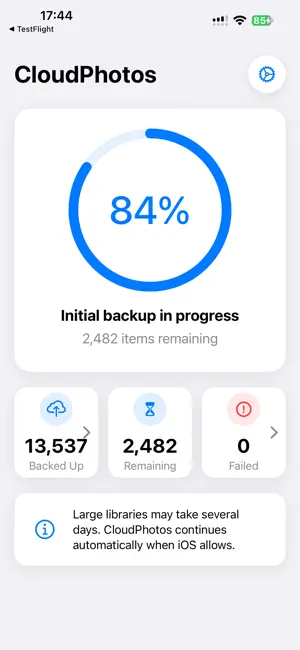
Your photos capture some of your most valuable and irreplaceable moments. Keep them backed up in a storage location you trust with CloudPhotos. CloudPhotos is designed for ongoing full-library backup. It works through your photo and video library over time, including older photos that may need to be fetched from iCloud first, and continues backing up new photos and videos as they are added. It keeps track of what has already been uploaded, resumes progress, and gives you a clear view of backup status. Built for people who want a simple, dedicated photo backup app rather than a full file manager, CloudPhotos does one job: helping you keep a complete backup of your iPhone photo library. Back up to Microsoft OneDrive, a WebDAV-compatible NAS, private cloud, or server. CloudPhotos works with WebDAV-compatible setups such as Synology, QNAP, ASUSTOR, TerraMaster, Nextcloud, ownCloud, TrueNAS, OpenMediaVault, and Unraid. Privacy is built in: CloudPhotos has no analytics, no ad tracking, and does not store your photos or videos on CloudPhotos servers. Your photos are uploaded directly to the storage destination you choose. Why CloudPhotos: • Back up your full iPhone photo and video library • Continue backing up new photos and videos over time • Maintain photo and video quality and metadata • Upload to OneDrive, NAS, or WebDAV-compatible storage • Works with NAS and private cloud setups • Supports iCloud-optimized photo libraries • Tracks uploaded, queued, and failed items • Resumes backup progress over time • No analytics or ad tracking CloudPhotos is free to try with one full library backup within the free tier. A CloudPhotos Premium subscription is required for continued photo and video backup. Terms of Use: https://www.apple.com/legal/internet-services/itunes/dev/stdeula/
What’s new
Version 1.2 · Updated July 16, 2026
• Expanded the free tier by removing the 300 photo/video limit. One full library backup will now complete within the free tier. Continuous library backup remains a Premium feature. • Customer support information is now available within the app. • Updated the dashboard UI.
App privacy
The developer, Ronan Fraser, reported these privacy practices to Apple.
Data Not Collected
The developer does not collect any data from this app.
Alternatives to CloudPhotos Photo Backup
Looking for apps like CloudPhotos Photo Backup? Here are 6 similar apps on the App Store. The highest rated is MediaHarbor: NAS Media Player (5.0/5), and all 6 are free to download.
-
 Camera » NAS
-
 Ripple Time Map
-
 Pico Photos
-
 RecallPic: AI Photo Search
-
 MediaHarbor: NAS Media Player
5.0
-
 Lumin - Photo Backup
| App | Rating | Price | Last updated | Compare |
|---|---|---|---|---|
| CloudPhotos Photo Backup | – | Free | July 16, 2026 | |
| Camera » NAS | – | Free | Mar 12, 2025 | Compare |
| Ripple Time Map | – | Free | Jun 11, 2026 | Compare |
| Pico Photos | – | Free | Sep 23, 2026 | Compare |
| RecallPic: AI Photo Search | – | Free | Mar 5, 2026 | Compare |
| MediaHarbor: NAS Media Player | 5.0 / 5 (2) | Free | Oct 18, 2026 | Compare |
| Lumin - Photo Backup | – | Free | Oct 6, 2026 | Compare |