

MediaHarbor: NAS Media Player
Ian Marrero Falcon Photo & Video iPhoneiPadiPod touch
MediaHarbor: NAS Media Player is a free Photo & Video app for iPhone and iPad by Ian Marrero Falcon. Rated 5.0/5 from 2 ratings. Requires iOS 17.0.
- Rating
- 5.0
- 2 ratings
- Price
- Free
- on the App Store
- Size
- 101 MB
- Age 4+
- Updated
- Oct 18
- 2026 · v1.2.0
Screenshots

About MediaHarbor: NAS Media Player
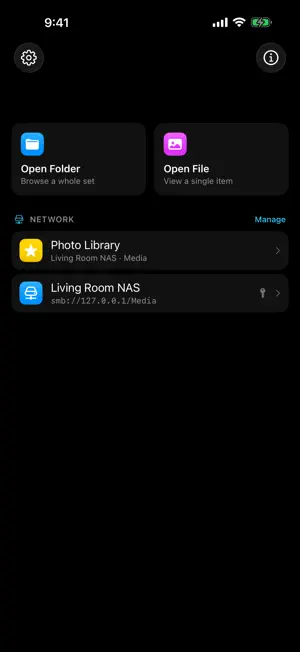
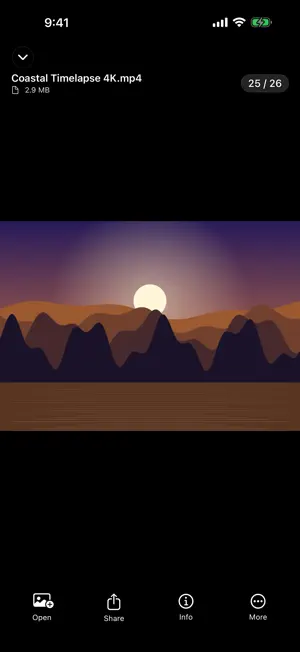
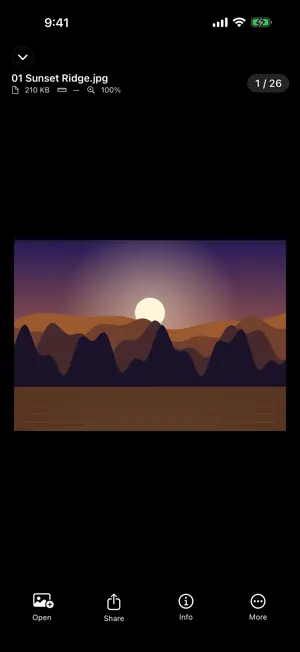
Your photos and videos live on a NAS, an external drive, or right here on your iPhone. MediaHarbor makes them feel like they're in the Photos app — without uploading a single file to anyone's cloud. CONNECT STRAIGHT TO YOUR SERVER Save SMB connections to Synology, QNAP, TrueNAS, Unraid, Windows shares, or any SMB server on your network — Macs and most NAS drives show up automatically. MediaHarbor speaks SMB directly, so you don't have to mount anything in the Files app first. Passwords are stored in the iOS Keychain, on your device only. A REAL PHOTO GRID, NOT A FILE LIST • Fast, adaptive thumbnail grid with pinch-to-resize columns • Sort by name, date, or size, with date-grouped headers • Favorites, filename search, and multi-select for batch actions • Press and hold any thumbnail to share, save, download, or see its info • JPEG, HEIC, PNG, GIF, TIFF, WebP, and RAW (DNG, ARW, CR2, CR3, NEF and more) • Live Photos play with a long press VIDEO THAT ACTUALLY PLAYS Two playback engines, chosen automatically. MP4 and MOV use the native player with Picture in Picture and AirPlay. MKV, AVI, WMV, TS and other containers iOS can't normally open play through a built-in VLC engine. • Stream video straight off your NAS — no waiting for a download • Or download for offline viewing, Picture in Picture, and AirPlay • Resume exactly where you left off, or pick up from Continue Watching on the home screen • Double-tap to skip, hold for 2× speed, drag for brightness and volume • Play Next or Shuffle when a video ends • Keep listening in the background, with Lock Screen, Control Center, and headphone controls • Save any frame to Photos as a snapshot • Audio and subtitle track selection, plus .srt sidecar files BUILT FOR PRIVACY No accounts, no ads, no third-party SDKs, no trackers — just four anonymous usage counters with an off switch in Settings. FREE TO TRY, ONE-TIME UNLOCK The free version includes one network connection and plays the first five minutes of each video — enough to confirm MediaHarbor works with your NAS and your files before you pay anything. A single Lifetime Unlock removes both limits forever. No subscription, and it's Family Shareable. Also included: EXIF and GPS metadata with a map view, on-device scene detection for smart albums, slideshows, save to Photos, and bookmarks for folders you use often.
What’s new
Version 1.2.0 · Updated October 18, 2026
Pick up where you left off: Continue Watching on Home lists the videos you're partway through, from your network shares or your folders. Keep listening in the background. Videos keep playing when you lock the screen or switch apps, with controls on the Lock Screen, in Control Center, and on your headphones. Turn it off in Settings → Video. Find your file server automatically. Macs and NAS drives on your network now show up when you add a connection. Press and hold any thumbnail to share, copy, save to Photos, favorite, download, or see its info. Take a snapshot of any video frame with More → Take Snapshot (or Shift-S on a keyboard). It's saved straight to Photos. New tips point out hidden gestures, and Command-/ lists every keyboard shortcut. Your network favorites and resume points now carry over when the app updates.
App privacy
The developer, Ian Marrero Falcon, reported these privacy practices to Apple.
Data Not Linked to You
The following data, which may be collected but is not linked to your identity, may be used for the following purposes:
- Purchases: Purchase History
- User Content: Customer Support, Other User Content
- Usage Data: Product Interaction
- Contact Info: Email Address
- Identifiers: Device ID
Used for: Analytics, App Functionality
Alternatives to MediaHarbor: NAS Media Player
Looking for apps like MediaHarbor: NAS Media Player? Here are 6 similar apps on the App Store. The highest rated is Sparkle - Live Photos (5.0/5), and all 6 are free to download.
-
 Phonas
-
 Loomey Viewer
4.5
Loomey Viewer
4.5
-
 TorchPhoto - NAS Gallery
-
 Memories: NAS Photo Widget
-
 Pocket Cinema: Jellyfin WebDAV
-
 Sparkle - Live Photos
5.0
Sparkle - Live Photos
5.0
| App | Rating | Price | Last updated | Compare |
|---|---|---|---|---|
| MediaHarbor: NAS Media Player | 5.0 / 5 (2 ratings) | Free | October 18, 2026 | |
| Phonas | – | Free | Aug 11, 2026 | Compare |
| Loomey Viewer | 4.5 / 5 (2) | Free | Sep 14, 2026 | Compare |
| TorchPhoto - NAS Gallery | – | Free | Oct 19, 2026 | Compare |
| Memories: NAS Photo Widget | – | Free | Sep 26, 2026 | Compare |
| Pocket Cinema: Jellyfin WebDAV | – | Free | Aug 7, 2026 | Compare |
| Sparkle - Live Photos | 5.0 / 5 (1) | Free | Jun 10, 2026 | Compare |