

Eclipse: Dark Mode PDF Reader
Burak ANI Productivity iPhoneiPadiPod touch
Eclipse: Dark Mode PDF Reader is a free Productivity app for iPhone and iPad by Burak ANI. Requires iOS 17.0. Updated May 6, 2026.
- Price
- Free
- on the App Store
- Size
- 20 MB
- Age 4+
- Updated
- May 6
- 2026 · v1.0
Screenshots
About Eclipse: Dark Mode PDF Reader
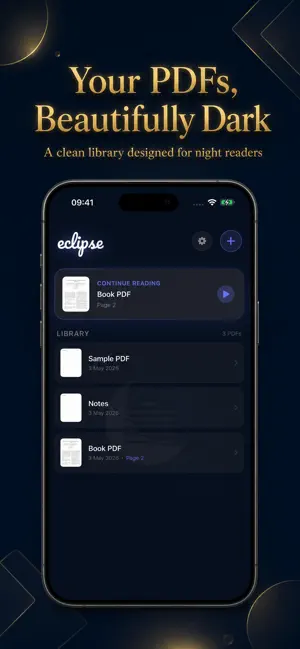
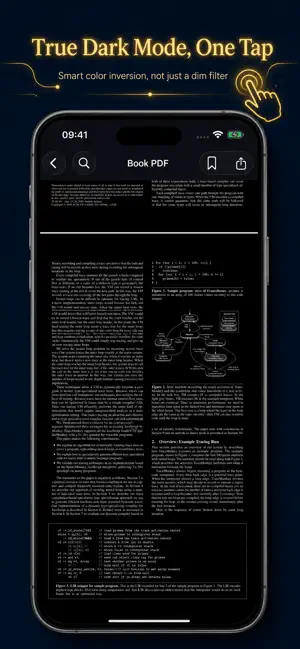
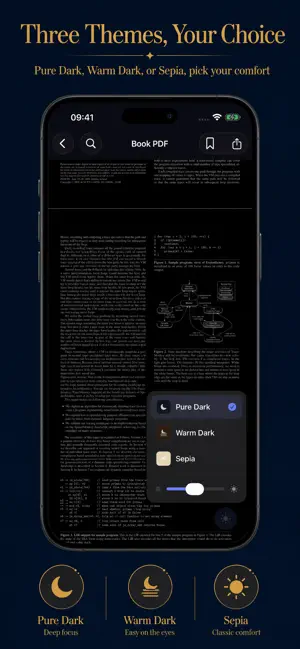
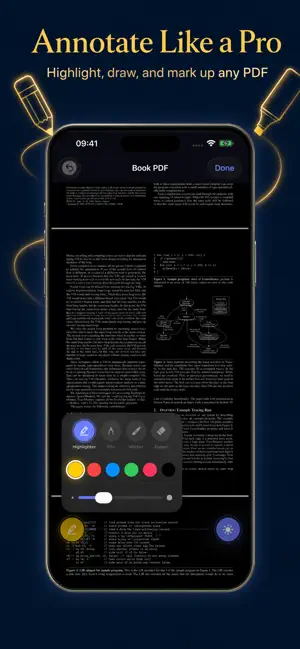
Hate reading PDFs at night? So did we. Eclipse is the dark mode PDF reader your eyes have been waiting for. One tap transforms any PDF into a beautiful, eye-friendly dark document — no more blinding white backgrounds in bed, on the couch, or during late-night study sessions. TRUE DARK MODE — NOT A FILTER Most apps just dim your screen. Eclipse is different. Our smart color inversion engine flips the actual content — white becomes black, black becomes white — giving you a true OLED-friendly dark reading experience that saves battery and protects your eyes. Choose from three reading themes: ◆ Pure Dark — Full inversion, maximum contrast, perfect for OLED ◆ Warm Dark — Soft tones for relaxed reading (Pro) ◆ Sepia — Paper-like warmth for long sessions (Pro) ANNOTATE & MARK UP YOUR DOCUMENTS Eclipse isn't just a viewer — it's your complete PDF workspace: ◆ Highlight text with a translucent highlighter ◆ Draw freehand with pen, marker, or highlighter tools ◆ Pick from multiple colors and adjust line thickness ◆ Undo strokes and erase individual annotations ◆ All changes are saved directly to the PDF file SMART READING FEATURES ◆ Bookmark any page with a custom title ◆ Full-text search across your entire document ◆ Go-to-page navigation for quick access ◆ Reading progress bar with page tracking ◆ Continue Reading — pick up exactly where you left off ◆ Screen brightness control built right in ◆ Share PDFs directly from the reader YOUR LIBRARY, ORGANIZED ◆ Import PDFs from Files, iCloud, email, or any app ◆ Thumbnail previews for every document ◆ Search your library by file name ◆ Delete documents with a long-press ◆ Clean, elegant interface — no clutter, no distractions 100% PRIVATE. ALWAYS. Your PDFs never leave your device. No cloud uploads. No servers. No analytics. No tracking. Everything happens on-device. We can't see your documents even if we wanted to. FREE TO USE — PRO FOR POWER READERS Eclipse is free with Pure Dark mode. Upgrade to Eclipse Pro to unlock Warm Dark & Sepia themes, bookmarks, and annotation tools. ◆ Monthly: $1.99/month ◆ Lifetime: $4.99 — one-time, forever No ads. No data collection. Just reading, the way it should be. Download Eclipse today and never read a blinding white PDF again. Terms of Use: https://burakani.github.io/eclipse-legal/terms.html Privacy Policy: https://burakani.github.io/eclipse-legal/privacy.html
App privacy
The developer, Burak ANI, reported these privacy practices to Apple.
Data Not Collected
The developer does not collect any data from this app.
Alternatives to Eclipse: Dark Mode PDF Reader
Looking for apps like Eclipse: Dark Mode PDF Reader? Here are 6 similar apps on the App Store. The highest rated is Dark Reader: PDF Viewer (4.5/5), and all 6 are free to download.
-
 Dark PDF: Night Mode Reader
-
 PDFDarkMode - Customize PDFs
4.2
PDFDarkMode - Customize PDFs
4.2
-
 DarkPaper: Dark Mode PDF
-
 Dark Reader: PDF Viewer
4.5
Dark Reader: PDF Viewer
4.5
-
 PolyInvert
-
 Richdown
| App | Rating | Price | Last updated | Compare |
|---|---|---|---|---|
| Eclipse: Dark Mode PDF Reader | – | Free | May 6, 2026 | |
| Dark PDF: Night Mode Reader | – | Free | Jul 5, 2026 | Compare |
| PDFDarkMode - Customize PDFs | 4.2 / 5 (5) | Free | Sep 16, 2025 | Compare |
| DarkPaper: Dark Mode PDF | – | Free | Jul 31, 2026 | Compare |
| Dark Reader: PDF Viewer | 4.5 / 5 (8) | Free | Mar 19, 2026 | Compare |
| PolyInvert | – | Free | Dec 5, 2025 | Compare |
| Richdown | – | Free | Jul 22, 2026 | Compare |