

PolyInvert
ADAM MICHAEL OGDEN Productivity iPhoneiPadiPod touch
PolyInvert is a free Productivity app for iPhone and iPad by ADAM MICHAEL OGDEN. Requires iOS 17.0. Updated December 5, 2025.
- Price
- Free
- on the App Store
- Size
- 8 MB
- Age 4+
- Updated
- Dec 5
- 2025 · v1.0.1
Screenshots
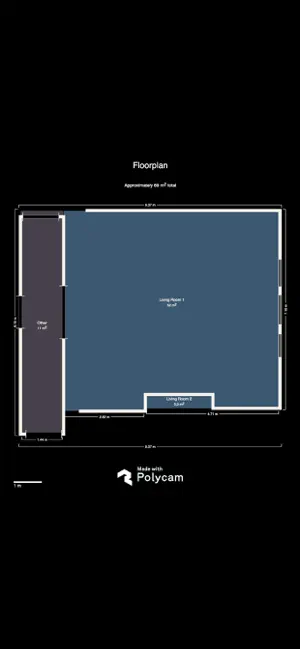


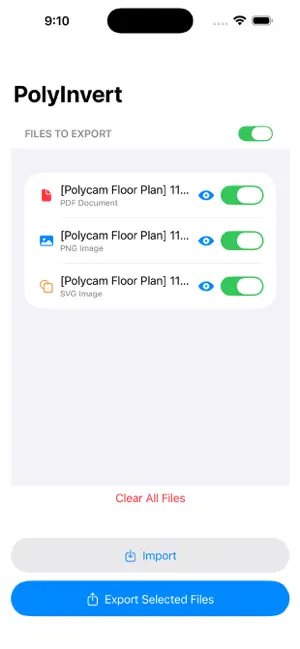
About PolyInvert
Transform PDF documents and images into inverted color versions with just one tap. PolyInvert is the perfect tool for converting Polycam floor plans, architectural drawings, documents, and images for viewing in darkmode. PERFECT FOR POLYCAM USERS Export your Polycam floor plans directly into PolyInvert and instantly invert them. Works seamlessly with PDF, PNG, and SVG exports from Polycam. KEY FEATURES • Smart Color Inversion - Advanced algorithms optimized for each file type • Multi-Format Support - PDF, PNG, SVG, and ZIP archives • Batch Processing - Import and invert multiple files at once • One-Tap Export - Share via Messages, Mail, Files, or any app • ZIP Support - Automatically extracts and processes archive contents • Privacy First - All processing happens locally on your device • No File Size Limits - Process documents of any size • Universal App - Works on iPhone, iPad, and Mac HOW IT WORKS 1. Import your files from iCloud Drive, Files app, or directly from Polycam via the share sheet. 2. Tap "Invert All" to process all files, or invert individually 3. Export inverted files via iOS Share Sheet to save or share anywhere PRIVACY & SECURITY Your files stay private. PolyInvert processes everything locally on your device. We never upload, store, or access the content of your files. What you invert stays on your device. USE CASES • Invert Polycam floor plans to dark mode for Blackout Lighting Console • Create dark mode versions of documents • Improve contrast on architectural drawings • Invert scanned documents for easier reading • Prepare images for presentations • Process technical diagrams and schematics FREE WITH OPTIONAL AD REMOVAL PolyInvert is completely free to use with ads. Remove all ads permanently with a one-time in-app purchase that syncs across all your devices. TECHNICAL DETAILS • Supports PDF, PNG, and SVG files • Handles multi-page PDFs with ease • ZIP archive auto-extraction • Maintains original file quality • Preserves document structure and formatting • Fast processing with optimized algorithms MADE BY AMOGAFFER PolyInvert is developed by AMOGaffer with a focus on simplicity, privacy, and reliability. We're committed to creating tools that just work. REQUIREMENTS • iOS 17.0 or later • iPadOS 17.0 or later • macOS 14.0 or later (Apple Silicon) Need help? Contact us at [email protected] Privacy Policy: https://amogaffer.com/privacy/polyinvert/
What’s new
Version 1.0.1 · Updated December 5, 2025
Adds easy bug reporting and feature requests Bug fixes
App privacy
The developer, ADAM MICHAEL OGDEN, reported these privacy practices to Apple.
Data Used to Track You
The following data may be used to track you across apps and websites owned by other companies:
- Identifiers: Device ID
Data Not Linked to You
The following data, which may be collected but is not linked to your identity, may be used for the following purposes:
- Identifiers: Device ID
- Usage Data: Product Interaction
Used for: Third-Party Advertising, Analytics
Alternatives to PolyInvert
Looking for apps like PolyInvert? Here are 6 similar apps on the App Store. The highest rated is Slyyd Lighting Control (5.0/5), and 5 of the 6 are free to download.
-
 sACN Viewer (OF COURSE)
-
 Eclipse: Dark Mode PDF Reader
-
 Slyyd Lighting Control
5.0
-
 Elgato Stream Deck Connect
1.7
-
 Total Crew
5.0
-
 PDFDarkMode - Customize PDFs
4.2
| App | Rating | Price | Last updated | Compare |
|---|---|---|---|---|
| PolyInvert | – | Free | December 5, 2025 | |
| sACN Viewer (OF COURSE) | – | 5.99 USD | Jun 18, 2026 | Compare |
| Eclipse: Dark Mode PDF Reader | – | Free | May 6, 2026 | Compare |
| Slyyd Lighting Control | 5.0 / 5 (8) | Free | May 6, 2026 | Compare |
| Elgato Stream Deck Connect | 1.7 / 5 (9) | Free | Jul 23, 2026 | Compare |
| Total Crew | 5.0 / 5 (2) | Free | Aug 4, 2026 | Compare |
| PDFDarkMode - Customize PDFs | 4.2 / 5 (5) | Free | Sep 16, 2025 | Compare |
Compare PolyInvert with the top alternatives: ratings, updates, ASO score and keyword gaps →