

Flows - Planner & Notes
HUNTER WESTLEY BOLTON Productivity iPhoneiPadiPod touchMac
Flows - Planner & Notes is a free Productivity app for iPhone and iPad by HUNTER WESTLEY BOLTON. Rated 4.9/5 from 7 ratings. Requires iOS 16.6.
- Rating
- 4.9
- 7 ratings
- Price
- Free
- on the App Store
- Size
- 49 MB
- Age 9+
- Updated
- Aug 29
- 2026 · v1.5.9
Screenshots
About Flows - Planner & Notes
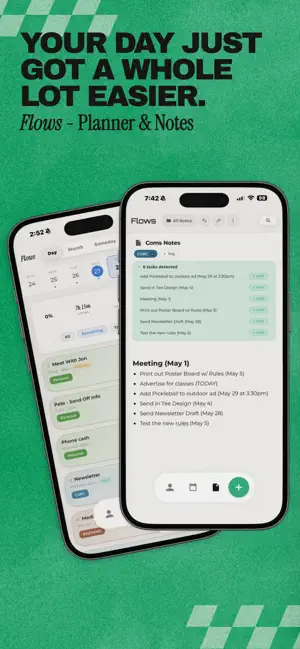
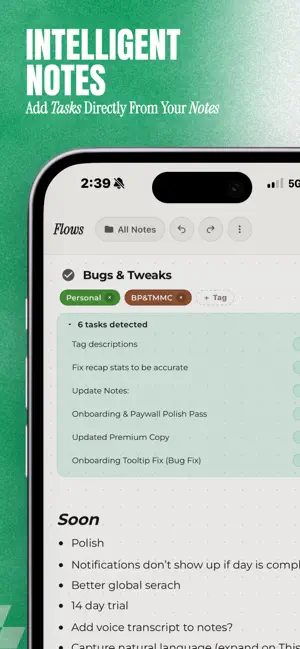
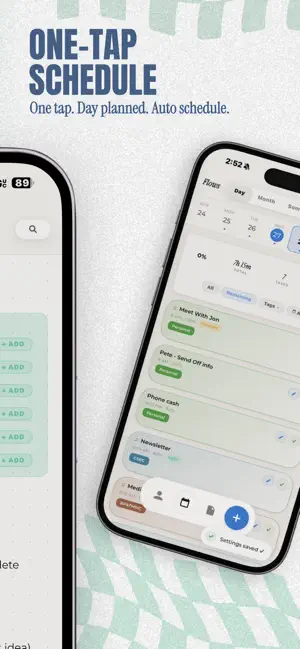
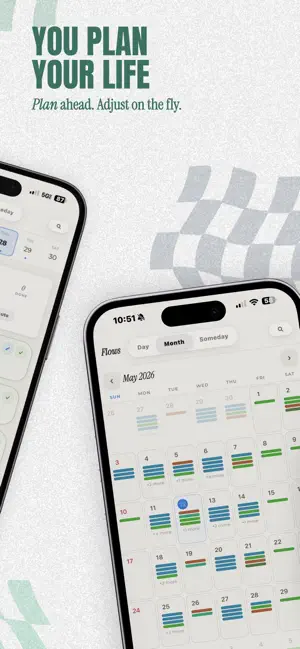
PLAN YOUR DAY IN MINUTES Add tasks, set time estimates and difficulty levels, then let Flows arrange your schedule. Let Auto-Schedule place them intelligently; hard tasks go in the morning, easy ones fill the gaps. View your day, week, or month at a glance. NOTES THAT WORK WITH YOUR TASKS Capture ideas, meeting notes, and to-dos with a rich-text editor organized into folders. Flows can detect tasks hiding in your notes and turn them into real, schedulable items, no copy-pasting required. SMART TAGS & AUTO-TAGGING Create tags with descriptions and keywords, and Flows will suggest them automatically as you add tasks. Organize your work by project, priority, or whatever makes sense for your life. STAY IN THE ZONE Start a Pomodoro timer for any task with customizable work and break intervals (5–90 minutes). Pick from ambient sounds like rain, lo-fi beats, or white noise. When the timer ends, your progress is logged automatically. BUILD A STREAK YOU'RE PROUD OF Complete your daily plan to keep your streak alive. Flows understands that rest days happen; your streak won't break over a weekend. Check your weekly recap to see how your focus time, completion rate, and productivity are trending. SEARCH EVERYTHING Find any task or note instantly with global search. Filter by type, date range, or completion status. Sort by relevance, date, or name. MAKE IT YOURS Choose from 16+ handcrafted color themes, switch between dark and light mode, and pick a display font. Five notification personalities, from gentle encouragement to delightfully unhinged commentary, keep things interesting. FLOWS PRO (30-Day Free Trial) Unlock the full experience: • Auto-Schedule — Intelligently fills your timeline based on difficulty, priority, and your available hours. Hard tasks land in the morning. Dreaded ones go first. • Focus Forecast — See how your focus time trends across days and weeks. Get a Monday morning preview of what's ahead. • Calendar Sync — Pull events from Google Calendar or Apple Calendar so your schedule and your plan live side by side. • Notion Sync — Connect your Notion workspace and keep everything in one place. • Slack Integration — Share your focus status with your team automatically. • Cloud Sync — Your tasks, notes, and streaks stay in sync across all your devices. • Unlimited Tags — Create as many tags as you need. • All Themes — Access every color theme and future additions. Terms & Conditions: https://flowspomo.com/terms.html Privacy Policy: https://flowspomo.com/privacy.html
Ratings & reviews
4.9
7 ratings
What’s new
Version 1.5.9 · Updated August 29, 2026
Glass Effects are now yours to choose. If you love the frosted look, nothing changes; it is right where you left it. If you would rather have something flatter and calmer, there is a new matte option in Appearance, and it runs especially smooth on older devices. The rest of this one is about feeling steadier. Scheduled tasks now stay exactly where you put them, and your tasks, notes, and tags merge properly across your devices, so what you do on your phone is waiting for you on your desktop. Thank you to the person who wrote in about tasks not sticking around after closing the app. The week is clearer too: hour lines across the grid, today highlighted, past hours softened, and anything overdue gently marked. Desktop has more room to breathe. And there is plenty of small polish throughout. Thanks for using Flows. — Hunter
App privacy
The developer, HUNTER WESTLEY BOLTON, reported these privacy practices to Apple.
Data Not Collected
The developer does not collect any data from this app.
Alternatives to Flows - Planner & Notes
Looking for apps like Flows - Planner & Notes? Here are 6 similar apps on the App Store. The highest rated is StrideFlow AI: Goal Planner (5.0/5), and all 6 are free to download.
-
 DayDo Calendar
4.5
DayDo Calendar
4.5
-
 Pala: ADHD Planner & Calendar
4.8
Pala: ADHD Planner & Calendar
4.8
-
 StrideFlow AI: Goal Planner
5.0
StrideFlow AI: Goal Planner
5.0
-
 Together: Organize Life
-
 Anchor: Daily Planner & Focus
4.9
Anchor: Daily Planner & Focus
4.9
-
 Actimate: ADHD Planner
4.9
Actimate: ADHD Planner
4.9
| App | Rating | Price | Last updated | Compare |
|---|---|---|---|---|
| Flows - Planner & Notes | 4.9 / 5 (7 ratings) | Free | August 29, 2026 | |
| DayDo Calendar | 4.5 / 5 (6) | Free | Jun 29, 2026 | Compare |
| Pala: ADHD Planner & Calendar | 4.8 / 5 (6) | Free | Oct 12, 2026 | Compare |
| StrideFlow AI: Goal Planner | 5.0 / 5 (5) | Free | Oct 15, 2026 | Compare |
| Together: Organize Life | – | Free | Sep 29, 2026 | Compare |
| Anchor: Daily Planner & Focus | 4.9 / 5 (21) | Free | Oct 20, 2026 | Compare |
| Actimate: ADHD Planner | 4.9 / 5 (9) | Free | Oct 9, 2026 | Compare |