

Slownotes AI
Bastiaan van Dreunen Utilities iPhoneiPadiPod touch
Slownotes AI is a free Utilities app for iPhone and iPad by Bastiaan van Dreunen. Requires iOS 26.0. Updated October 9, 2026.
- Price
- Free
- on the App Store
- Size
- 9 MB
- Age 4+
- Updated
- Oct 9
- 2026 · v1.1.0
Screenshots



About Slownotes AI
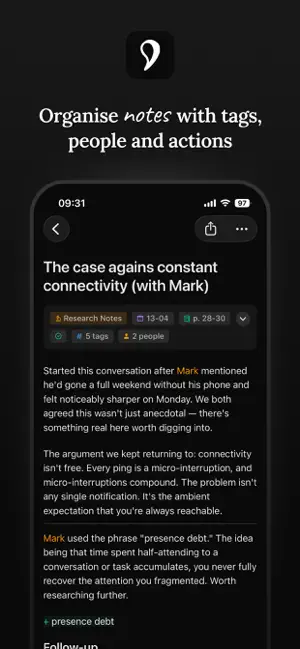
The perfect companion for your physical notebook. Slownotes converts your handwriting from a physical notebook into digital text. This creates a bridge between writing the way you love and your favorite digital workflows. Writing by hand is still the best way to capture ideas and structure your thoughts. Slownotes lets you hold on to your pen and paper, while making your handwritten notes searchable, shareable and ready for AI. Send them to note-taking tools like Obsidian, Notion and others. HOW IT WORKS Scan your notes with your phone's camera. Slownotes transcribes and polishes your handwriting into clean, digital text. Use Slowdown, our markup language for handwriting, to mark things like people, places, ideas and quotes. Slownotes recognizes them and turns them into linked, searchable items in your library. SEND YOUR HANDWRITTEN NOTES ANYWHERE Your notes, your rules. Slownotes can send your notes to Obsidian, Notion, or any webhook of your choosing. This opens up integrations with n8n, AI agents, and any tool that can receive HTTP requests. Slownotes integrates your handwritten notes seamlessly with your digital workflows. SLOWDOWN - The markup language for handwritten notes. Use symbols in your handwriting to mark people, ideas, quotes and other key elements. Slownotes recognizes them when it scans your page. Marked elements can become linked, filterable items in your library or can even trigger actions from Slownotes. Examples: - Tag people with @name - Tag key subjects with #term - Mark something with (term)* to instruct Slownotes to bring in context Slowdown is a completely new approach to structuring text, designed specifically for people who love writing by hand. It works in any notebook, with any pen. --- Slownotes. No more downsides to handwriting. Terms of Use: https://www.apple.com/legal/internet-services/itunes/dev/stdeula/
What’s new
Version 1.1.0 · Updated October 9, 2026
Import from Photos Use the new upload button next to the scan button to add pages you've already photographed. Slownotes finds the page in each photo and straightens it, so a quick snapshot of your notebook works as well as a scan. "Add more" now lets you choose between scanning and picking photos. Share to Slownotes Send photos to Slownotes from any app with the share sheet, up to five pages at a time. They open in Slownotes, ready to process. Key points stand out Lines that start with an arrow now get a soft yellow background, so your key points are easy to find when you look back through a note. Typing -> turns into →. Discoveries are easier to spot too. Fixes - Notes that finished processing while Slownotes was in the background no longer show as failed. - When you send a failed scan for review, you can now add a note about what went wrong. Sending works reliably again, and so does the consent checkbox. - The buttons at the top of the home screen now line up with the rest of the app.
App privacy
The developer, Bastiaan van Dreunen, reported these privacy practices to Apple.
Data Not Linked to You
The following data, which may be collected but is not linked to your identity, may be used for the following purposes:
- Purchases: Purchase History
- Contact Info: Email Address, Name
- User Content: Other User Content
- Identifiers: User ID
Used for: App Functionality
Alternatives to Slownotes AI
Looking for apps like Slownotes AI? Here are 6 similar apps on the App Store. The highest rated is Cast Volume: Remote Control (5.0/5), and 5 of the 6 are free to download.
-
 Yamler
-
 Cast Volume: Remote Control
5.0
Cast Volume: Remote Control
5.0
-
 Nested List: Outliner
3.0
Nested List: Outliner
3.0
-
 HelixNotes
5.0
HelixNotes
5.0
-
 S3 Client & Browser
1.0
S3 Client & Browser
1.0
-
 Prixon
| App | Rating | Price | Last updated | Compare |
|---|---|---|---|---|
| Slownotes AI | – | Free | October 9, 2026 | |
| Yamler | – | 0.99 USD | Jan 12, 2026 | Compare |
| Cast Volume: Remote Control | 5.0 / 5 (2) | Free | Oct 26, 2026 | Compare |
| Nested List: Outliner | 3.0 / 5 (2) | Free | Sep 9, 2026 | Compare |
| HelixNotes | 5.0 / 5 (3) | Free | Sep 30, 2026 | Compare |
| S3 Client & Browser | 1.0 / 5 (2) | Free | Oct 20, 2025 | Compare |
| Prixon | – | Free | Feb 6, 2026 | Compare |
Compare Slownotes AI with the top alternatives: ratings, updates, ASO score and keyword gaps →