

Cast Volume: Remote Control
Søren Thorup Utilities iPhoneiPadiPod touch
Cast Volume: Remote Control is a free Utilities app for iPhone and iPad by Søren Thorup. Rated 5.0/5 from 2 ratings. Requires iOS 18.6.
- Rating
- 5.0
- 2 ratings
- Price
- Free
- on the App Store
- Size
- 6 MB
- Age 4+
- Updated
- Oct 26
- 2026 · v2.3.0
Screenshots



About Cast Volume: Remote Control
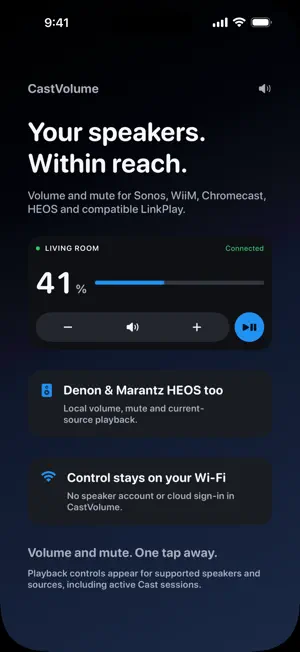
Your speaker remote, right where you need it. Morning radio. Music for dinner. A quick mute when the phone rings. CastVolume puts everyday speaker controls on your iPhone or iPad, so you can spend less time opening apps and more time listening. YOUR MUSIC, ONE TAP AWAY Start saved Sonos Favourites, WiiM Home favourites and compatible LinkPlay presets from a Home Screen widget. Keep stations, albums and playlists within reach. Browse more Sonos favourites with pages, up to 16 items in a large widget or 24 in an extra-large iPad widget. Save music in your speaker's usual app, then open Favourites in CastVolume to load it. Content depends on your speaker and music service; Chromecast and HEOS music favourites are not supported. QUICK CONTROLS FOR YOUR SPEAKERS • Adjust volume and mute on Sonos, WiiM, Chromecast, Denon/Marantz HEOS and compatible LinkPlay devices. • Add widgets and Controls to your Home Screen, Lock Screen and Control Center, or assign a Control to a supported iPhone's Action Button. • Use playback controls on supported speakers and sources. Cast playback requires an active media session; next/previous also require queue support. Some AirPlay or TV sources need their original app or remote. • Enable Night Sound on compatible Sonos home-theater speakers. Check support in the room's Favourites screen, then add the optional widget button or Control. • Choose colours, widget backgrounds and volume steps to suit you. An optional Live Tile keeps quick controls on the Lock Screen and Dynamic Island on supported devices. START WITH ONE SPEAKER, FREE All supported brands, in-app controls, saved speakers and appearance choices are free. Free widgets and Controls share one chosen speaker. Optional Premium lets each widget or Control use its own speaker, with a one-time purchase. An optional 30-day free trial has no automatic charge. After expiry, your chosen free speaker keeps working; additional targets require Premium and keep their saved assignments. Existing Premium purchases remain unlocked. No subscription or ads. MADE FOR YOUR LOCAL NETWORK Keep your phone and receiver on the same network and allow Local Network access. Discover speakers or add supported receivers by local IP. Sonos requires compatible Connection Security settings; portable speakers must be awake. Turn off Fixed Volume Output on WiiM. HEOS favourites, AVR power and input selection stay in the HEOS app. LinkPlay compatibility depends on the model, local API and firmware. AirPlay-only devices are not supported. Widgets show the last confirmed state; changes in other apps may not appear immediately. A locked phone may require unlocking before a command runs. Live Tile updates depend on app activity and iOS limits. CastVolume is an independent app, not affiliated with the speaker manufacturers.
What’s new
Version 2.3.0 · Updated October 26, 2026
More of your music, closer at hand. • Browse more Sonos favourites with pages in the app and widgets. • Keep up to 24 favourites in the extra-large iPad widget, or 16 in a large widget. • Add Night Sound shortcuts for compatible Sonos home-theater speakers. • Use Play/Pause and queue navigation for supported active Chromecast sessions. • Enjoy simpler appearance choices and a clearer Lock Screen layout. • Improved first-run Sonos discovery, radio artwork handling and receiver command feedback. • Volume sliders now require dragging the thumb, helping prevent accidental changes while scrolling. Your speaker assignments and existing Premium purchases are preserved. Playback and settings depend on the receiver, firmware and source.
App privacy
The developer, Søren Thorup, reported these privacy practices to Apple.
Data Not Collected
The developer does not collect any data from this app.
Alternatives to Cast Volume: Remote Control
Looking for apps like Cast Volume: Remote Control? Here are 6 similar apps on the App Store. The highest rated is Pylo · HomeKit Camera (5.0/5), and 4 of the 6 are free to download.
-
 Pylo · HomeKit Camera
5.0
Pylo · HomeKit Camera
5.0
-
 DashOne
-
 RAmp - Remote Amp Controller
-
 Flux Remote: Mac Management
-
 timelinelogger
-
 Lock Status: Laptop & Desktop
| App | Rating | Price | Last updated | Compare |
|---|---|---|---|---|
| Cast Volume: Remote Control | 5.0 / 5 (2 ratings) | Free | October 26, 2026 | |
| Pylo · HomeKit Camera | 5.0 / 5 (5) | 4.99 USD | Apr 30, 2026 | Compare |
| DashOne | – | Free | Oct 27, 2026 | Compare |
| RAmp - Remote Amp Controller | – | Free | Sep 4, 2026 | Compare |
| Flux Remote: Mac Management | – | 1.99 USD | Aug 2, 2026 | Compare |
| timelinelogger | – | Free | Feb 16, 2026 | Compare |
| Lock Status: Laptop & Desktop | – | Free | Sep 19, 2026 | Compare |