

PlanTodo - Task from Plan
潮洋 宋 Productivity iPhoneiPadiPod touchMac
PlanTodo - Task from Plan is a free Productivity app for iPhone and iPad by 潮洋 宋. Requires iOS 15.0. Updated October 13, 2026.
- Price
- Free
- on the App Store
- Size
- 28 MB
- Age 4+
- Updated
- Oct 13
- 2026 · v0.8.27
Screenshots
About PlanTodo - Task from Plan
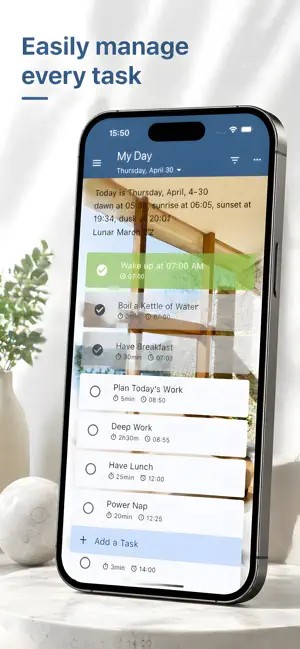
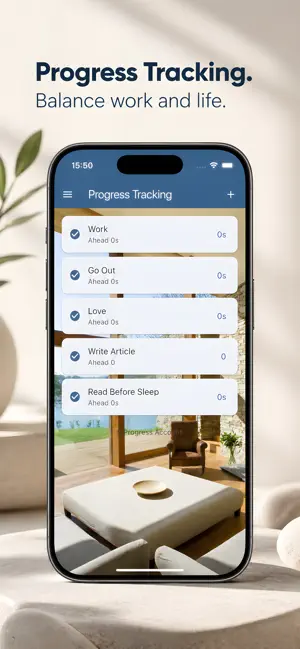
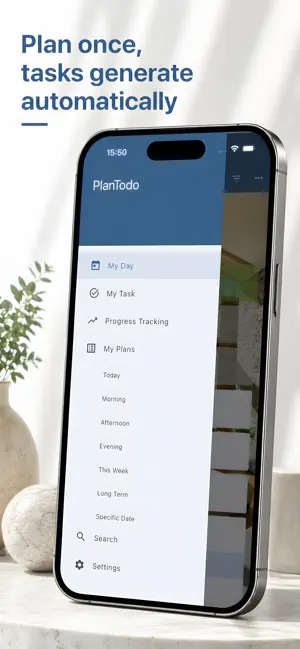
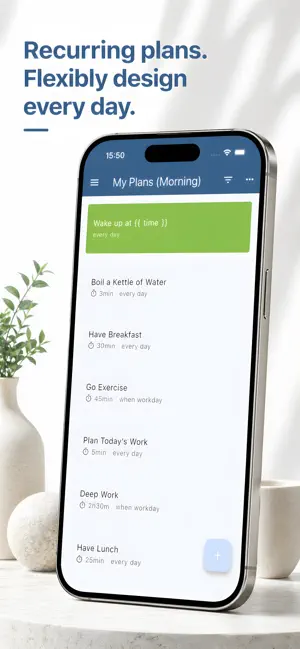
PlanTodo — A Smarter Way to Manage Tasks and Recurring Plans PlanTodo is a cross-platform to-do app designed for multiple devices. It doesn’t just help you track tasks — it helps you automatically plan the future. Unlike traditional to-do apps, PlanTodo clearly separates Tasks and Plans: - Tasks: one-time to-dos - Plans: rule-based systems that continuously generate tasks You can use it as a simple to-do list, or unlock its full power by letting recurring work take care of itself. --- Flexible and Powerful Planning System PlanTodo goes far beyond typical recurring task features: Basic Rules - Daily / every n days - Specific weekdays (e.g., Monday, Friday) - Fixed dates each month or year Advanced Rules - The last Saturday of each month - The second Monday every two months - The nth day from the end of the year Advanced Automation - Trigger based on other plans (e.g., 3 days before another plan) - Multi-level dependencies (plans can trigger one another in chains) - Combined conditions (trigger when any or all conditions are met) Fine-Grained Control - Exclude specific dates - Automatic postponement (e.g., skip workdays and trigger on the next non-working day) - Auto enable / disable / delete - Sleep cycles (skip a set number of triggers before activating) Set up complex long-term schedules once, and let them run automatically. --- Efficient Task Management Everything you expect from a modern task manager: - Add, edit, duplicate, delete, and restore tasks - Rich attributes: date, start time, reminders, duration, color, and more - Supports subtasks, allowing complex tasks to be broken down for step-by-step progress while maintaining an overall view. - Supports task timer to track the actual time spent on tasks from the task details page. Tasks generated by plans eliminate the need to repeatedly create the same items. Tasks can also inherit parent-child relationships from plans. With the timeline enabled, you can quickly identify time conflicts through the red sections and find available time through the transparent sections, helping you arrange tasks more efficiently. A current time indicator on timeline clearly shows daily progress and the flow of time. --- Progress Tracking Without Pressure PlanTodo focuses on cumulative progress, not daily perfection. For example: - Set a goal like “Read for 30 minutes a day” - Completing 20 minutes isn’t a failure — the gap is recorded - Catch up later to stay on track overall This approach makes long-term goals more sustainable and less stressful. Supports tracking by both time spent and completion count. Three charts are available to help you track your progress: Balance, Total Completed, and Daily Completed, giving you a clear and intuitive view of how your progress changes over time. --- Multi-device sync Privacy-first, local-first. * End-to-end encrypted * Only your devices can read your data * Even the server can't decrypt it --- Clippings Clippings are for saving a sentence or a URL. * Save on the go. When you find something interesting on your phone, share it directly to PlanTodo to save it as a clipping. * Collect with ease. Set up automatic categorization rules for clipping categories, and let PlanTodo fetch page titles from URLs automatically. * Turn clippings into action. Link a plan’s description to a clipping category, and daily tasks will pull in relevant clippings. For example, a foreign-language vlog URL can appear directly in your task, so you can get started without searching for it again. Import and export clippings in bulk. Every now and then, export your saved article URLs and open them all in your browser with One Click Open. Set aside a solid block of time for an immersive reading session. --- Website: https://plantodo.app/
What’s new
Version 0.8.27 · Updated October 13, 2026
1. Added Clipping: Add clippings manually in the app or create them quickly via system sharing on Android and iOS. Supports automatic categorization rules and fetching titles from the first URL. 2. Improved Cross-device sync: Sync countdown timers and preset tasks across devices. 3. Improved Plan description: Link clipping category to a plan, use its clippings as task content, and format clippings. 4. Improved Task ordering: Use `before tag` and `after tag` in plan start time to control the relative order of generated tasks. 5. Clearer virtual task actions: Distinguish between Abandon (stop pursuing a task) and Cancel (remove a task from a plan). 6. Fixed several known issues.
App privacy
The developer, 潮洋 宋, reported these privacy practices to Apple.
Data Not Linked to You
The following data, which may be collected but is not linked to your identity, may be used for the following purposes:
- Location: Coarse Location
Used for: App Functionality
Alternatives to PlanTodo - Task from Plan
Looking for apps like PlanTodo - Task from Plan? Here are 6 similar apps on the App Store. The highest rated is Task Chart — Planner Notebook (5.0/5), and all 6 are free to download.
-
 LockScreen Notes Calendar
-
 DueCycle: Recurring Tasks
-
 DayMosaic: Visual Day Planner
-
 Task Chart — Planner Notebook
5.0
Task Chart — Planner Notebook
5.0
-
 Remember: AI Life Assistant
-
 TimeBarX
| App | Rating | Price | Last updated | Compare |
|---|---|---|---|---|
| PlanTodo - Task from Plan | – | Free | October 13, 2026 | |
| LockScreen Notes Calendar | – | Free | Oct 6, 2026 | Compare |
| DueCycle: Recurring Tasks | – | Free | Mar 4, 2026 | Compare |
| DayMosaic: Visual Day Planner | – | Free | Oct 2, 2026 | Compare |
| Task Chart — Planner Notebook | 5.0 / 5 (1) | Free | Sep 4, 2026 | Compare |
| Remember: AI Life Assistant | – | Free | Oct 17, 2026 | Compare |
| TimeBarX | – | Free | Sep 30, 2026 | Compare |