

Merge Photos & Videos
Osawa Shunsuke Photo & Video iPhoneiPadiPod touch
Merge Photos & Videos is a free Photo & Video app for iPhone and iPad by Osawa Shunsuke. Rated 4.7/5 from 3 ratings. Requires iOS 18.0.
- Rating
- 4.7
- 3 ratings
- Price
- Free
- on the App Store
- Size
- 8 MB
- Age 4+
- Updated
- Nov 2
- 2026 · v1.6
Screenshots



About Merge Photos & Videos
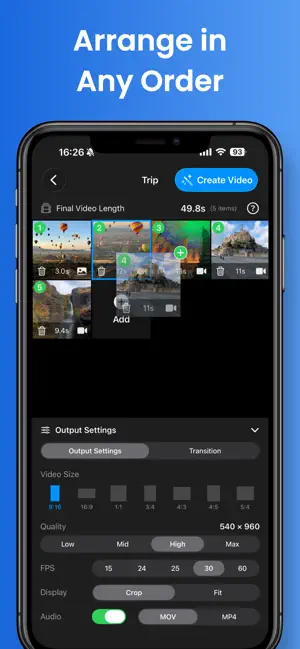
Turn photos and video clips into one slideshow with music. Merge Photos & Videos is an iPhone app for making baby milestone videos, family memories, and trip recaps. It adds labels like "8 months old" from your child's birthday, or "Day 3" for a trip, automatically from each photo's capture date. No typing a caption on every shot. Make videos with up to 5 photos and clips in total for free, with no watermark. Extras such as 4K and MP4 come with Pro, a one-time purchase, not a subscription. HOW IT WORKS 1. Select photos and videos from your library 2. Reorder them, trim clips, and set how long each photo is shown 3. Choose a format, music, and labels, then save or share The finished video is saved to your Photos library. No timeline editing and no account needed. DAY COUNTS AND AGE LABELS • Day count: shows "Day 1, Day 2…" based on each capture date. You can change which date counts as Day 1. • Age: set a birthday to show your child's age when each photo or clip was taken, such as "12 days old," "8 months old," or "1 year 3 months" • Capture time on each shot • Full capture date and time (Pro) • Labels use the capture date saved with each photo or video MUSIC AND EFFECTS • Add a song from your music library, an audio file from Files, or the sound from another video • 11 transitions, including fades and slides • Keep or mute the original sound of your videos • Soft filter, plus 10 more such as Warm, Cinema, and Retro (Pro) • Smooth zoom and pan motion for still photos (Pro) • Blurred background (Pro) FREE AND PRO • Free: up to 5 photos and clips in total per video, including day-count and age labels, with no watermark. Saves in up to Full HD (1080p) at 30 fps as MOV. • Pro: a one-time in-app purchase, not a subscription. Removes the item limit and adds 4K, 15, 24, 25, and 60 fps, MP4, and the features marked (Pro). GREAT FOR • A baby's first year or a monthly growth video • Travel diaries and vlogs • Birthdays, weddings, graduations, and family events • Photo slideshows and video compilations for social media • Joining several short clips into one video FAQ How do I combine photos and videos into one video on iPhone? Select them in the app, arrange the order, and tap Save. The app creates a single video in your Photos library. Can it show "Day 1, Day 2" on a trip video automatically? Yes. Each photo or clip shows its day number based on its capture date, and you can change which date counts as Day 1. Can it show my baby's age on each photo? Yes. Set the birthday, and each photo or clip shows the age at the time it was taken, based on its capture date. Can I make a photo slideshow with music? Yes. Choose a song from your music library or an audio file from Files. Copy-protected songs, such as Apple Music streaming tracks, can't be used. Is it free? Is there a watermark? Videos with up to 5 photos and clips in total are free and have no watermark. Pro is a one-time purchase. SPECS • Aspect ratios: 9:16, 16:9, 1:1, 4:5, 5:4, 3:4, and 4:3 for Reels, TikTok, YouTube Shorts, Stories, and widescreen • Background: fill the frame, or fit it with a black, white, or blurred (Pro) background • File format: MOV (free), MP4 (Pro) • Resolution: up to Full HD (free), 4K (Pro) • Frame rate: 30 fps (free); 15, 24, 25, and 60 fps (Pro) • Background export while you use other apps (iOS 26 and later) • Requires iPhone with iOS 18 or later
What’s new
Version 1.6 · Updated November 2, 2026
New • Day counts and age labels: show "Day 3," "8 months old," and more on each photo and clip, automatically from its capture date. Great for trip videos and baby milestones. • Day counts, age labels, and the Outline, Background, and Retro styles are now free.
App privacy
The developer, Osawa Shunsuke, reported these privacy practices to Apple.
Data Linked to You
The following data, which may be collected and linked to your identity, may be used for the following purposes:
- Purchases: Purchase History
- Location: Coarse Location
- Identifiers: Device ID
- Usage Data: Product Interaction
- Diagnostics: Crash Data, Other Diagnostic Data
Used for: Analytics, App Functionality
Alternatives to Merge Photos & Videos
Looking for apps like Merge Photos & Videos? Here are 6 similar apps on the App Store. The highest rated is JoinCut - Video Merge & Trim (4.7/5), and all 6 are free to download.
-
 Simple Photo Slideshow Maker
-
 JoinCut - Video Merge & Trim
4.7
-
 Merge Photos: Add Person Photo
3.8
-
 MergeVideoApp
4.0
-
 Video Merger: Join Clips
3.5
-
 Merge Photos and Videos
4.5
| App | Rating | Price | Last updated | Compare |
|---|---|---|---|---|
| Merge Photos & Videos | 4.7 / 5 (3 ratings) | Free | November 2, 2026 | |
| Simple Photo Slideshow Maker | – | Free | Aug 27, 2026 | Compare |
| JoinCut - Video Merge & Trim | 4.7 / 5 (3) | Free | Oct 22, 2026 | Compare |
| Merge Photos: Add Person Photo | 3.8 / 5 (10) | Free | Sep 9, 2026 | Compare |
| MergeVideoApp | 4.0 / 5 (10) | Free | Jan 9, 2025 | Compare |
| Video Merger: Join Clips | 3.5 / 5 (2) | Free | Jun 13, 2026 | Compare |
| Merge Photos and Videos | 4.5 / 5 (514) | Free | Nov 4, 2026 | Compare |