

Openterface KVM iPad
Guangzhou Billio Technology Co., Ltd. Productivity iPad
Openterface KVM iPad is a free Productivity app for iPad by Guangzhou Billio Technology Co., Ltd. Requires iOS 17.2. Updated September 15, 2026.
- Price
- Free
- on the App Store
- Size
- 3 MB
- Age 4+
- Updated
- Sep 15
- 2026 · v1.2
Screenshots
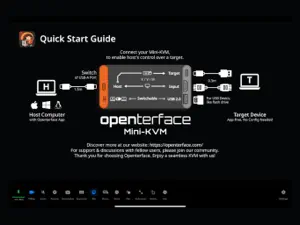
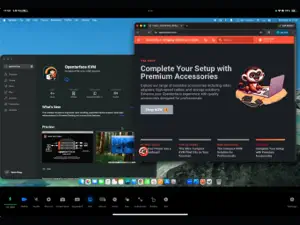
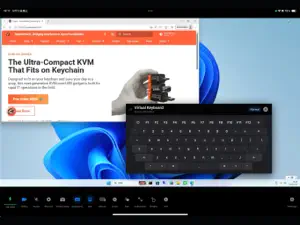
About Openterface KVM iPad
Openterface KVM turns your iPad into a portable KVM console for computers, servers, single-board computers, and embedded systems. Connect supported Openterface hardware to view HDMI video output and control target devices directly using your iPad’s touch screen. Whether you are configuring a new machine, debugging embedded hardware, accessing BIOS settings, or recovering offline systems, Openterface KVM provides a simple and portable workflow without requiring network access or remote desktop software. Designed for developers, IT professionals, makers, and hardware enthusiasts, Openterface KVM helps simplify troubleshooting and device management in labs, workshops, classrooms, server rooms, and field environments. Features: • View HDMI video directly on iPad • Keyboard and mouse control for connected devices • Low-latency portable KVM workflow • Access BIOS, boot menus, and recovery environments • Works without installing software on the target device • Ideal for Raspberry Pi, mini PCs, servers, embedded systems, and development boards • Lightweight setup for travel and field work Use Cases: • Embedded development and debugging • Server maintenance and deployment • Portable crash cart replacement • Education and hardware labs • IT troubleshooting and recovery • Raspberry Pi and SBC management Openterface KVM is designed to make hardware interaction simpler, more portable, and more accessible from iPadOS.
What’s new
Version 1.2 · Updated September 15, 2026
IMPROVED — Keyboard that behaves like a real keyboard Shortcut buttons now use true press-and-release semantics — just like the keys on your physical keyboard. • Hold a chip or numpad button to trigger key-repeat on the target • Toggle keys (Ctrl / Alt / Shift / Caps) keep their lock behavior • No more stuck arrow keys — every press now sends a clean release SMARTER — Cross-platform key mapping The GUI key label on the keyboard now adapts to your target OS — showing Cmd for Mac, Win for Windows, and Super for Linux — while sending the correct HID code behind the scenes. • Added Win, Super, and App key aliases for Windows and Linux targets • Modifier translator automatically maps your shortcuts to the right keycodes
App privacy
The developer, Guangzhou Billio Technology Co., Ltd., reported these privacy practices to Apple.
Data Not Collected
The developer does not collect any data from this app.
Alternatives to Openterface KVM iPad
Looking for apps like Openterface KVM iPad? Here are 6 similar apps on the App Store. The highest rated is Tovo – Kanban, Tasks & Planner (5.0/5), and all 6 are free to download.
-
 Stockrooms by Oomnitza
-
 Tovo – Kanban, Tasks & Planner
5.0
Tovo – Kanban, Tasks & Planner
5.0
-
 Reachbeam
-
 spacecommz.io
-
 Talk Task App
-
 Vibelist: Sequential Todolist
| App | Rating | Price | Last updated | Compare |
|---|---|---|---|---|
| Openterface KVM iPad | – | Free | September 15, 2026 | |
| Stockrooms by Oomnitza | – | Free | Nov 29, 2023 | Compare |
| Tovo – Kanban, Tasks & Planner | 5.0 / 5 (2) | Free | Feb 14, 2026 | Compare |
| Reachbeam | – | Free | Oct 26, 2026 | Compare |
| spacecommz.io | – | Free | Apr 25, 2026 | Compare |
| Talk Task App | – | Free | Jul 22, 2025 | Compare |
| Vibelist: Sequential Todolist | – | Free | Aug 18, 2026 | Compare |