

Clipped: AI Video Clipper
Salvatore Castellitti Photo & Video iPhoneiPadiPod touch
Clipped: AI Video Clipper is a free Photo & Video app for iPhone and iPad by Salvatore Castellitti. Rated 4.9/5 from 12 ratings. Requires iOS 26.0.
- Rating
- 4.9
- 12 ratings
- Price
- Free
- on the App Store
- Size
- 20 MB
- Age 12+
- Updated
- Aug 6
- 2026 · v2.0.0
Screenshots


About Clipped: AI Video Clipper
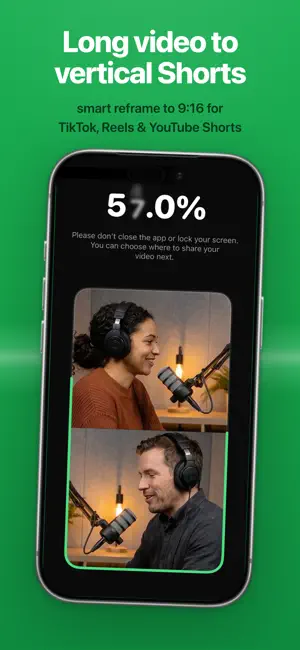
Clipped turns long recordings (podcasts, interviews, lectures, livestreams) into short, ready-to-post clips, entirely on your iPhone. No uploads. No account. No monthly credit limits. Because every model runs on-device, Clipped works in airplane mode and never sends your footage anywhere. HOW IT WORKS 1. Import a long video: podcast, interview, lecture, livestream, or vlog. 2. Pick a model in Settings: Smarter for the best highlight picks, Faster for quicker results, or No AI to choose moments yourself. Apple's on-device Speech engine transcribes the audio; download extra language packs anytime. 3. On-device AI finds the strongest moments and builds clips automatically. 4. Auto-captions are burned into the video. Choose from 7 animated styles, customize the colors, and preview the look live before exporting. 5. Reframe from 16:9 to 9:16 with face detection and tracking. Pick a layout: hard crop that follows the speaker, split-screen, or blur-fill. 6. Export straight to your Camera Roll, ready to post to TikTok, Reels, or Shorts. NEW IN 2.0 - Advanced framing: split-screen panes and a face-tracked camera with smooth motion - Enhance pass: adds AI-timed visual beats, animated text and stat overlays synced to what's being said - AI social captions: generate ready-to-post captions with Apple Intelligence - Redesigned Home and Settings, a model download manager, and noticeably faster transcription WHY ON-DEVICE MATTERS - Your footage never leaves your phone. No cloud, no server, nothing to leak. - Works anywhere: airplane mode, no signal, remote shoots, sensitive client footage. - No account required. Open the app and start clipping. - No monthly credit limits. One podcast or fifty, clip as many as you like, every day. PERFECT FOR - Podcasters turning full episodes into shorts - Streamers and YouTubers clipping long VODs and streams - Interviewers, coaches, and course creators repurposing long recordings - Anyone who wants full control over sensitive or unreleased footage HONEST PRICING Clipped is free to use. Every export includes a small watermark until you remove it with a single one-time purchase. That's the whole model: no subscription, no monthly credits, no "Pro" tier, no paywalled features. Compare that to the rest of this category, which is entirely subscription- and credit-metered, often $15-$30 a month or more. With Clipped, what you pay never changes whether you clip once or every single day. Privacy: https://www.clipped.cc/privacy Terms: https://www.clipped.cc/terms https://www.clipped.cc/
Ratings & reviews
4.9
12 ratings
What’s new
Version 2.0.0 · Updated August 6, 2026
Clipped 2.0 brings advanced framing, smarter highlights, and a faster, cleaner app. - Advanced framing: split-screen panes and a face-tracked camera with smooth, natural motion - Enhance pass: adds AI-timed visual beats (animated text and stat overlays) synced to your content - AI social captions: generate ready-to-post captions with Apple Intelligence - Redesigned Home and Settings, plus a new model download manager - Faster on-device transcription across the board Still 100% on-device: no cloud, no account, no credits, ever.
App privacy
The developer, Salvatore Castellitti, reported these privacy practices to Apple.
Data Not Linked to You
The following data, which may be collected but is not linked to your identity, may be used for the following purposes:
- Identifiers: User ID
Used for: App Functionality
Alternatives to Clipped: AI Video Clipper
Looking for apps like Clipped: AI Video Clipper? Here are 6 similar apps on the App Store. The highest rated is Autoclip: Clip Maker & Editor (5.0/5), and all 6 are free to download.
-
 Autoclip: Clip Maker & Editor
5.0
Autoclip: Clip Maker & Editor
5.0
-
 Clipolette: AI Clips, Captions
4.8
Clipolette: AI Clips, Captions
4.8
-
 ClipForge – AI Video Clips
1.0
ClipForge – AI Video Clips
1.0
-
 Vidulk: Clipping Viral Videos
4.4
Vidulk: Clipping Viral Videos
4.4
-
 Bitcut - AI Video Editor
-
 Auto Clipper: AI Editor
| App | Rating | Price | Last updated | Compare |
|---|---|---|---|---|
| Clipped: AI Video Clipper | 4.9 / 5 (12 ratings) | Free | August 6, 2026 | |
| Autoclip: Clip Maker & Editor | 5.0 / 5 (12) | Free | Oct 7, 2026 | Compare |
| Clipolette: AI Clips, Captions | 4.8 / 5 (4) | Free | Oct 2, 2026 | Compare |
| ClipForge – AI Video Clips | 1.0 / 5 (1) | Free | Aug 19, 2026 | Compare |
| Vidulk: Clipping Viral Videos | 4.4 / 5 (26) | Free | Oct 11, 2026 | Compare |
| Bitcut - AI Video Editor | – | Free | Oct 16, 2026 | Compare |
| Auto Clipper: AI Editor | – | Free | Aug 31, 2026 | Compare |