

Autoclip: Clip Maker & Editor
Josh Jarrett Photo & Video iPhoneiPadiPod touch
Autoclip: Clip Maker & Editor is a free Photo & Video app for iPhone and iPad by Josh Jarrett. Rated 5.0/5 from 12 ratings. Requires iOS 17.0.
- Rating
- 5.0
- 12 ratings
- Price
- Free
- on the App Store
- Size
- 50 MB
- Age 4+
- Updated
- Oct 7
- 2026 · v1.17
Screenshots



About Autoclip: Clip Maker & Editor
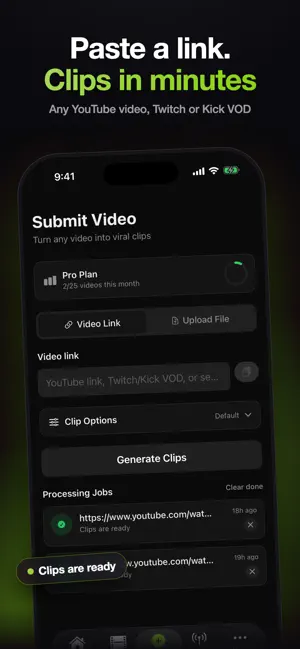
Autoclip AI turns long videos into viral short-form clips — automatically. Paste any YouTube link (or upload your own video) and our AI finds the most engaging moments, cuts them into vertical clips with animated captions, and gets them ready to post on TikTok, Instagram Reels, YouTube Shorts, and more. Built for clippers, creators, marketers, agencies, and content teams who want to post more without editing all day. HOW IT WORKS • Paste a YouTube, Twitch, or Kick link — or upload a video • AI analyzes the full video and finds the viral moments • Get ready-to-post clips with captions, 9:16 reframing, and virality scores • Post now or schedule to all your connected accounts WHY CREATORS LOVE IT • Virality score on every clip — know what to post first • Animated captions with keyword highlights • Smart reframing: landscape to vertical with face tracking • B-roll overlays and punch-in zooms for extra retention • Channel tracking: auto-clip new uploads from any channel on autopilot • Post and schedule to TikTok, Instagram, YouTube, Facebook, LinkedIn, X, Threads, Pinterest, and more • Track performance: views, engagement, best posting times • Earn from clipping: browse content-rewards campaigns and track earnings • Clip Coach: weekly AI report on what's working (Scale plan) PLANS • Starter: 10 videos and 50 clips per month, 1 tracked channel, 3 social accounts • Pro: 25 videos and 200 clips per month, 3 tracked channels, 8 social accounts, B-roll and translation — with a 3-day free trial • Scale: 50 videos and 500 clips per month, 10 channels, 25 accounts, Clip Coach, no watermark Subscriptions are billed through your Apple ID and renew automatically until canceled in Settings. The Pro free trial converts to a paid subscription unless canceled at least 24 hours before it ends. Terms of Use: https://www.apple.com/legal/internet-services/itunes/dev/stdeula/ Privacy Policy: https://autoclip.dev/privacy
Ratings & reviews
5.0
12 ratings
What’s new
Version 1.17 · Updated October 7, 2026
A cleaner subscription screen makes it easier to compare plans and upgrade.
App privacy
The developer, Josh Jarrett, reported these privacy practices to Apple.
Data Linked to You
The following data, which may be collected and linked to your identity, may be used for the following purposes:
- Usage Data: Product Interaction
- Purchases: Purchase History
- Contact Info: Email Address, Name
- User Content: Photos or Videos
- Identifiers: User ID
Used for: Analytics, App Functionality
Alternatives to Autoclip: Clip Maker & Editor
Looking for apps like Autoclip: Clip Maker & Editor? Here are 6 similar apps on the App Store. The highest rated is Clipped: AI Video Clipper (4.9/5), and all 6 are free to download.
-
 Clipped: AI Video Clipper
4.9
Clipped: AI Video Clipper
4.9
-
 ClipForge – AI Video Clips
1.0
ClipForge – AI Video Clips
1.0
-
 Auto Clipper: AI Editor
-
 MagicClip: AI video clipping
4.5
MagicClip: AI video clipping
4.5
-
 Vidulk: Clipping Viral Videos
4.4
Vidulk: Clipping Viral Videos
4.4
-
 Clipolette: AI Clips, Captions
4.8
Clipolette: AI Clips, Captions
4.8
| App | Rating | Price | Last updated | Compare |
|---|---|---|---|---|
| Autoclip: Clip Maker & Editor | 5.0 / 5 (12 ratings) | Free | October 7, 2026 | |
| Clipped: AI Video Clipper | 4.9 / 5 (12) | Free | Aug 6, 2026 | Compare |
| ClipForge – AI Video Clips | 1.0 / 5 (1) | Free | Aug 19, 2026 | Compare |
| Auto Clipper: AI Editor | – | Free | Aug 31, 2026 | Compare |
| MagicClip: AI video clipping | 4.5 / 5 (338) | Free | Jul 21, 2026 | Compare |
| Vidulk: Clipping Viral Videos | 4.4 / 5 (26) | Free | Oct 11, 2026 | Compare |
| Clipolette: AI Clips, Captions | 4.8 / 5 (4) | Free | Oct 2, 2026 | Compare |