

Useful Sound Stitch
katapu.net Music iPhoneiPadiPod touch
Useful Sound Stitch is a free Music app for iPhone and iPad by katapu.net. Requires iOS 15.6. Updated October 17, 2026.
- Price
- Free
- on the App Store
- Size
- 52 MB
- Age 4+
- Updated
- Oct 17
- 2026 · v1.1.1
Screenshots


About Useful Sound Stitch
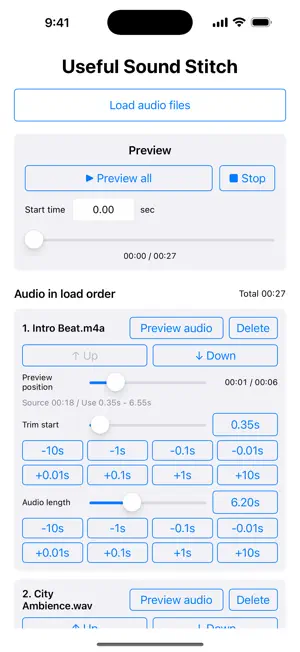
Load music and audio files, keep only the parts you need, join them in order, and save the result with a simple audio editing app. Useful Sound Stitch lets you load multiple audio files, preview them while editing, combine them from the top of the list, and export one finished audio file. It is useful when you want to connect parts of favorite songs, combine recorded audio, organize sound effects or background music materials, or turn several audio clips into one file. Each loaded audio file can be adjusted individually. Set the start trim and the length to use, remove unwanted silence or extra parts, and create a joined audio file that flows naturally. You can preview the full combined audio, and you can also preview each individual audio file. Sliders make it easy to check playback positions and fine-tune timing while listening. The order of audio files can be changed with up and down buttons. You can also save the current editing state and load it again later, so it is easy to continue the same edit. Export formats include M4A and WAV. For M4A, you can choose the audio quality to balance file size and sound quality. When you want to join audio files, combine recordings, or organize background music materials, give this app a try. 【How to Use】 1. Tap "Load audio files" and choose the audio files you want to join. 2. Loaded audio files are joined from the beginning in the order shown in the list. 3. Adjust "Trim start" and "Audio length" for each file as needed. 4. Use individual previews and the full preview to check how the audio connects and where playback starts. 5. To change the order, use the up and down buttons for each audio file. 6. Save the current editing state if you want to continue later. 7. Choose the export format and quality, then tap "Stitch and export file" to export and save the audio file.
What’s new
Version 1.1.1 · Updated October 17, 2026
• Improved stability when importing multiple audio files at once. • Improved the performance and stability of preview playback.
App privacy
The developer, katapu.net, reported these privacy practices to Apple.
Data Used to Track You
The following data may be used to track you across apps and websites owned by other companies:
- Identifiers: Device ID
Data Linked to You
The following data, which may be collected and linked to your identity, may be used for the following purposes:
- Location: Coarse Location
- Identifiers: Device ID
- Usage Data: Product Interaction, Advertising Data
Used for: Third-Party Advertising, Developer’s Advertising or Marketing, Analytics, App Functionality
Data Not Linked to You
The following data, which may be collected but is not linked to your identity, may be used for the following purposes:
- Location: Coarse Location
- Identifiers: User ID
- Usage Data: Product Interaction, Advertising Data, Other Usage Data
- Diagnostics: Performance Data, Other Diagnostic Data, Crash Data
- Other Data: Other Data Types
Used for: Third-Party Advertising, Developer’s Advertising or Marketing, Analytics, App Functionality
Alternatives to Useful Sound Stitch
Looking for apps like Useful Sound Stitch? Here are 6 similar apps on the App Store. The highest rated is Audio Editor - Audixy (4.0/5), and all 6 are free to download.
-
 Audio Joiner & Merger: Audjio
-
 Audio Editor - Audixy
4.0
Audio Editor - Audixy
4.0
-
 DS Guitar Chord
-
 Audipella
-
 JoinSound - Merge Audio Files
-
 SongStems
4.0
SongStems
4.0
| App | Rating | Price | Last updated | Compare |
|---|---|---|---|---|
| Useful Sound Stitch | – | Free | October 17, 2026 | |
| Audio Joiner & Merger: Audjio | – | Free | Oct 2, 2026 | Compare |
| Audio Editor - Audixy | 4.0 / 5 (4) | Free | Sep 20, 2026 | Compare |
| DS Guitar Chord | – | Free | Oct 14, 2026 | Compare |
| Audipella | – | Free | Jun 6, 2026 | Compare |
| JoinSound - Merge Audio Files | – | Free | Oct 13, 2026 | Compare |
| SongStems | 4.0 / 5 (1) | Free | Aug 7, 2026 | Compare |