

Audipella
Gary Seales Music iPhoneiPadiPod touch
Audipella is a free Music app for iPhone and iPad by Gary Seales. Requires iOS 15.1. Updated June 6, 2026.
- Price
- Free
- on the App Store
- Size
- 69 MB
- Age 17+
- Updated
- Jun 6
- 2026 · v0.2.3
Screenshots


About Audipella
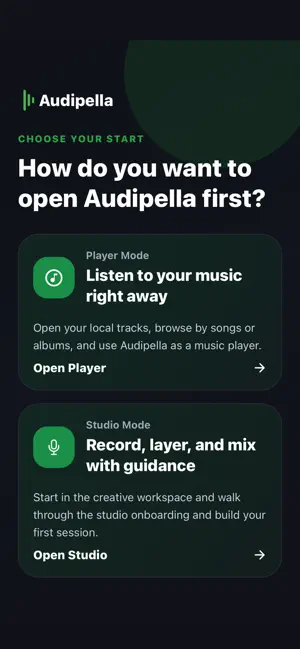
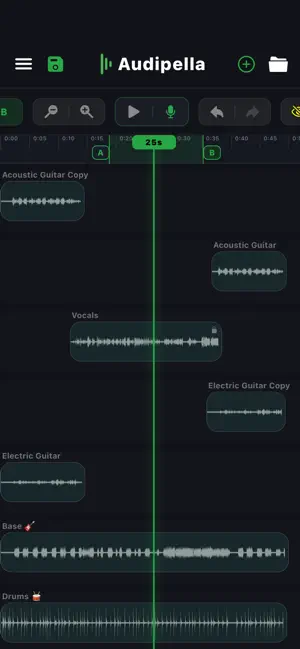
Audipella double as a music player and a powerful audio mixing app designed for creators who want professional results without complex studio software. Whether you’re a vocalist, podcaster, or songwriter, Audipella gives you the tools to record, align, edit, and export high-quality audio directly from your device. Studio Key Features: Multi-Track Workspace Organize your project with a flexible multi-track timeline. Drag, group, and pan tracks to perfectly align your arrangement with a smooth, optimized interface built for mobile. Record Over Your Mix Import a base track and record vocals while listening to your project in real time. Perfect for layering harmonies, overdubs, and vocal arrangements. Per-Track EQ Control Apply equalization to individual tracks for precise sound shaping. Adjust each track independently to create a balanced and polished mix. Master Mix EQ Fine-tune the final output by applying EQ to the entire mix before exporting. Pro-Grade Processing Built-in noise reduction and loudness normalization help your recordings sound clean, clear, and professionally balanced. Advanced Export Options Export your final mix as a high-quality MP3 or attach cover artwork to generate an MP4 video ready for sharing on social media platforms. Smart Editing Tools Lock tracks to prevent accidental movement, solo individual tracks for focused editing, and use Ghost View to visually align recordings during group or single track adjustments. Player Key Features: Chat & Download Features Search and download audio from URLs, Conversational search with download progress, Visual progress bars with live update Playback Features Drag down gesture to collapsible bottom player with controls, drag up gesture to expanded view with large full screen player Set start/end points for looped playback sections Audio Trimmer Integration Visual audio editing, Set start/end trim points, Save edited versions to library Media Library Browsing 5 Tab Categories: Songs, Albums, Artists, Playlists, Recent. Smart Playlists: Recently Added, Downloads, Playable tracks, Favorites Library Management Real-time search across the library, Multi-select tracks/albums/artists/playlists for batch actions, Import audio files into the player library, Pull-to-refresh library scanning Playback Controls Play, pause, skip forward/backward, Touch-to-seek with time display, Loop Modes includes Off, All, Once, Playback Speed, variable speed from 0.5x to 2.0x Shuffle Mode: Random playback or order playback, restores playback position. Why Choose Audipella? Easy to Use Designed with a mobile-first workflow and intuitive gestures that make player music or multi-track editing simple. Free to Use Access powerful studio mixing tools without expensive studio software. High Performance Powered by a native audio engine for fast playback, smooth editing, and quick exporting. Stop waiting for studio time. Create, mix, play and share your music anytime with Audipella.
What’s new
Version 0.2.3 · Updated June 6, 2026
loop once, loop all fixed, other fixes
App privacy
The developer, Gary Seales, reported these privacy practices to Apple.
Data Not Collected
The developer does not collect any data from this app.
Alternatives to Audipella
Looking for apps like Audipella? Here are 6 similar apps on the App Store. The highest rated is MP3 Tag Editor: Music Metadata (5.0/5), and all 6 are free to download.
-
 MP3 Tag Editor: Music Metadata
5.0
-
 TuneScribe
-
 Music Visualizer: Sound Art
4.0
-
 PlayStems: Audio Stem Player
1.0
-
 Stemly Live Multitrack
-
 Guanche's DJ Booth
| App | Rating | Price | Last updated | Compare |
|---|---|---|---|---|
| Audipella | – | Free | June 6, 2026 | |
| MP3 Tag Editor: Music Metadata | 5.0 / 5 (1) | Free | Oct 27, 2026 | Compare |
| TuneScribe | – | Free | Sep 16, 2026 | Compare |
| Music Visualizer: Sound Art | 4.0 / 5 (4) | Free | Nov 11, 2026 | Compare |
| PlayStems: Audio Stem Player | 1.0 / 5 (1) | Free | Oct 29, 2026 | Compare |
| Stemly Live Multitrack | – | Free | Oct 27, 2026 | Compare |
| Guanche's DJ Booth | – | Free | Sep 9, 2026 | Compare |
Compare Audipella with the top alternatives: ratings, updates, ASO score and keyword gaps →