

TickTrail - Fast Focus Tracker
必隆 张 Productivity iPhoneiPadiPod touch
TickTrail - Fast Focus Tracker is a free Productivity app for iPhone and iPad by 必隆 张. Requires iOS 17.0. Updated September 6, 2026.
- Price
- Free
- on the App Store
- Size
- 78 MB
- Age 4+
- Updated
- Sep 6
- 2026 · v2.1.0
Screenshots

About TickTrail - Fast Focus Tracker
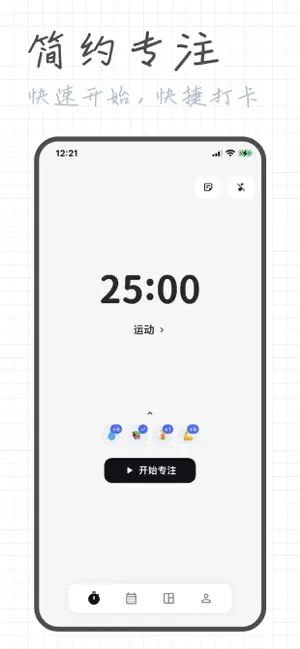
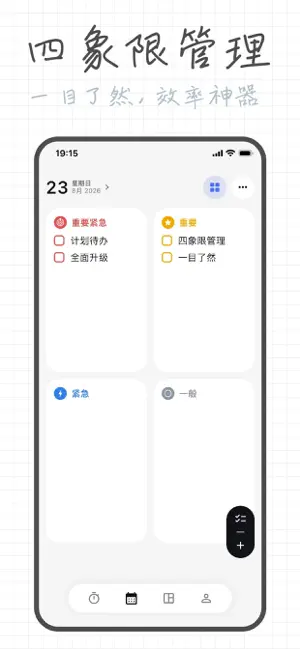
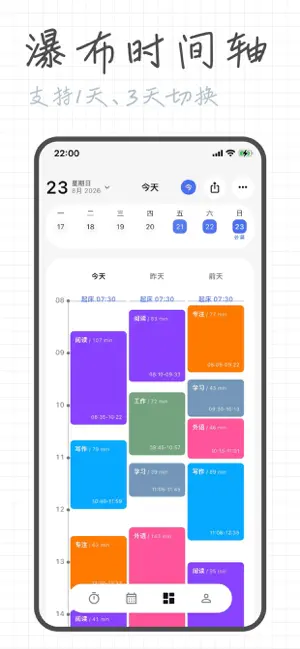
Two focus timer modes to suit your needs: Pomodoro Timer: Default 25-minute focus + 5-minute break, fully customizable. Driven by "time pressure," it's great for quick starts and beating procrastination, keeping your brain in a productive rhythm. Stopwatch (Count-up): Starts from zero and accumulates until the task is done. Driven by a "sense of completion," it's ideal for deep creative work and immersive thinking, without disrupting your flow. Recommendation: Use Pomodoro for routine tasks and Stopwatch for deep work. Switch flexibly to double your efficiency. You can change labels and adjust duration even during a focus session. To-dos and daily reviews: List a few tasks for today, link them to focus tags, and check them off when done. Unfinished items can be rolled over to tomorrow with one tap. Jot down a quick review each day, choose your mood and weather, and browse through daily, weekly, or monthly logs. Habit tracking for visible consistency: Create custom habit check-in labels and add reminders to your system calendar. Each check-in triggers a celebratory animation—a little reward for yourself. Deep stats to truly see where your time goes: Drill down into your timeline by day, week, month, or year. Heatmaps show your most productive hours, with tag rankings, weekday vs. weekend comparisons, and focus quality at a glance. All records can be filtered by tag and status. Today overview, all on one page: Total focus time, completion rate, tag distribution, and comparison with last week—just a glance and you'll know where you stand. Immersive experience, your style your way: Multiple themes to choose from, with automatic light/dark mode switching. Freely adjust navigation style, corner radius, card layout, and color scheme. System integration for speed and convenience: Real-time progress on the lock screen, widgets for a quick glance, and notification center controls for instant status switching. Enhanced alerts when a session ends. Data security you can trust: Local-first, so it works even without internet. Apple ID one-click login, encrypted cloud backup, and seamless iCloud sync across all your devices. Supports import/export for easy backups anytime. Cross-platform sync keeps your data with you wherever you go.
What’s new
Version 2.1.0 · Updated September 6, 2026
【New Features】 Focused Experience: Enhanced "Study Mode" now supports ending focus sessions with a long press. Background & Sound Effects: Added a ticking clock ambient sound; optimized background music, beats, reminder cleanup, and native audio playback. Holidays & Work Schedules: Integrated with the system’s holiday calendar, supporting statutory holiday and workday markings. Routines & Health: Imported health sleep data and routine analysis; added option to clear sleep preferences, and synchronized default routine values. 【Optimizations】 Overhauled layout for homepage, today’s overview, statistics, plans, and schedule pages, unifying visual standards for calendars, pop-ups, theme surfaces, task lists, and statistical periods. Optimized plan configuration drawers, time and priority selection, tag editing, continuous creation, seamless auto-save, task completion feedback, and migration of incomplete plans. Enhanced month-view zoom, multi-column viewing, date switching, "Back to Today," and animations for switching between quadrants and list views. Improved desktop responsive layout, reducing repeated layout computations during window resizing, page switching, and inactive page states. Cached scheduled derived data, background blur layers, and page states to improve first-screen loading, page activation, historical archiving, and statistical retrieval performance. Optimized sync scheduling, auto-sync speed, sync completion status, sync center counts, local indexing, and consistency with cloud data. Updated brand icons across all platforms. 【Bug Fixes】 Fixed issues with initial pull, empty local data recovery, focus snapshot restoration, sync progress, completion determination, and tag counting. Fixed expired schedule records, recurring rules, recurring tasks, date grouping, calendar switching flicker, task-subtask status linkage, and arrangement data refresh issues. Fixed Live Activity timing records, picture-in-picture status, push configuration, background music synchronization, and auto-start prompt sounds. Fixed sleep default value null errors, to-do focus history tags, remote sync version metadata, avatar and profile page sync display issues.
App privacy
The developer, 必隆 张, reported these privacy practices to Apple.
Data Linked to You
The following data, which may be collected and linked to your identity, may be used for the following purposes:
- Contact Info: Email Address
- User Content: Other User Content
- Identifiers: User ID, Device ID
- Usage Data: Other Usage Data
- Diagnostics: Other Diagnostic Data
Used for: App Functionality
Alternatives to TickTrail - Fast Focus Tracker
Looking for apps like TickTrail - Fast Focus Tracker? Here are 6 similar apps on the App Store.
-
 FocusTimer: Pomodoro Focus
-
 极简番茄-自律打卡专注每刻
-
 Little Beaver: Focus Timer
-
 ECC Export Contacts-Calendars
-
 Aimward: Goal & Focus Planning
-
 Now Block
| App | Rating | Price | Last updated | Compare |
|---|---|---|---|---|
| TickTrail - Fast Focus Tracker | – | Free | September 6, 2026 | |
| FocusTimer: Pomodoro Focus | – | Free | Aug 24, 2026 | Compare |
| 极简番茄-自律打卡专注每刻 | – | Free | Apr 26, 2026 | Compare |
| Little Beaver: Focus Timer | – | Free | Jul 25, 2026 | Compare |
| ECC Export Contacts-Calendars | – | 2.99 USD | Jul 28, 2026 | Compare |
| Aimward: Goal & Focus Planning | – | Free | Sep 21, 2026 | Compare |
| Now Block | – | Free | Apr 24, 2026 | Compare |