

FocusTimer: Pomodoro Focus
Dt nova Productivity iPhoneiPadiPod touch
FocusTimer: Pomodoro Focus is a free Productivity app for iPhone and iPad by Dt nova. Requires iOS 16.0. Updated August 24, 2026.
- Price
- Free
- on the App Store
- Size
- 3 MB
- Age 4+
- Updated
- Aug 24
- 2026 · v1.1
Screenshots
About FocusTimer: Pomodoro Focus
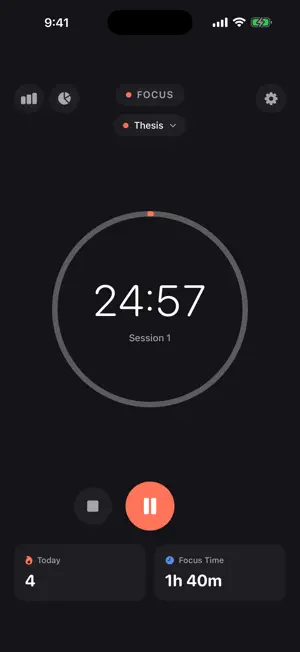
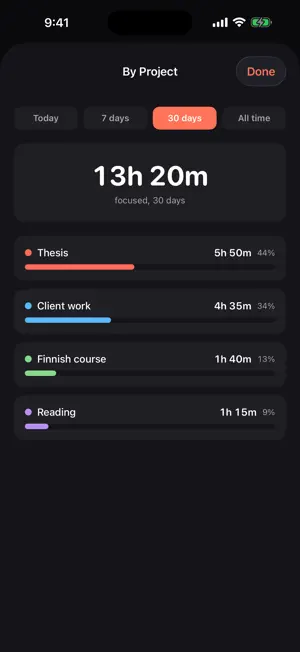
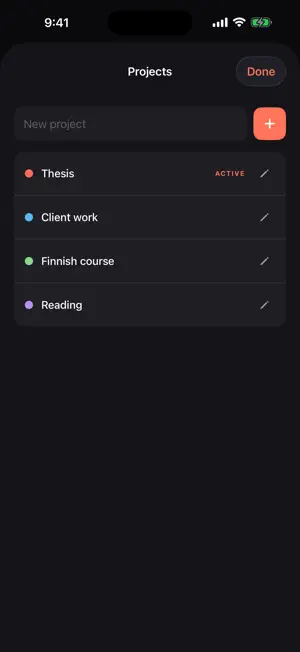
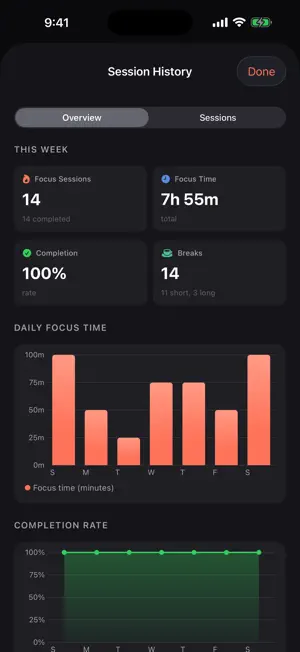
FocusTimer is a Pomodoro timer that tells you where the hours actually went. Start a 25 minute session in one tap. Name what you are working on, and FocusTimer keeps a running total per project, so at the end of the week you know you gave the thesis 5 hours and the client 4, instead of guessing. FREE, FOREVER - 25/5/15 Pomodoro cycles, and every duration is yours to change: focus 5 to 60 minutes, short break 1 to 15, long break 10 to 30 - Long break after any number of pomodoros you choose, 2 to 6 - Auto-start breaks, auto-start focus, or full manual control - Automatic Do Not Disturb during a focus session, through Shortcuts - Session history, a weekly focus chart and a completion-rate trend - Two projects, and today's breakdown by project - Renaming and deleting your projects is free, and always will be - Runs with the screen locked and tells you when the session ends - Everything stays on your device. No account, no sign-up WHAT YOU FOCUSED ON, NOT JUST HOW LONG Tap the chip above the timer to pick a project. Every focus session you finish counts toward it. The report screen shows hours and a share of the total per project, so the number you report to a client or a supervisor is a number you actually measured. FOCUSTIMER PRO - As many projects as you track, instead of two - The 7 day, 30 day and all-time reports - Restored on every iPhone and iPad signed into your Apple Account WHAT YOU WILL NOT FIND No ads. No account to create. No streak nagging you into opening the app. No social feed. FocusTimer Pro is a subscription: 2.99 USD per month, or 19.99 USD per year with the first 14 days free. Prices are shown in local currency by region. Cancel any time during the free trial and you are not charged. Payment is charged to your Apple Account at confirmation of purchase. The subscription renews automatically for the same price and period unless it is cancelled at least 24 hours before the end of the current period. You can manage or cancel it in your Apple Account settings after purchase. Terms of Use (EULA): https://thedolceway.com/terms Privacy Policy: https://thedolceway.com/privacy
What’s new
Version 1.1 · Updated August 24, 2026
You can finally see what you focused on, not just how long. - New: projects. Name what you are working on, pick it above the timer, and every finished session counts toward it. - New: a by-project report. Hours and share of the total, for today, the last 7 days, the last 30, or all time. - Today's breakdown and two projects are free. Renaming and deleting a project is free and always will be. - FocusTimer Pro removes the project cap and unlocks the longer reports. Monthly or yearly, with the first 14 days free on the yearly plan. - The upgrade screen and the Terms of Use now sit at the top of Settings instead of below four sections of sliders.
App privacy
The developer, Dt nova, reported these privacy practices to Apple.
Data Not Collected
The developer does not collect any data from this app.
Alternatives to FocusTimer: Pomodoro Focus
Looking for apps like FocusTimer: Pomodoro Focus? Here are 6 similar apps on the App Store. The highest rated is Plio: Time Tracker & Focus (5.0/5), and all 6 are free to download.
-
 Focus Timer - Pomodoro & Study
-
 My Clock: Pomodoro Focus Timer
-
 Focus Timer - Where Time Goes
-
 Seidō - Focus Timer & Pomodoro
-
 Plio: Time Tracker & Focus
5.0
Plio: Time Tracker & Focus
5.0
-
 FocusTasks - Pomodoro
| App | Rating | Price | Last updated | Compare |
|---|---|---|---|---|
| FocusTimer: Pomodoro Focus | – | Free | August 24, 2026 | |
| Focus Timer - Pomodoro & Study | – | Free | Apr 15, 2026 | Compare |
| My Clock: Pomodoro Focus Timer | – | Free | Aug 1, 2026 | Compare |
| Focus Timer - Where Time Goes | – | Free | Oct 28, 2026 | Compare |
| Seidō - Focus Timer & Pomodoro | – | Free | May 15, 2026 | Compare |
| Plio: Time Tracker & Focus | 5.0 / 5 (1) | Free | Aug 26, 2026 | Compare |
| FocusTasks - Pomodoro | – | Free | Aug 7, 2026 | Compare |