

Scribelet: AI Notebook
Scribelet Productivity iPhoneiPadiPod touch
Scribelet: AI Notebook is a free Productivity app for iPhone and iPad by Scribelet. Requires iOS 16.0. Updated October 20, 2026.
- Price
- Free
- on the App Store
- Size
- 64 MB
- Age 12+
- Updated
- Oct 20
- 2026 · v1.8
Screenshots

About Scribelet: AI Notebook
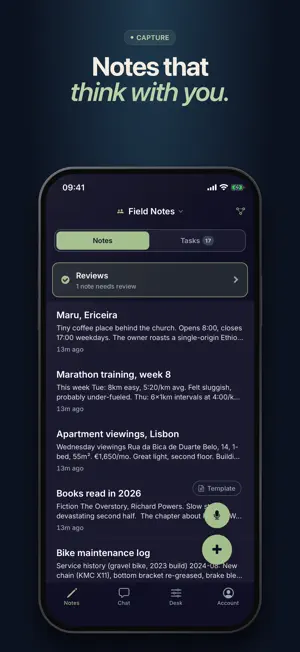
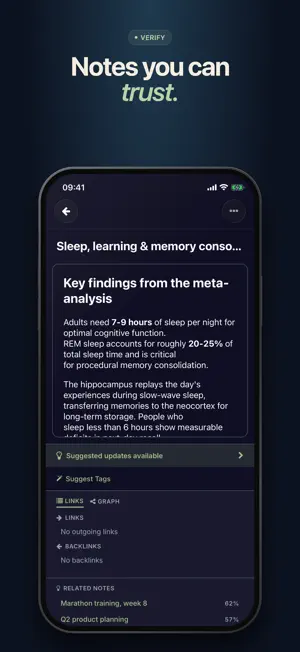
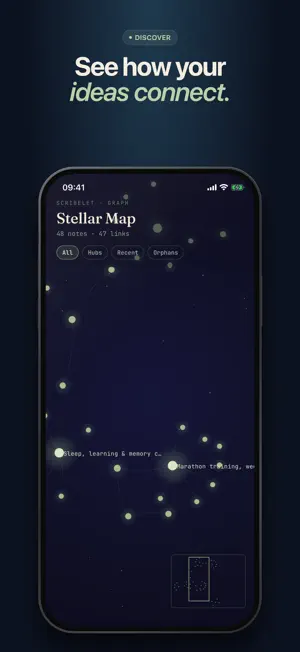
Most note apps just store what you write. Scribelet keeps working on them. While you focus on the next thought, it quietly fact-checks your notes against the web or custom sources, finds connections between ideas you forgot you had, and helps you write more clearly with an AI assistant that actually knows your notebook. Capture by voice or typing. Then trust what's there. FEATURES • Background fact-checking. Scribelet scans your notes for claims, searches the web for evidence, and surfaces anything that doesn't hold up with cited sources and a clear diff. Accept, dismiss, or ignore. You stay in control. • Voice notes that structure themselves. Speak naturally; Scribelet transcribes and organizes the result into clean headings, bullets, and action items. Templates supported. • Snap it, don't type it. Attach photos, screenshots, and PDFs; Scribelet extracts the text so whiteboards, receipts, and documents become searchable notes. • Ask your notes anything. An AI assistant that searches everything you've written, answers from what's actually there, cites the source notes, and can suggest edits or create new ones for you. • Attachments are first-class. The AI assistant reads them, the fact-checker verifies them, and everything stays encrypted with your workspace keys. • Connections you'd never find yourself. A semantic auto-linker compares the meaning of every note (not just keywords) and surfaces surprising links. A daily digest and weekly insights resurface forgotten work. • Tasks where they belong. Add @due and @remind annotations inline; tasks live next to the notes that created them. BUILT FOR PRIVACY • Every workspace is encrypted with its own keys. • Voice recordings are processed in memory and never stored. • Passkey and two-factor authentication. • Optional: bring your own OpenAI, Anthropic, or Gemini API keys to route AI calls directly to your provider. WORKS EVERYWHERE Same workspace on iPhone, iPad, and the web at app.scribelet.app. Your notes follow you. PRICING Free forever: unlimited notes, full-text search, full encryption, and 10 AI verifications per month. Pro subscription with free trial; see in-app pricing. Unlimited AI features (chat, verification, weekly insights), background checks, voice notes, semantic search. Free trial available, up to 14 days on the yearly plan. Terms of Use (EULA): https://scribelet.app/terms Privacy Policy: https://scribelet.app/privacy
What’s new
Version 1.8 · Updated October 20, 2026
Find anything faster. Search your notes from the Notes tab, type #word to tag as you write, browse all your tags, and pin the notes you use most. Nothing is lost by accident. Deleted notes go to Recently Deleted, every note keeps a history you can compare and restore, and the editor has Undo and Redo. Share or export any note as Markdown from its menu, and attach photos straight from your library or camera. A new, simpler start: sign in with an emailed code, no password needed, and your first note gets a reflection right away. AI chat answers now render properly formatted and cite only the notes they actually use. Reminders follow your local time zone. Enjoying Scribelet? You can now rate it from Account > Help. Plus many fixes for taps, buttons and the keyboard on iOS 26 and later. Scribelet now requires iOS 16 or later.
App privacy
The developer, Scribelet, reported these privacy practices to Apple.
Data Linked to You
The following data, which may be collected and linked to your identity, may be used for the following purposes:
- Contact Info: Email Address, Name
- Purchases: Purchase History
- Identifiers: User ID
- Usage Data: Product Interaction
- Diagnostics: Crash Data, Performance Data
- User Content: Other User Content, Photos or Videos, Audio Data, Customer Support
Used for: Developer’s Advertising or Marketing, Analytics, Product Personalization, App Functionality
Alternatives to Scribelet: AI Notebook
Looking for apps like Scribelet: AI Notebook? Here are 6 similar apps on the App Store. The highest rated is MoreBrainSpace (5.0/5), and all 6 are free to download.
-
 Document Organizer - DocuRadar
-
 Mapable: AI Notes & Journal
-
 MoreBrainSpace
5.0
MoreBrainSpace
5.0
-
 at8pm
at8pm
-
 Mement: Smart Planner
-
 Nothing Notes, Tasks, AI
2.0
Nothing Notes, Tasks, AI
2.0
| App | Rating | Price | Last updated | Compare |
|---|---|---|---|---|
| Scribelet: AI Notebook | – | Free | October 20, 2026 | |
| Document Organizer - DocuRadar | – | Free | Sep 8, 2026 | Compare |
| Mapable: AI Notes & Journal | – | Free | Oct 19, 2026 | Compare |
| MoreBrainSpace | 5.0 / 5 (5) | Free | Aug 15, 2026 | Compare |
| at8pm | – | Free | Sep 5, 2026 | Compare |
| Mement: Smart Planner | – | Free | Oct 29, 2026 | Compare |
| Nothing Notes, Tasks, AI | 2.0 / 5 (1) | Free | Oct 23, 2026 | Compare |