

Aupath: Task & Event Calendar
KAZUMI KURA Productivity iPhoneiPadiPod touch
Aupath: Task & Event Calendar is a free Productivity app for iPhone and iPad by KAZUMI KURA. Requires iOS 18.2. Updated June 20, 2026.
- Price
- Free
- on the App Store
- Size
- 10 MB
- Age 4+
- Updated
- Jun 20
- 2026 · v1.2.1
Screenshots
About Aupath: Task & Event Calendar
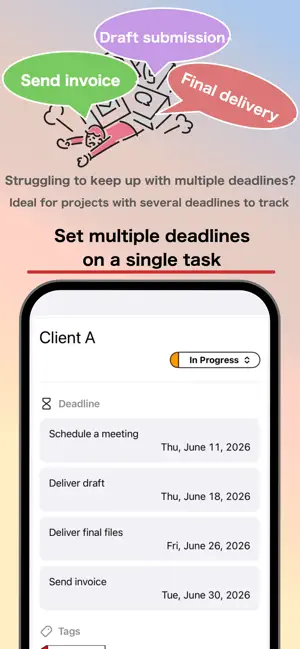
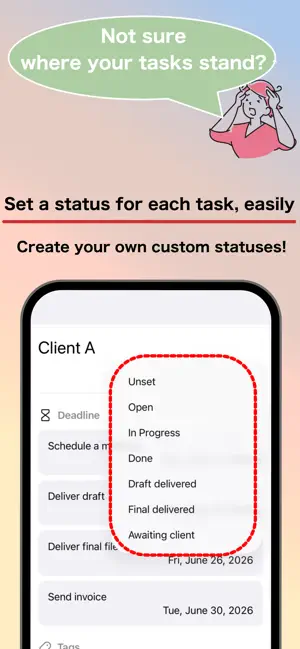
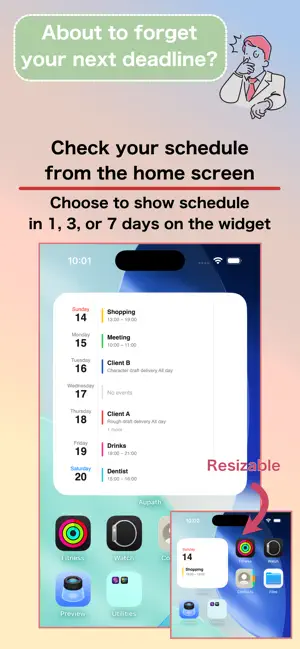
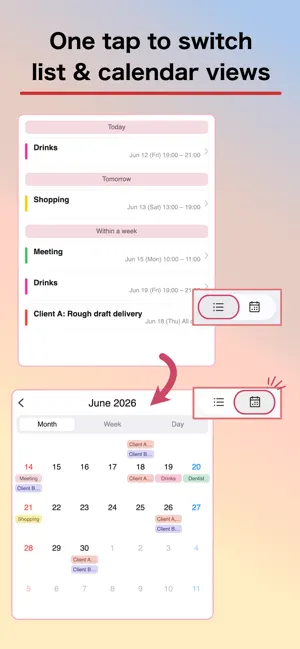
Aupath is a simple yet powerful schedule manager built for creators juggling multiple projects and deadlines. "Which project was due, and when?" Aupath brings your tasks, events, and calendar together on a single screen—turning the scattered mess in your head into a clear, at-a-glance overview. No more bouncing between a calendar app and a to-do app. ■ Who it's for ・Freelancers, designers, illustrators, and video creators running several projects at once ・Anyone managing projects with multiple deadlines ・People who want work and personal plans in one place ・Anyone tired of juggling a separate calendar app and to-do app ■ Key features Multiple deadlines for a single task — Give one project several milestones like "rough draft," "revisions," and "final delivery." Manage the whole workflow in one place and see your progress at a glance. Create recurring work in one tap with templates — Save projects and events you create over and over as templates, then recall an entire setup—deadlines, tags, and notifications included—to all but eliminate repetitive entry. Duplicate and reorder them to reuse your own way of working exactly as it is. Calendar × tasks on one screen — See task deadlines and events together on the calendar, and switch between today, this week, and this month to grasp your project status intuitively. Month, week, and day views — Switch between three views in a single tap. Perfect for zooming out to plan, or zooming in on the details of a single day. A fast, scannable list view — See every plan, event, and task in a list, neatly separated by tabs. Work and personal life, all in one place. Home Screen widgets — Choose from widgets in multiple sizes and check today's plans and upcoming deadlines right from your Home Screen, without even opening the app. Customizable statuses — Freely add, edit, and reorder project statuses like "To do," "In progress," and "Done" to match the way you actually work. Organize and filter with tags — Tag projects and categories, then filter down to just the plans you need in seconds. Holidays worldwide — Holidays appear automatically based on your device's region settings, so overseas projects and long-term plans are easy to map out. 11 languages — Available in Japanese, English, Chinese (Simplified & Traditional), Korean, Spanish, French, German, Portuguese, Arabic, and Hindi. Switch anytime inside the app, independently of your device settings. Dark mode — Switches automatically with your device settings, or set it manually in the app. Easy on the eyes for late-night work. Simple, beautiful design — An interface stripped of needless decoration and focused on delivering information clearly. Because you'll use it every day, we obsessed over readability and ease of use. ■ Ways to use it ・Tag projects and filter by them ・Get reminders as task deadlines approach ・Spin up recurring projects from templates ・Plan your workload week by week ・Schedule around personal commitments so nothing collides ■ From the developer "Running several projects in parallel." "One project with multiple deadlines." I always felt existing calendar and to-do apps didn't truly answer this creator-specific way of working. Aupath was born from those real-world frustrations. I'd be glad if it could ride alongside your creative work for a long time to come. Questions or requests? Please don't hesitate to reach out to our support team.
What’s new
Version 1.2.1 · Updated June 20, 2026
Updated the layout of the Arabic screen.
App privacy
The developer, KAZUMI KURA, reported these privacy practices to Apple.
Data Used to Track You
The following data may be used to track you across apps and websites owned by other companies:
- Identifiers: Device ID
- Usage Data: Product Interaction, Advertising Data
Data Not Linked to You
The following data, which may be collected but is not linked to your identity, may be used for the following purposes:
- Identifiers: Device ID
- Usage Data: Product Interaction, Advertising Data
Used for: Third-Party Advertising
Alternatives to Aupath: Task & Event Calendar
Looking for apps like Aupath: Task & Event Calendar? Here are 6 similar apps on the App Store.
-
 Project Planner - 計画管理
-
 Thread Mark: Markdown Notes
-
 Pixel Girl's Chill:ピクセルガールズチル
-
 Retn : Imprint One Focus
-
 ToDo Tab
-
 Routine Facilitator
| App | Rating | Price | Last updated | Compare |
|---|---|---|---|---|
| Aupath: Task & Event Calendar | – | Free | June 20, 2026 | |
| Project Planner - 計画管理 | – | Free | Apr 9, 2026 | Compare |
| Thread Mark: Markdown Notes | – | Free | Jul 4, 2026 | Compare |
| Pixel Girl's Chill:ピクセルガールズチル | – | Free | May 18, 2026 | Compare |
| Retn : Imprint One Focus | – | Free | Jan 6, 2026 | Compare |
| ToDo Tab | – | Free | May 13, 2025 | Compare |
| Routine Facilitator | – | Free | Apr 16, 2026 | Compare |