

Authenticator App · 2FA, MFA
Riverside Art LLC Utilities iPhoneiPadiPod touch
Authenticator App · 2FA, MFA is a free Utilities app for iPhone and iPad by Riverside Art LLC. Rated 3.0/5 from 4 ratings. Requires iOS 17.0.
- Rating
- 3.0
- 4 ratings
- Price
- Free
- on the App Store
- Size
- 15 MB
- Age 4+
- Updated
- Oct 15
- 2026 · v1.0.6
Screenshots


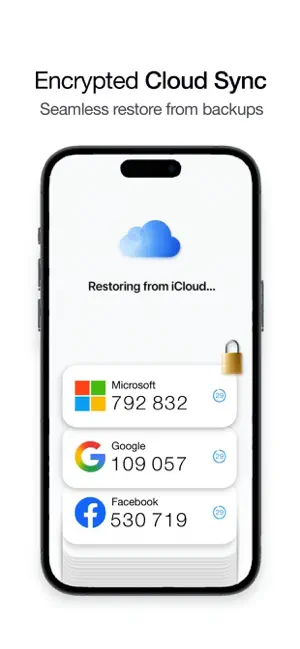
About Authenticator App · 2FA, MFA
Secure your digital life by protecting your most valuable accounts with the ultimate 2FA Authenticator. Instead of slow, insecure SMS text messages, Authenticator generates highly secure, time-based one-time passwords (TOTP) directly on your iPhone to ensure that only you can access your data, giving you peace of mind. Secure and protect your emails, social media, crypto wallets, and more, today! CORE FEATURES: + Universal Support: Instantly secure Google, Microsoft, Facebook, Instagram, Discord, Amazon, Crypto Wallets, Banking apps, and 10,000+ other services. + Face ID & Biometric Lock: Your codes are for your eyes only. Lock the app behind FaceID or TouchID so no one can access your tokens. + Encrypted iCloud Backup: Never lose your accounts if you upgrade or lose your iPhone. Securely back up and sync your 2FA vault across all your Apple devices. + 100% Offline Mode: Traveling or have bad cell service? Authenticator generates secure OTP codes locally on your device, even in Airplane Mode. + Lightning-Fast Setup: No typing required. Automatically pair any account in seconds using our ultra-fast QR camera scanner. --- Core authentication functionalities are available upon initial download, and users wanting access to the complete suite of advanced security utilities may optionally opt for a premium access upgrade, which includes unlimited 2FA code storage, encrypted iCloud backups, multi-device synchronization, and more. --- Legal and Subscription Information: Access to the full suite of application services, ongoing feature updates, and continuous scanning tools including premium services is governed by standard billing protocols. By electing to upgrade your account status, the application provides access to features via an auto-renewing subscription model. Users may be offered an introductory 3-day free trial period to evaluate the full feature set, after which a standard subscription fee will be charged to the payment method associated with your Apple Account. Subscriptions automatically renew at the same price and duration period unless auto-renewal is turned off at least 24 hours prior to the end of the current billing cycle. Your account will be charged for renewal within 24 hours prior to the end of the current period. You can manage your subscriptions and turn off auto-renewal at any time by navigating to your Apple Account Settings after purchase. Any unused portion of a free trial period, if offered, will be forfeited when the user purchases a subscription to that publication, where applicable. By downloading and continuing to use the application, you agree to our standard Terms of Use and Privacy Policy. --- Terms of Use (EULA): https://www.apple.com/legal/internet-services/itunes/dev/stdeula/ Terms of Use: https://riversideartcompany.com/terms-of-use Privacy Policy: https://riversideartcompany.com/privacy-policy
What’s new
Version 1.0.6 · Updated October 15, 2026
- Import From Screenshot is now right in the scanner, and QR codes inside screenshots read more reliably. - Time Sync now checks your clock against Apple's time server. If the clock is off, Tap to Fix on the Time Sync banner corrects code timing in the app instead of opening Settings. - Icons for more services, cleaner widgets, and other fixes.
App privacy
The developer, Riverside Art LLC, reported these privacy practices to Apple.
Data Used to Track You
The following data may be used to track you across apps and websites owned by other companies:
- Identifiers: Device ID
Data Linked to You
The following data, which may be collected and linked to your identity, may be used for the following purposes:
- Identifiers: Device ID
Used for: Third-Party Advertising
Data Not Linked to You
The following data, which may be collected but is not linked to your identity, may be used for the following purposes:
- Usage Data: Product Interaction, Other Usage Data
- Purchases: Purchase History
- Diagnostics: Crash Data, Other Diagnostic Data
Used for: Analytics, App Functionality
Alternatives to Authenticator App · 2FA, MFA
Looking for apps like Authenticator App · 2FA, MFA? Here are 6 similar apps on the App Store. The highest rated is Authenticator App " (5.0/5), and all 6 are free to download.
-
 Authenticator App "
5.0
-
 Authenticator - OTP Security
5.0
-
 Authenticator+ 2FA App
4.1
-
 Authenticator© App
4.6
-
 Authenticator™ App
4.1
-
 Authenticator App-2FA・MFA・OTP
4.6
| App | Rating | Price | Last updated | Compare |
|---|---|---|---|---|
| Authenticator App · 2FA, MFA | 3.0 / 5 (4 ratings) | Free | October 15, 2026 | |
| Authenticator App " | 5.0 / 5 (1) | Free | May 21, 2026 | Compare |
| Authenticator - OTP Security | 5.0 / 5 (4) | Free | Oct 1, 2024 | Compare |
| Authenticator+ 2FA App | 4.1 / 5 (58) | Free | Sep 24, 2026 | Compare |
| Authenticator© App | 4.6 / 5 (923) | Free | Oct 8, 2026 | Compare |
| Authenticator™ App | 4.1 / 5 (489) | Free | Oct 15, 2024 | Compare |
| Authenticator App-2FA・MFA・OTP | 4.6 / 5 (719) | Free | Oct 13, 2026 | Compare |