

Pyre: Visual Focus Timer
Peppertree Productivity iPhoneiPadiPod touch
Pyre: Visual Focus Timer is a free Productivity app for iPhone and iPad by Peppertree. Requires iOS 15.0. Updated October 23, 2026.
- Price
- Free
- on the App Store
- Size
- 24 MB
- Age 4+
- Updated
- Oct 23
- 2026 · v1.1.0
Screenshots

About Pyre: Visual Focus Timer
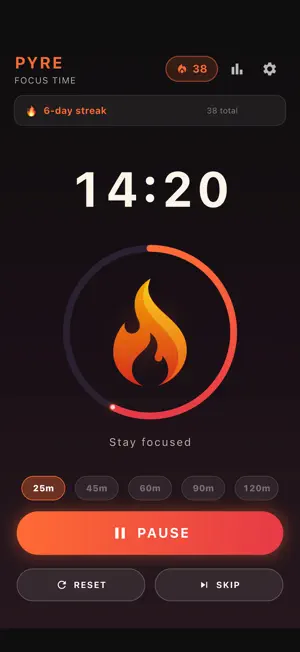
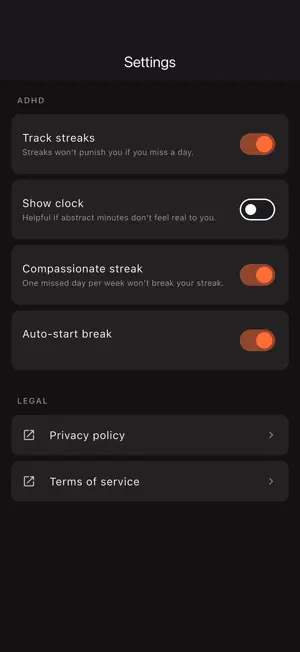
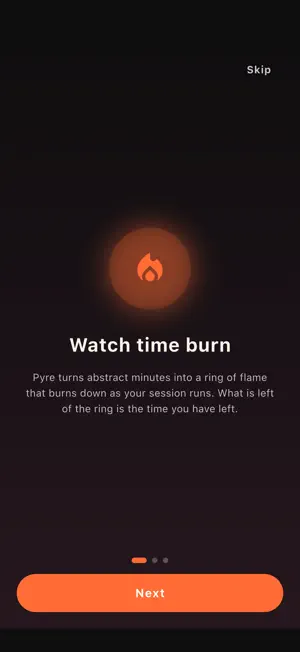
Ten minutes into a work block, can you say how much time is left without checking a number? Pyre turns the clock into a ring of flame. It burns down as your session runs, and what is left of the ring is the time you have left. The countdown digits sit in the middle of the ring, but you do not have to read them: one glance from across the desk tells you where you are. PICK A RHYTHM - Classic 25: a 25 minute focus sprint with a 5 minute break - Deep 45 and Deep 60: one long block, no break built in - Deep 90 and Deep 120: long blocks with a 15 or 20 minute break afterwards - Breaks can start by themselves when a session ends, or wait for your tap - A notification tells you when a session or break is over, even with the screen locked SETTINGS FOR WANDERING ATTENTION - Show the wall clock beside the timer when minutes feel abstract - Streaks are off by default. Turn them on only if a streak motivates you - Compassionate streak: one missed day per week does not break it - Stats show lifetime sessions, your current streak and your best streak ADHD-friendly here means gentle defaults and a visual cue. Pyre is a productivity tool, not a medical device. It does not diagnose, treat or manage ADHD or any other condition. THE AD, AND YOUR DATA Pyre is free. It shows a single small banner at the bottom of the Stats screen, and nowhere else. The timer screen is where your session runs, so it stays clear. Where the law requires it (the EEA and UK), a consent form asks about ads before any load, and Settings gets an Ad privacy options row so you can change your answer later. On iPhone and iPad the system tracking prompt appears only if that step allows it. Say no to the form or to the prompt and nothing in Pyre gets locked. Your settings, session totals and streaks are stored on your device and there is no Pyre account. The only network traffic Pyre starts itself is the ad request. The notification prompt appears when you start your first session, not when you open the app. WHERE IT HELPS Writers, students, developers and anyone who loses the thread of time while working. If a plain countdown never felt real to you, watch it burn. Questions or feedback: [email protected]
What’s new
Version 1.1.0 · Updated October 23, 2026
Pyre 1.1.0 - Pyre now speaks Korean, Japanese, Simplified Chinese and Traditional Chinese, following your device's language - Pyre now runs on iPad, in portrait, landscape and Split View - A small banner ad now sits at the bottom of the Stats screen. The timer screen has none, so a running session is never interrupted by one - Where required (EEA and UK) a consent form asks for your ad choice first, and Settings gets an Ad privacy options row to change it later - The system's tracking question is asked only if the consent form allows it - The notification permission prompt now appears when you start your first session, not when you open the app - Fixed: a session in progress was lost if the system closed Pyre in the background - Fixed: around daylight saving time changes a streak could reset or miss a day - Fixed: the 9:00 daily reminder used UTC instead of your time zone - Fixed: pressing Start on a finished session counted it a second time - Fixed: Auto-start break now really starts the break when a focus session ends
App privacy
The developer, Peppertree, reported these privacy practices to Apple.
Data Used to Track You
The following data may be used to track you across apps and websites owned by other companies:
- Identifiers: Device ID
Data Linked to You
The following data, which may be collected and linked to your identity, may be used for the following purposes:
- Location: Coarse Location
- Identifiers: Device ID
- Usage Data: Product Interaction, Advertising Data
Used for: Third-Party Advertising, Developer’s Advertising or Marketing, Analytics
Data Not Linked to You
The following data, which may be collected but is not linked to your identity, may be used for the following purposes:
- Diagnostics: Performance Data, Other Diagnostic Data, Crash Data
Used for: Third-Party Advertising, Developer’s Advertising or Marketing, Analytics
Alternatives to Pyre: Visual Focus Timer
Looking for apps like Pyre: Visual Focus Timer? Here are 6 similar apps on the App Store. The highest rated is The No List (5.0/5), and all 6 are free to download.
-
 FocusPomo: Pomodoro Timer
-
 GoNoGo - Business Ideas
-
 Focus Timer: Pomodoro; Tasks
-
 The No List
5.0
The No List
5.0
-
 AI for X Twitter: Followergrow
5.0
AI for X Twitter: Followergrow
5.0
-
 Sandbook: Natural Voice Reader
4.6
Sandbook: Natural Voice Reader
4.6
| App | Rating | Price | Last updated | Compare |
|---|---|---|---|---|
| Pyre: Visual Focus Timer | – | Free | October 23, 2026 | |
| FocusPomo: Pomodoro Timer | – | Free | Jun 19, 2026 | Compare |
| GoNoGo - Business Ideas | – | Free | Oct 14, 2026 | Compare |
| Focus Timer: Pomodoro; Tasks | – | Free | Oct 5, 2026 | Compare |
| The No List | 5.0 / 5 (7) | Free | Sep 5, 2025 | Compare |
| AI for X Twitter: Followergrow | 5.0 / 5 (2) | Free | May 12, 2026 | Compare |
| Sandbook: Natural Voice Reader | 4.6 / 5 (131) | Free | Oct 26, 2026 | Compare |