

Focus Timer: Pomodoro; Tasks
Huzaib Sayyed Productivity iPhoneiPadiPod touch
Focus Timer: Pomodoro; Tasks is a free Productivity app for iPhone and iPad by Huzaib Sayyed. Requires iOS 15.0. Updated October 5, 2026.
- Price
- Free
- on the App Store
- Size
- 41 MB
- Age 4+
- Updated
- Oct 5
- 2026 · v2.0.1
Screenshots

About Focus Timer: Pomodoro; Tasks
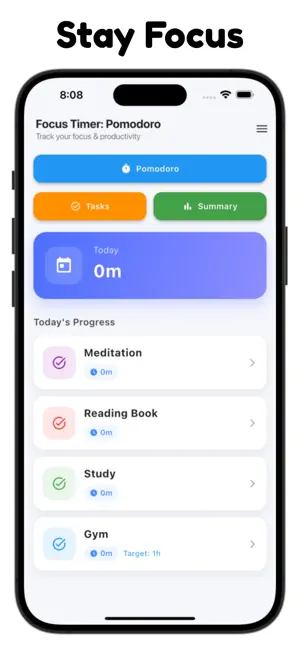
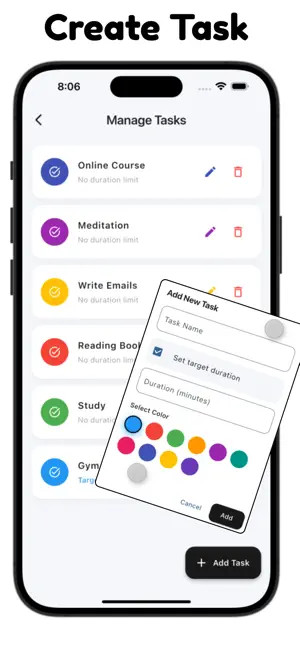
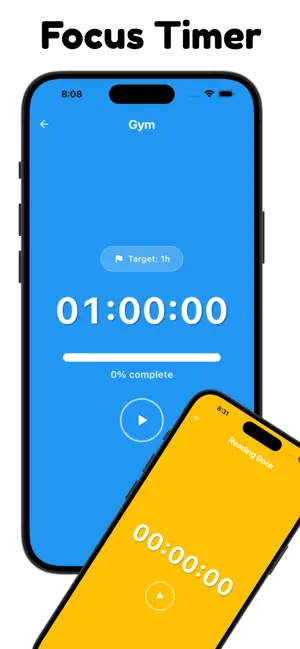
Stay focused, manage your time, and understand where your day goes with Focus Timer. Focus Timer combines a Pomodoro timer, task-based focus sessions, time tracking, and simple productivity insights in one distraction-free app. Whether you're studying, working, reading, exercising, or managing everyday routines, start a timer and focus on one task at a time. TASK-BASED FOCUS TIMER Create tasks and organize your time around what you actually do. Start a timer for Study, Work, Reading, Gym, or any custom activity and let the app keep track of your focused time. Switch between tasks whenever your priorities change without losing track of your progress. POMODORO TIMER Structure your work and study sessions using the Pomodoro technique. Use the classic rhythm: 25 minutes of focused work 5 minutes of short break 15 minutes of long break Focused sessions and regular breaks can make it easier to structure study, work, and deep-work routines throughout the day. TRACK YOUR TIME See how you're spending your time instead of guessing. Focus Timer automatically records your task sessions so you can review what you worked on and how long you spent doing it. DAILY & WEEKLY INSIGHTS Build better awareness of your routines with simple productivity statistics. Review your daily activity, compare weekly focus time, and understand which tasks receive most of your attention. ADHD-FRIENDLY FOCUS The clean, straightforward interface is designed to reduce unnecessary complexity and make starting a focus session simple. Short structured sessions can be useful for anyone who prefers breaking larger tasks into smaller, more manageable periods of focused time. MADE FOR STUDY, WORK & DAILY ROUTINES Use Focus Timer for: • Studying and exam preparation • Work and deep-focus sessions • Reading and learning • Personal projects • Exercise and routines • Task and time tracking • Pomodoro sessions • Building consistent focus habits WHY USE FOCUS TIMER? Start a task in seconds, track your focused time automatically, switch between activities without losing progress, and review your daily and weekly history—all from one simple productivity timer. Spend less time thinking about the clock and more time working on what matters. Start a focus session today.
What’s new
Version 2.0.1 · Updated October 5, 2026
- App Enhancement - Added App Tracking Transparency (ATT) - Bug Fix
App privacy
The developer, Huzaib Sayyed, reported these privacy practices to Apple.
Data Used to Track You
The following data may be used to track you across apps and websites owned by other companies:
- Usage Data: Advertising Data
Data Linked to You
The following data, which may be collected and linked to your identity, may be used for the following purposes:
- Usage Data: Advertising Data
Used for: Third-Party Advertising, Analytics, App Functionality
Alternatives to Focus Timer: Pomodoro; Tasks
Looking for apps like Focus Timer: Pomodoro; Tasks? Here are 6 similar apps on the App Store. The highest rated is Focus Pomodoro: Tasks & Timer (5.0/5), and all 6 are free to download.
-
 Focus Pomodoro: Tasks & Timer
5.0
Focus Pomodoro: Tasks & Timer
5.0
-
 Pomodoro.io
5.0
Pomodoro.io
5.0
-
 Pomodoro Minimal
-
 Peak Focus Pomodoro Timer
5.0
Peak Focus Pomodoro Timer
5.0
-
 Pomodoro Buddy: Focus Timer
5.0
Pomodoro Buddy: Focus Timer
5.0
-
 Pomodoro Focus
| App | Rating | Price | Last updated | Compare |
|---|---|---|---|---|
| Focus Timer: Pomodoro; Tasks | – | Free | October 5, 2026 | |
| Focus Pomodoro: Tasks & Timer | 5.0 / 5 (2) | Free | Jul 8, 2026 | Compare |
| Pomodoro.io | 5.0 / 5 (1) | Free | Mar 20, 2025 | Compare |
| Pomodoro Minimal | – | Free | Apr 23, 2026 | Compare |
| Peak Focus Pomodoro Timer | 5.0 / 5 (3) | Free | Jan 12, 2025 | Compare |
| Pomodoro Buddy: Focus Timer | 5.0 / 5 (2) | Free | Feb 23, 2026 | Compare |
| Pomodoro Focus | – | Free | Aug 3, 2026 | Compare |