

Solo.Shots: Daily Timelapse
Gul Eda Aydemir Photo & Video iPhoneiPadiPod touch
Solo.Shots: Daily Timelapse is a free Photo & Video app for iPhone and iPad by Gul Eda Aydemir. Requires iOS 17.6. Updated November 2, 2026.
- Price
- Free
- on the App Store
- Size
- 17 MB
- Age 4+
- Updated
- Nov 2
- 2026 · v3.1
Screenshots
Save to Pinterest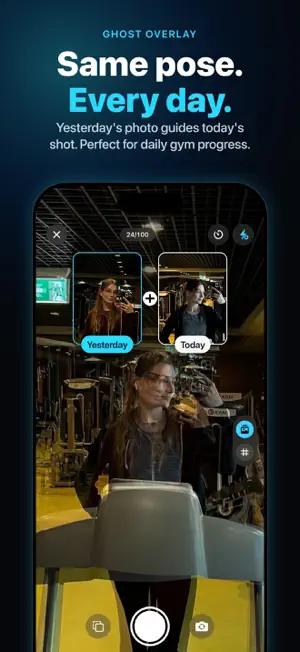

About Solo.Shots: Daily Timelapse
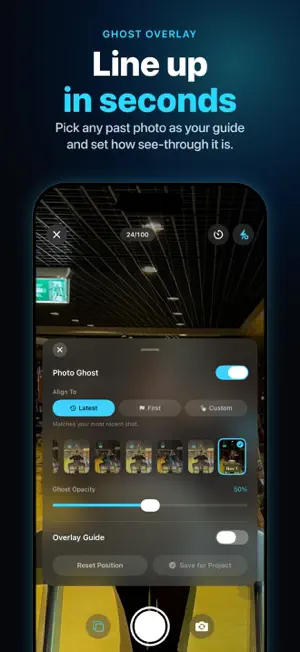
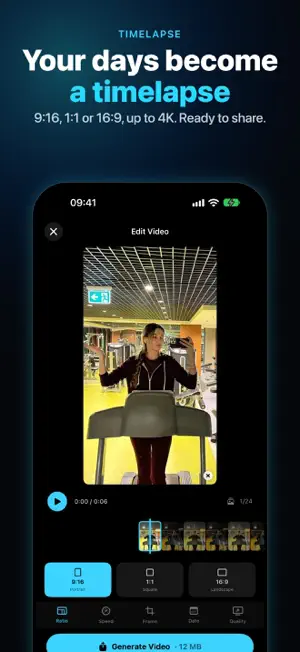
Take one photo a day. Solo.Shots turns them into a smooth timelapse of your progress. The secret is Ghost Overlay. Yesterday's photo appears see-through on your camera, so you can line up today's shot in seconds: same pose, same spot, same framing. No more jumpy progress videos. HOW IT WORKS 1. Start a project: gym, weight loss, pregnancy, hair, baby, plants, anything. 2. Line up with your ghost and take today's photo. 3. Turn your days into a timelapse video in a few taps. WHAT MAKES IT DIFFERENT • Ghost Overlay: use your latest photo, your first photo or any photo you choose as the guide, and set how see-through it is. • Framing tools: level, grid and shape guides help you hold the phone the same way each time. • Timelapse editor: pick 9:16, 1:1 or 16:9, set the speed, add dates, and export in 1080p or 4K. • Timelapse from old photos: Solo.Shots finds someone across your library and lines up every photo on the eyes, right on your device. • Streaks and reminders: reminders for each project, streaks, milestones and a Home Screen widget keep you showing up. • Posters and DNA Cards: share your journey as a photo mosaic or a progress card. • Private by design: no account and no sign-in. Your photos stay on your device unless you turn on iCloud backup. • Ready for iPhone Duo: works folded or open. PERFECT FOR Gym progress • Weight loss • Body transformation • Pregnancy and baby bump • Newborns and kids • Hair and beard growth • Skincare • Daily selfies • Art practice • Home renovation • Plants and pets FREE AND PREMIUM Free includes up to 3 projects and 100 photos per project, with ads and a watermark on videos. Solo.Shots Premium removes ads and the watermark, and adds unlimited projects and photos, 4K export, photo import, iCloud backup and timelapses from your old photos. Payment is charged to your Apple Account at confirmation. The subscription renews automatically unless cancelled at least 24 hours before the end of the current period. Manage or cancel in your Apple Account settings. Privacy Policy: https://guledaaydemir.github.io/solo.shots/privacy-policy.html Terms of Use (EULA): https://www.apple.com/legal/internet-services/itunes/dev/stdeula/
What’s new
Version 3.1 · Updated November 2, 2026
Solo.Shots is now ready for iPhone Duo, folded or open. Also new: the app is available in Brazilian Portuguese, the ghost controls no longer sit under the shutter button on smaller screens, and the App Store page now explains Ghost Overlay in 50 languages.
App privacy
The developer, Gul Eda Aydemir, reported these privacy practices to Apple.
Data Used to Track You
The following data may be used to track you across apps and websites owned by other companies:
- Location: Coarse Location
- Identifiers: Device ID
- Usage Data: Product Interaction, Advertising Data
Data Not Linked to You
The following data, which may be collected but is not linked to your identity, may be used for the following purposes:
- Location: Coarse Location
- Identifiers: Device ID
- Usage Data: Product Interaction, Advertising Data
- Purchases: Purchase History
- Diagnostics: Crash Data, Performance Data
Used for: Third-Party Advertising, Analytics
Alternatives to Solo.Shots: Daily Timelapse
Looking for apps like Solo.Shots: Daily Timelapse? Here are 6 similar apps on the App Store. The highest rated is Dittoday: Progress Timelapse (5.0/5), and 5 of the 6 are free to download.
-
 FaceLapse: Baby Growth Video
-
 Dittoday: Progress Timelapse
5.0
-
 Lign - Face & Photo Alignment
-
 @izkiz
5.0
-
 Lapser: Photo a Day Timelapse
5.0
-
 Dayloop: Progress Photo Diary
5.0
| App | Rating | Price | Last updated | Compare |
|---|---|---|---|---|
| Solo.Shots: Daily Timelapse | – | Free | November 2, 2026 | |
| FaceLapse: Baby Growth Video | – | Free | Aug 24, 2026 | Compare |
| Dittoday: Progress Timelapse | 5.0 / 5 (1) | Free | Oct 20, 2026 | Compare |
| Lign - Face & Photo Alignment | – | Free | Oct 23, 2026 | Compare |
| @izkiz | 5.0 / 5 (1) | 9.99 USD | Nov 17, 2025 | Compare |
| Lapser: Photo a Day Timelapse | 5.0 / 5 (4) | Free | Nov 6, 2026 | Compare |
| Dayloop: Progress Photo Diary | 5.0 / 5 (5) | Free | Oct 14, 2026 | Compare |