

Lapser: Photo Timelapse
Downgate Labs LLC Photo & Video iPhoneiPadiPod touch
Lapser: Photo Timelapse is a free Photo & Video app for iPhone and iPad by Downgate Labs LLC. Rated 5.0/5 from 3 ratings. Requires iOS 15.5.
- Rating
- 5.0
- 3 ratings
- Price
- Free
- on the App Store
- Size
- 184 MB
- Age 4+
- Updated
- Oct 3
- 2026 · v1.3.2
Screenshots

About Lapser: Photo Timelapse
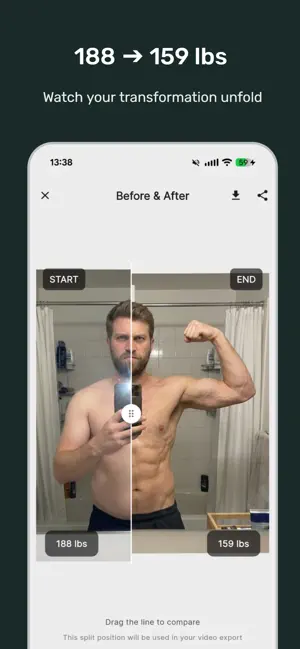
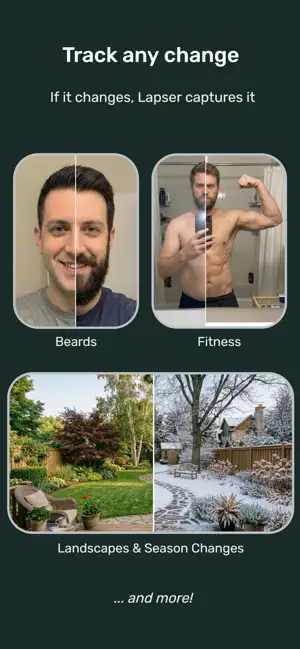
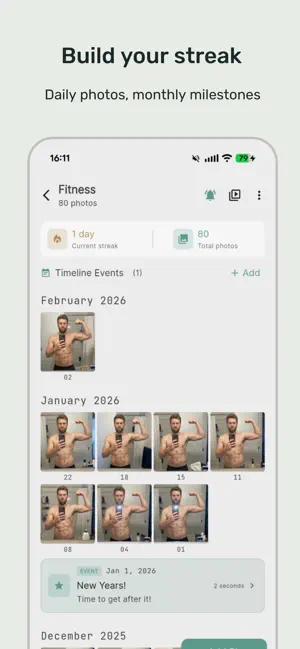
More than a selfie app. Lapser is a daily photo timelapse tool for faces, fitness, family, and anything that changes over time. Track a weight loss journey with your stats displayed in the video. Document your child growing up across years. Watch a home renovation unfold. See your beard fill in week by week. Lapser handles multiple projects with precise photo alignment, then exports polished timelapse videos you'll actually want to share. ----- WHAT SETS LAPSER APART AI-POWERED ALIGNMENT One tap and your photos align perfectly to the previous shot. Faces, bodies, landscapes, objects — anything. Manual controls always available if you prefer hands-on precision. YOUR PHOTOS STAY YOURS Local storage by default. No account needed. No ads, ever. Premium users back up to their own cloud storage — not our servers, yours. We never see your photos. PROFESSIONAL EXPORTS Before/after comparisons you can download, share, or include at the end of your video. Adjustable resolution and frame rates. Background music. Date labels burned into frames. Videos you'll actually want to share. OPTIONAL DATA TRACKING Premium users can attach weight, measurements, or custom data to photos. Your numbers appear right in the exported video alongside the visuals. Add milestone events (surgery date, goal reached, first steps) to your timeline. ----- USE IT FOR FACE & SELFIE TRACKING Daily selfies, aging over time, beard growth, skincare progress, makeup transformations. BODY & FITNESS TRANSFORMATION Weight loss, muscle building, pregnancy, post-surgery recovery. Premium users can optionally track and display weight or measurements in their videos. KIDS & FAMILY Watch your child grow from newborn onward. The ghost overlay camera helps you line up shots consistently, even with a squirmy toddler. LANDSCAPES, PROJECTS & MORE Home renovations, garden changes across seasons, art projects, plant growth, construction. If it evolves over time, Lapser can track it. ----- KEY FEATURES - AI-assisted photo alignment for faces, bodies, landscapes and objects - Ghost overlay camera to match your previous shot - Before/after comparisons: download, share, or add to your video - Photo editing: brightness, contrast, saturation and more (premium) - Reminder notifications to keep your streak alive - Date adjustment and automatic chronological ordering - MP4 video export with resolution options, music, and date overlays - Timeline milestone markers - Optional data tracking (weight, measurements) in videos - 100% ad-free, free and premium ----- FREE VS PREMIUM FREE (no account needed): • One project: face, body, plant, landscape, anything • Your first 10 automatic alignments, free • Ghost overlay camera • Reminder notifications • Editable dates and timeline • Video export with watermark PREMIUM (subscribe monthly or yearly — or buy once, own it forever): • Unlimited projects • Unlimited AI alignment • Photo editing (brightness, contrast, saturation and more) • Full HD export, no watermark • Before/after comparisons: download, share, or add to your video • Background music in videos • Cloud backup (your storage, your data) • Batch image imports • Custom data tracking displayed in video • Timeline milestone events • No subscription required — a one-time purchase unlocks everything for good ----- START TODAY Take your first photo. Do it again tomorrow. In a month you'll have a story worth watching. In a year you'll have something magical. Change doesn't happen overnight, but with Lapser, you'll never miss a moment of it. Questions? Feedback? Contact us at: [email protected] Terms of Use (EULA): https://www.apple.com/legal/internet-services/itunes/dev/stdeula/
What’s new
Version 1.3.2 · Updated October 3, 2026
- Lapser now speaks your language: German, French, Italian, Spanish, Portuguese and Dutch. - Much faster exports and browsing, even with thousands of photos, plus video at up to 60 FPS. - Smarter Auto-Align for plants and objects: more photos line up, and much faster. - New full-screen editor for timeline events, with a live preview and redesigned cards. - Rebuilt cloud backup with a Backup Status screen. Interrupted backups now resume on their own.
App privacy
The developer, Downgate Labs LLC, reported these privacy practices to Apple.
Data Linked to You
The following data, which may be collected and linked to your identity, may be used for the following purposes:
- Location: Coarse Location
- Identifiers: User ID, Device ID
- Usage Data: Product Interaction
- Diagnostics: Crash Data, Performance Data
Used for: Analytics
Data Not Linked to You
The following data, which may be collected but is not linked to your identity, may be used for the following purposes:
- User Content: Photos or Videos
Used for: App Functionality
Alternatives to Lapser: Photo Timelapse
Looking for apps like Lapser: Photo Timelapse? Here are 6 similar apps on the App Store. The highest rated is PlantReels: Growth Journal (5.0/5), and all 6 are free to download.
-
 PlantReels: Growth Journal
5.0
PlantReels: Growth Journal
5.0
-
 Camera Organizer: Photos Video
5.0
Camera Organizer: Photos Video
5.0
-
 AI Effects: Vye
4.2
AI Effects: Vye
4.2
-
 FrameTwin: Dual Format Camera
5.0
FrameTwin: Dual Format Camera
5.0
-
 Photo Organizer: Memory AI
5.0
Photo Organizer: Memory AI
5.0
-
 Photo Collage Maker – Picframe
4.9
Photo Collage Maker – Picframe
4.9
| App | Rating | Price | Last updated | Compare |
|---|---|---|---|---|
| Lapser: Photo Timelapse | 5.0 / 5 (3 ratings) | Free | October 3, 2026 | |
| PlantReels: Growth Journal | 5.0 / 5 (1) | Free | Sep 24, 2026 | Compare |
| Camera Organizer: Photos Video | 5.0 / 5 (1) | Free | Jun 15, 2026 | Compare |
| AI Effects: Vye | 4.2 / 5 (5) | Free | Jul 10, 2026 | Compare |
| FrameTwin: Dual Format Camera | 5.0 / 5 (2) | Free | Sep 10, 2026 | Compare |
| Photo Organizer: Memory AI | 5.0 / 5 (9) | Free | Aug 20, 2026 | Compare |
| Photo Collage Maker – Picframe | 4.9 / 5 (22) | Free | May 29, 2026 | Compare |