

TezBlock - Screen Time Control
Gandzhiya Edaliva Productivity iPhoneiPadiPod touch
TezBlock - Screen Time Control is a free Productivity app for iPhone and iPad by Gandzhiya Edaliva. Rated 4.8/5 from 16 ratings. Requires iOS 17.6.
- Rating
- 4.8
- 16 ratings
- Price
- Free
- on the App Store
- Size
- 219 MB
- Age 12+
- Updated
- Oct 5
- 2026 · v1.0.7
Screenshots


About TezBlock - Screen Time Control
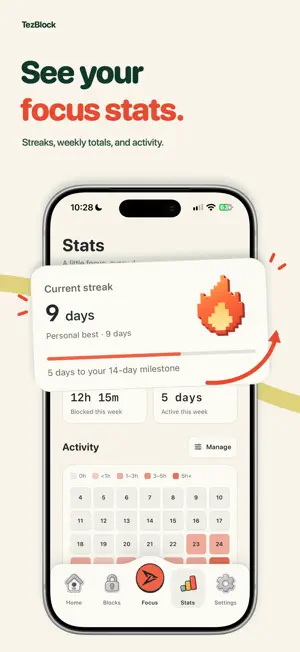
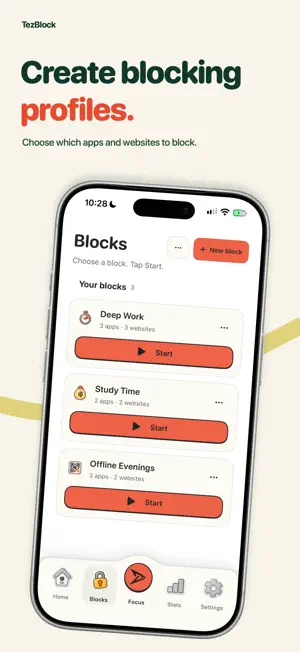
Make room for real life with TezBlock. Block distracting apps and websites, create focus routines, and see your progress—all in a calm woodland space. FOCUS YOUR WAY • Start a session with a timer or manual controls. • Use an NFC tag or QR code to make unlocking a deliberate action. • Create profiles for work, study, and downtime. • Set recurring schedules and optional breaks. • Follow your streak, focus sessions, and activity in Stats. • Focus with friends, share progress, and use widgets and Siri shortcuts. Core blocking works without an account. Sign in only if you want Friends and synced session history. NFC modes require a compatible iPhone and NFC tag. QR modes require a code to scan. No dedicated TezBlock hardware is required. MEMBERSHIP TezBlock is free to download. Membership unlocks all blocking modes, unlimited profiles, schedules, breaks, and insights. Eligible new subscribers get one month free, then $1.99/month or $19.99/year in the U.S. Local prices may vary. Subscriptions renew automatically unless canceled at least 24 hours before the trial or billing period ends. Manage or cancel in App Store settings. One introductory offer per subscription group. Past subscription payments do not grant lifetime access. Use Restore Purchases to recover an active subscription or an existing lifetime purchase. Existing subscriptions are not canceled automatically. The optional developer tip does not unlock features. Privacy: https://tezblock.app/privacy.html Terms: https://www.apple.com/legal/internet-services/itunes/dev/stdeula/
Ratings & reviews
4.8
16 ratings
What’s new
Version 1.0.7 · Updated October 5, 2026
Blocking methods now appear beside your profile names.
App privacy
The developer, Gandzhiya Edaliva, reported these privacy practices to Apple.
Data Linked to You
The following data, which may be collected and linked to your identity, may be used for the following purposes:
- Purchases: Purchase History
- Identifiers: Device ID, User ID
- Usage Data: Other Usage Data, Product Interaction
- Contact Info: Email Address, Name
- Contacts: Contacts
- User Content: Other User Content
Used for: Analytics, App Functionality
Data Not Linked to You
The following data, which may be collected but is not linked to your identity, may be used for the following purposes:
- Identifiers: User ID
- Usage Data: Product Interaction
Used for: Analytics
Alternatives to TezBlock - Screen Time Control
Looking for apps like TezBlock - Screen Time Control? Here are 6 similar apps on the App Store. The highest rated is Peace: App Blocker & Focus (5.0/5), and 5 of the 6 are free to download.
-
 apptoken
-
 Peace: App Blocker & Focus
5.0
Peace: App Blocker & Focus
5.0
-
 TapLock card
-
 Descreened: App Blocker
-
 WatchPomo - Focus Timer
-
 HoldOn: Screen Time Nudge
5.0
HoldOn: Screen Time Nudge
5.0
| App | Rating | Price | Last updated | Compare |
|---|---|---|---|---|
| TezBlock - Screen Time Control | 4.8 / 5 (16 ratings) | Free | October 5, 2026 | |
| apptoken | – | Free | May 12, 2026 | Compare |
| Peace: App Blocker & Focus | 5.0 / 5 (1) | Free | Oct 2, 2026 | Compare |
| TapLock card | – | Free | Jul 3, 2026 | Compare |
| Descreened: App Blocker | – | Free | Aug 25, 2026 | Compare |
| WatchPomo - Focus Timer | – | 2.99 USD | Apr 8, 2026 | Compare |
| HoldOn: Screen Time Nudge | 5.0 / 5 (1) | Free | Oct 1, 2026 | Compare |