

Corxor Cyber Defense
Corxor, Inc. Utilities iPhoneiPadiPod touch
Corxor Cyber Defense is a free Utilities app for iPhone and iPad by Corxor, Inc. Requires iOS 17.0. Updated October 14, 2026.
- Price
- Free
- on the App Store
- Size
- 25 MB
- Age 4+
- Updated
- Oct 14
- 2026 · v1.0.6
Screenshots

About Corxor Cyber Defense
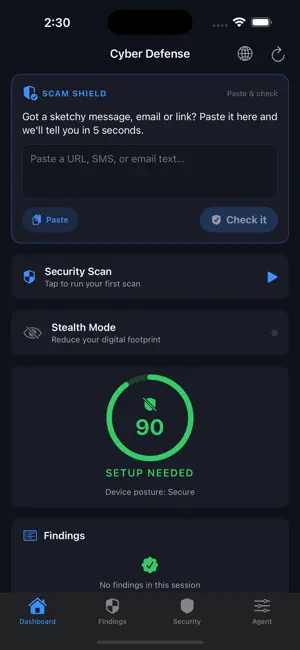
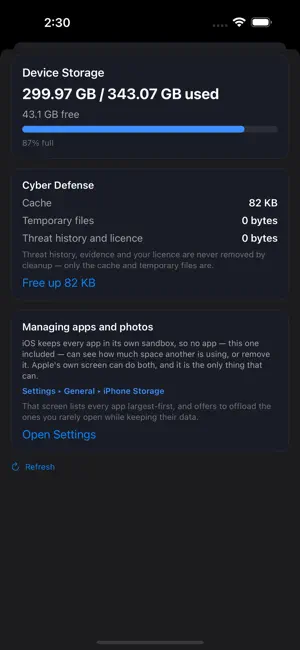
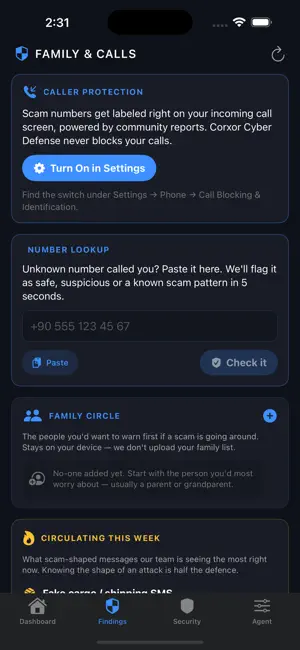
Corxor Cyber Defense is the 5-second sanity check for anything sketchy on your iPhone — a suspicious SMS, an unknown number that just called, a link your aunt forwarded, a "your package is being held" email that doesn't quite look right. Paste it, get a verdict, move on. Built for normal people, not security nerds. Built for whole families — including the relatives who fall for the convincing-looking scams. WHAT IT DOES • Scam Shield — paste any link, SMS body or email, and we tell you in five seconds whether it looks safe, sketchy, or like a known scam pattern. Works offline. • Number Lookup — paste an unknown number and we flag premium-rate prefixes, spoofed service lines and wangiri callbacks. • Family Circle — keep a private list of the people you'd warn first if a scam was going around. Mom, Dad, your kid, your in-laws. Stays on your device — we don't upload your family list. • Breach Watch — monitor up to 5 email addresses for new appearances in known data breaches. Silent unless something new shows up. Uses k-anonymity hashing: the full email never leaves your phone. • Lost Phone Panic — one-tap shortcuts to Find My iPhone, your Apple ID account security page, the official lost/stolen guide, and iOS Settings. • Trending Scams — five hand-curated scam shapes circulating right now (fake cargo SMS, bank-OTP impersonators, fake job offers, lottery hooks, "grandma it's me" emergencies). • Weekly Sanity Report — a Sunday recap of what we checked for you. Nothing alarming when there's nothing to be alarmed about. • Help Mode — bigger text, simpler buttons. Designed for the parent or grandparent who finds modern UIs too dense. • Security Hub — Wi-Fi safety check (captive-portal detection and reputation cues for the network you're on), device posture, and data-breach lookup for any email you care about. • Device Storage — see what is using the room on your iPhone, clear our own cache safely, and get sent to the right place in Settings for the rest. Free. • AI insights — after every scan, plain-English analysis explains what changed and what to do about it. PRIVACY • Your family list stays on your phone — we never upload it. • Email breach checks use k-anonymity (only a hash prefix leaves the device). • Phone number checks run entirely offline. LANGUAGES Full UI in 18 languages, with a quick picker right on the Dashboard. WHAT IT COSTS The app is free. Every feature above runs on your iPhone and costs you nothing — no account, no card, no trial clock. Premium is optional and covers what we pay for each time it is used: AI analysis of a finding, mailbox protection, keeping your devices on the Corxor console, and the weekly report. If a subscription lapses or a payment fails, nothing is taken away from you — the free protection carries on working. SUBSCRIPTION Corxor Cyber Defense offers an optional auto-renewable subscription called "Corxor Cyber Defense Personal" with two options: • Corxor Cyber Defense Personal — Monthly: billed monthly at the price shown on the in-app upgrade screen and on the App Store product page. • Corxor Cyber Defense Personal — Yearly: billed once per year at the price shown on the in-app upgrade screen and on the App Store product page. A 7-day free trial is included with eligible plans. Payment is charged to your Apple ID account at confirmation of purchase. Your subscription automatically renews unless auto-renew is turned off at least 24 hours before the end of the current period. Your account will be charged for renewal within 24 hours prior to the end of the current period, at the same price unless the plan price has changed. You can manage your subscription and turn off auto-renewal in Settings ▸ Apple ID ▸ Subscriptions any time after purchase. Privacy Policy: https://corxor.com/privacy Terms of Use (EULA): https://corxor.com/terms Made by Corxor — security tools that work for the family, not just the IT person in it.
What’s new
Version 1.0.6 · Updated October 14, 2026
Prompt security: check what you are about to send to an AI assistant, before it leaves your device. A new Safari extension warns you on AI assistant sites — in the page, before the message is sent. Turn it on in Settings › Apps › Safari › Extensions. You can also paste text into Prompt Security in the Security tab and check it yourself. Secrets, credentials and known injection phrasings are examined on this device. Nothing is uploaded, and the app tells you which check ran.
App privacy
The developer, Corxor, Inc., reported these privacy practices to Apple.
Data Linked to You
The following data, which may be collected and linked to your identity, may be used for the following purposes:
- Usage Data: Other Usage Data
- Diagnostics: Crash Data, Performance Data, Other Diagnostic Data
- Contact Info: Email Address
- User Content: Emails or Text Messages
- Identifiers: User ID, Device ID
Used for: Analytics, App Functionality
Alternatives to Corxor Cyber Defense
Looking for apps like Corxor Cyber Defense? Here are 6 similar apps on the App Store. The highest rated is Clearly: Privacy Companion (5.0/5), and all 6 are free to download.
-
 Clevermon
-
 Dark Mode Reader
-
 BLE Simulator GATT
-
 Clearly: Privacy Companion
5.0
Clearly: Privacy Companion
5.0
-
 DNS Button: Changer & Switcher
5.0
DNS Button: Changer & Switcher
5.0
-
 CyberScan: Wi-Fi & Bluetooth
| App | Rating | Price | Last updated | Compare |
|---|---|---|---|---|
| Corxor Cyber Defense | – | Free | October 14, 2026 | |
| Clevermon | – | Free | Dec 30, 2025 | Compare |
| Dark Mode Reader | – | Free | Sep 2, 2026 | Compare |
| BLE Simulator GATT | – | Free | Jul 7, 2026 | Compare |
| Clearly: Privacy Companion | 5.0 / 5 (1) | Free | Aug 21, 2026 | Compare |
| DNS Button: Changer & Switcher | 5.0 / 5 (3) | Free | Oct 14, 2026 | Compare |
| CyberScan: Wi-Fi & Bluetooth | – | Free | Feb 1, 2026 | Compare |