

Signature Maker - eSign
KELVIN SENANU WALLACE Utilities iPhoneiPadiPod touch
Signature Maker - eSign is a free Utilities app for iPhone and iPad by KELVIN SENANU WALLACE. Requires iOS 17.0. Updated July 13, 2026.
- Price
- Free
- on the App Store
- Size
- 17 MB
- Age 4+
- Updated
- Jul 13
- 2026 · v1.1
Screenshots

About Signature Maker - eSign
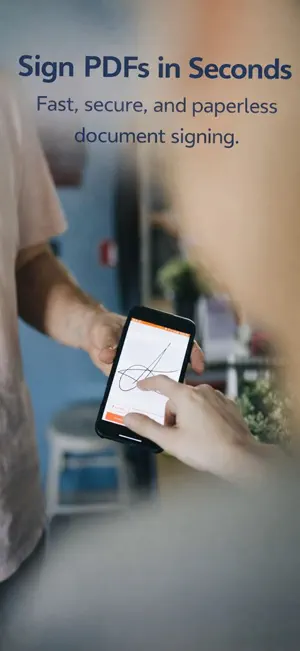
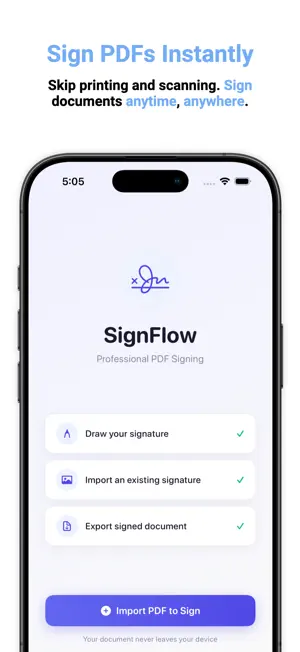
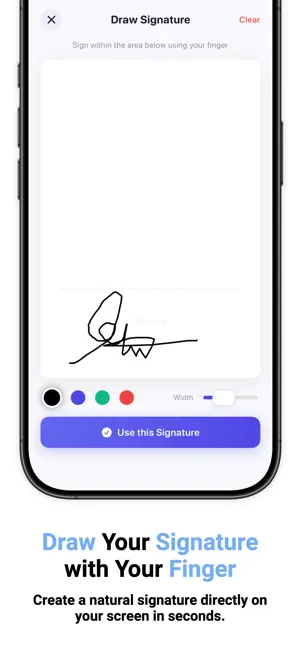
Signature Maker - eSign – Create, Save & Sign Documents Signature Maker - eSign app is a fast and secure electronic signature app designed for professionals, freelancers, students, and anyone who needs to sign PDF documents without printing or scanning. Create your own digital signature, import an existing handwritten signature, and sign documents in seconds from your iPhone or iPad. Create signatures your way: Draw a smooth handwritten signature directly on your device using an intuitive signature pad. Customize the pen color, create multiple signatures, and save them for future use. If you already have a handwritten signature, simply import it from a photo and use it instantly. Sign PDF documents with precision: Open any PDF and place your signature exactly where it's needed. Resize, rotate, and reposition your signature with pixel-perfect accuracy to ensure every document looks professional before exporting. Everything you need to sign documents professionally: • Create digital signatures with a natural handwriting experience • Import handwritten signatures from photos • Save multiple signatures for personal and business use • Sign PDF contracts, forms, agreements, and other documents • Resize, move, and position signatures with precision • Generate high-quality signed PDF files • Share signed documents instantly from your device • Simple, clean interface designed for fast document signing Built for everyday paperwork: • Sign employment contracts and offer letters • Complete rental and lease agreements • Approve invoices and purchase orders • Sign business proposals and client documents • Fill out school and university forms • Complete government and administrative paperwork • Handle legal and financial documents with ease Designed for speed and simplicity: • Save signatures once and reuse them anytime • Complete document signing in just a few taps • Preserve the original quality of your PDF documents • Navigate with an intuitive interface that requires no learning curve • Store your signatures securely on your device Whether you're working remotely, running a business, managing client paperwork, or simply signing personal documents, Signature Maker - eSign helps you complete paperwork faster while maintaining a professional appearance. Download Signature Maker - eSign today and create, manage, and apply digital signatures to your PDF documents anytime, anywhere. Subscription Details: • Title: Savory All Access • Length: 1 year & Lifetime. • Price: $29.99 per year, $3.99 per week (auto-renews) and $39.99 Lifetime. • Terms of Use: https://www.apple.com/legal/internet-services/itunes/dev/stdeula/ • Privacy Policy: https://docs.google.com/document/d/1IysoItFPBXxdxDkkTJ6FRT1Of8qXqAwwB0op5coC1nU/edit?usp=sharing
What’s new
Version 1.1 · Updated July 13, 2026
We ship updates often to resolve bugs, enhance performance, and refine your experience. Thank you for using Signature Maker - eSign.
App privacy
The developer, KELVIN SENANU WALLACE, reported these privacy practices to Apple.
Data Not Collected
The developer does not collect any data from this app.
Alternatives to Signature Maker - eSign
Looking for apps like Signature Maker - eSign? Here are 6 similar apps on the App Store. The highest rated is Signature Maker: Sign Document (4.3/5), and all 6 are free to download.
-
 El Paso County SeeClickFix
-
 Sign Documents Signature Maker
-
 eSign: Digital Signature‧
-
 Signature Maker: Sign Document
4.3
Signature Maker: Sign Document
4.3
-
 PDF Sign: eSign & Export
-
 eSign - PDF Signature Maker
| App | Rating | Price | Last updated | Compare |
|---|---|---|---|---|
| Signature Maker - eSign | – | Free | July 13, 2026 | |
| El Paso County SeeClickFix | – | Free | May 21, 2026 | Compare |
| Sign Documents Signature Maker | – | Free | Aug 21, 2025 | Compare |
| eSign: Digital Signature‧ | – | Free | Oct 16, 2026 | Compare |
| Signature Maker: Sign Document | 4.3 / 5 (3) | Free | Sep 18, 2026 | Compare |
| PDF Sign: eSign & Export | – | Free | Oct 12, 2026 | Compare |
| eSign - PDF Signature Maker | – | Free | Oct 1, 2026 | Compare |