

Semantic Developer
John Abbott Developer Tools iPhoneiPadiPod touch
Semantic Developer is a free Developer Tools app for iPhone and iPad by John Abbott. Rated 4.0/5 from 1 ratings. Requires iOS 16.0. Updated May 3, 2026.
- Rating
- 4.0
- 1 ratings
- Price
- Free
- on the App Store
- Size
- 60 MB
- Age 4+
- Updated
- May 3
- 2026 · v1.0.2
Screenshots


About Semantic Developer
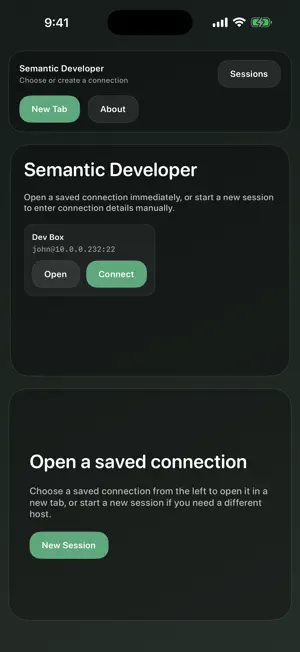
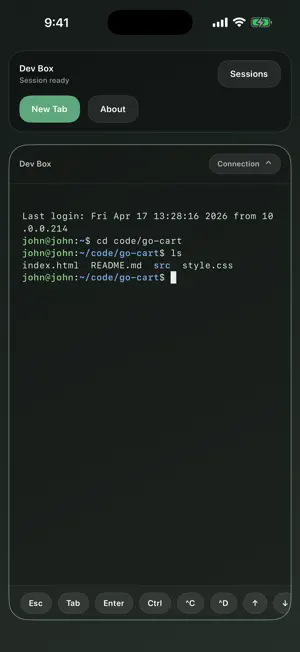
Semantic Developer is a professional SSH terminal built for AI-assisted development workflows. Connect to remote servers, run Claude Code, Codex CLI, or any long-running shell tool, and monitor your work from iPhone or iPad. **SSH terminal for real development** Connect with password or private-key authentication, verify known hosts, and save the connection profiles you use every day. Credentials stay in Apple Keychain, while saved connection metadata remains separate from secrets. **Full terminal emulation** A from-scratch xterm-256color emulator renders your shell output faithfully: 256-color and true-color SGR, bold, italic, dim, inverse, alternate screen, scroll regions, reverse index, DEC line drawing, and application cursor key mode. vim, htop, Claude Code, and other TUI tools render correctly. **Multi-tab workflow** Open multiple SSH sessions as tabs, and on wider layouts view two sessions side by side. Each tab has an activity indicator so you can see output arriving in background sessions without switching away. **Persisted sessions with Pro** Semantic Developer Pro can install an optional helper on a server you control. With your approval, the helper keeps a remote shell running between connections so you can reattach after closing the app, switching networks, or stepping away. **iOS and iPadOS companion** Use the iPhone and iPad app to monitor and interact with remote sessions while away from your desk. A full terminal surface with hardware keyboard support, a software keyboard with terminal-specific accessory keys (Escape, Tab, Ctrl, arrows), and adaptive layout for all screen sizes and orientations. **Built for developers** - SSH with password or private key authentication - Known-hosts verification with configurable policy - xterm-256color and true-color rendering - OSC 7 current directory tracking per tab - OSC 2 window title capture with per-tab display - Git status sidebar for quick diff review - Free edition includes 1 saved connection - Pro unlocks unlimited saved connections and persisted sessions
What’s new
Version 1.0.2 · Updated May 3, 2026
Scrollback history is now preserved while running AI coding tools like Claude Code and Codex, so you can scroll up to review output without losing context. Git status detection is also more reliable — the app now better tracks your current directory as you navigate between projects.
App privacy
The developer, John Abbott, reported these privacy practices to Apple.
Data Not Collected
The developer does not collect any data from this app.
Alternatives to Semantic Developer
Looking for apps like Semantic Developer? Here are 6 similar apps on the App Store. The highest rated is CoTerm – AI Coding Terminal (5.0/5), and all 6 are free to download.
-
 vmux Agent Console
-
 Keys Tester
-
 Upkr
Upkr
-
 CoTerm – AI Coding Terminal
5.0
CoTerm – AI Coding Terminal
5.0
-
 TermBridge Remote Terminal Pro
5.0
TermBridge Remote Terminal Pro
5.0
-
 Nepsis Code - AI Terminal
| App | Rating | Price | Last updated | Compare |
|---|---|---|---|---|
| Semantic Developer | 4.0 / 5 (1 rating) | Free | May 3, 2026 | |
| vmux Agent Console | – | Free | Aug 11, 2026 | Compare |
| Keys Tester | – | Free | Mar 13, 2026 | Compare |
| Upkr | – | Free | Apr 20, 2026 | Compare |
| CoTerm – AI Coding Terminal | 5.0 / 5 (1) | Free | Apr 3, 2026 | Compare |
| TermBridge Remote Terminal Pro | 5.0 / 5 (1) | Free | Oct 15, 2026 | Compare |
| Nepsis Code - AI Terminal | – | Free | Apr 22, 2026 | Compare |
Compare Semantic Developer with the top alternatives: ratings, updates, ASO score and keyword gaps →