

TermBridge Remote Terminal Pro
Clovinyx Developer Tools iPhoneiPadiPod touch
TermBridge Remote Terminal Pro is a free Developer Tools app for iPhone and iPad by Clovinyx. Rated 5.0/5 from 1 ratings. Requires iOS 16.4.
- Rating
- 5.0
- 1 ratings
- Price
- Free
- on the App Store
- Size
- 53 MB
- Age 4+
- Updated
- Oct 15
- 2026 · v1.2.3
Screenshots
About TermBridge Remote Terminal Pro
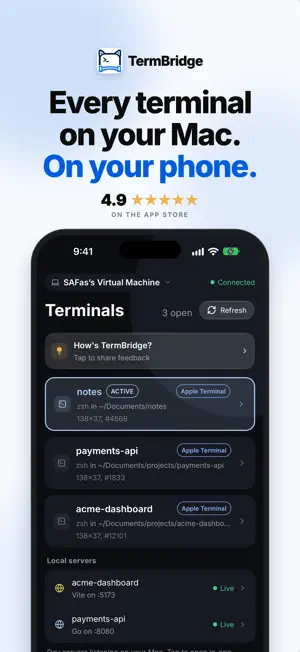
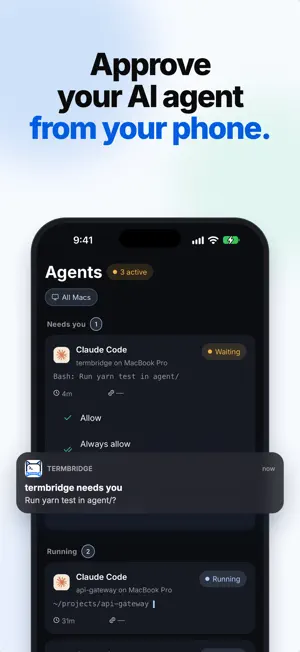
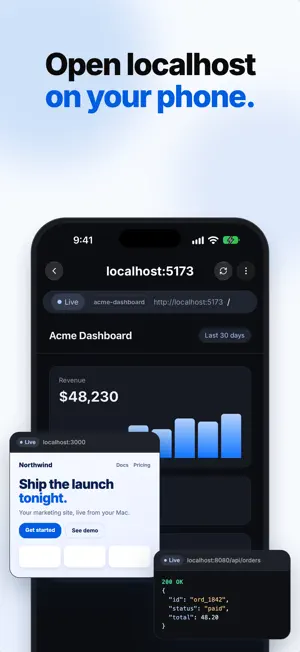
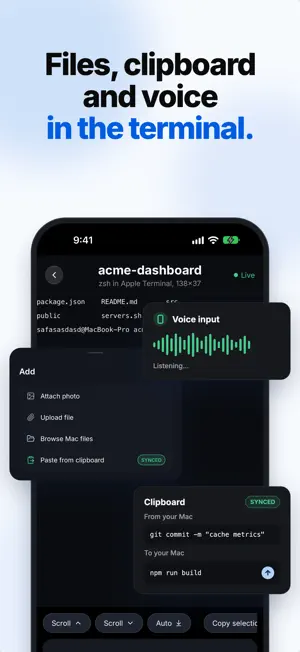
Control and observe any terminal on your Mac from your phone — from anywhere. TermBridge attaches at the shell layer, so it works across every terminal you already use: iTerm2, Terminal.app, the integrated terminals in VS Code, Zed, and Cursor, plus tmux. There's no new terminal app to live in and nothing to reconfigure. The exact shell you're already typing in simply shows up on your phone, live. VIBE CODING, UNTETHERED Start a long Claude Code or Codex run on your Mac, then walk away. TermBridge keeps you in the loop from wherever you are. • Answer the agent from your phone: Allow, Always allow, Deny, or Deny with a note. Answer Claude's questions too, including ones with several picks. • Get a push the moment an agent needs you. Approve right from the notification, or tap to land on the request. • See every agent across all of your Macs in one place: needs you, running, finished. • Watch any agent run live, character by character, exactly as it appears on your Mac. DO REAL WORK FROM YOUR PHONE TermBridge is built to get things done, not just watch. • Dictate commands and prompts by voice, with a live waveform so you know it's listening. • Attach a file or image from your phone. It uploads to your Mac and the path drops into the terminal, ready to run or hand to your agent. • Browse your Mac's files, and preview what the agent touched — Markdown and READMEs rendered, and the local servers running on your Mac, open right on your phone. • Two-way clipboard sync: copy on your Mac, paste on your phone, and back. WHAT MAKES IT DIFFERENT Most remote-terminal apps only see sessions they created, on a server you SSH into. TermBridge is the opposite. • Attach to the terminals you're ALREADY in — not just sessions this app spawned. • See your editor's integrated terminals (VS Code, Zed, Cursor) on your phone. • Open a new shell or Claude Code session on your Mac from your phone, in one tap. • Pair multiple devices (iPhone + iPad) to one Mac, and switch between Macs instantly — each keeps its own live connection, so an offline Mac never drops the one you're using. MADE YOURS • Themes and fonts to match your setup. • A custom on-screen key row and macros for the keys you actually use. • A full-color terminal with deep scrollback on iPhone, and a 3-panel layout on iPad. • A touch keyboard bar with Tab, Esc, Ctrl-C, arrows, and the modifiers a terminal needs. SECURE BY DESIGN Your terminal is sensitive. TermBridge treats it that way. • End-to-end encrypted with X25519 + AES-256-GCM — the relay only ever sees ciphertext. • Forward secrecy: fresh keys every session, so a future compromise can't unlock past ones. • Zero-knowledge relay — your secrets never touch a server, and no inbound port is opened on your Mac. • QR-code pairing, approved right on your Mac, with a fingerprint you can verify. RELIABLE • Reconnects the instant your network changes or your phone comes back online. • Sessions keep running when you step away — pick up exactly where you left off. • Missed output replays on attach, so you never lose what happened while you were gone. PERMISSIONS — ONLY WHEN YOU USE THE FEATURE • Notifications — to alert you when an agent on your Mac is waiting; tap to jump into that terminal. • Camera — to scan the QR code that pairs your phone with your Mac. • Microphone & Speech Recognition — only when you dictate by voice; transcription runs on-device. • Photos — only if you choose to attach an image to send to your Mac. GETTING STARTED Install the free TermBridge menu-bar app on your Mac, scan the QR code once, approve on the Mac, and your terminals are with you everywhere. No SSH keys, no ports to forward, no servers to rent. Learn more at https://termbridge.clovinyx.io Terms of Use: https://www.apple.com/legal/internet-services/itunes/dev/stdeula/
What’s new
Version 1.2.3 · Updated October 15, 2026
Open terminals from your phone • New terminal: tap + on the Terminals tab to open a Shell or Claude Code on your Mac, and go straight into it. Needs TermBridge 1.3.7 or later on your Mac. • Voice typing: every word stays, even after you pause. • Fixes: back from a terminal lands on your terminal list, messages at the top of the screen show in full, and the Send button says Send.
App privacy
The developer, Clovinyx, reported these privacy practices to Apple.
Data Not Collected
The developer does not collect any data from this app.
Alternatives to TermBridge Remote Terminal Pro
Looking for apps like TermBridge Remote Terminal Pro? Here are 6 similar apps on the App Store. The highest rated is ShellRelay (5.0/5), and all 6 are free to download.


| App | Rating | Price | Last updated | Compare |
|---|---|---|---|---|
| TermBridge Remote Terminal Pro | 5.0 / 5 (1 rating) | Free | October 15, 2026 | |
| Oh Pi App | – | Free | Sep 18, 2026 | Compare |
| Vibecode Assistant | – | Free | Feb 22, 2026 | Compare |
| Shannonlog | – | Free | Mar 31, 2026 | Compare |
| farcrew: terminal for agents | – | Free | Sep 7, 2026 | Compare |
| ShellRelay | 5.0 / 5 (1) | Free | May 5, 2026 | Compare |
| Dev & Ads AI | – | Free | Jul 30, 2026 | Compare |