

DayDots: Calendar Wallpaper
Xuzhou Decoding Dangxian Development Co., Ltd Utilities iPhoneiPadiPod touch
DayDots: Calendar Wallpaper is a free Utilities app for iPhone and iPad by Xuzhou Decoding Dangxian Development Co., Ltd. Requires iOS 17.0.
- Price
- Free
- on the App Store
- Size
- 25 MB
- Age 4+
- Updated
- Aug 6
- 2026 · v1.2.2
Screenshots
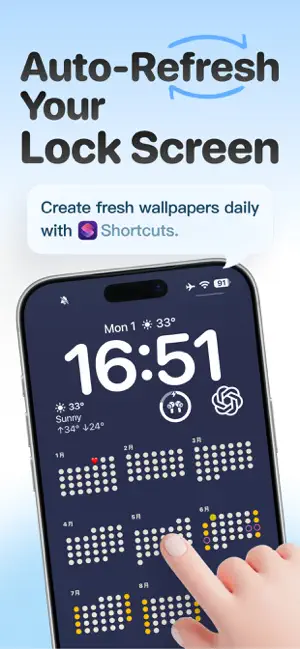


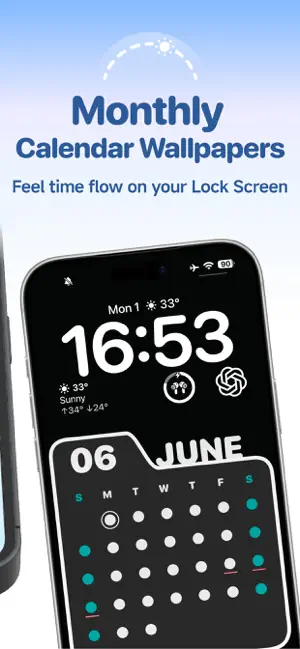
About DayDots: Calendar Wallpaper
Your Lock Screen doesn’t have to be just a background. It can be a calendar, a reminder, a goal tracker, or a personal signature that belongs only to you. DayDots is a DIY calendar Lock Screen wallpaper app. Start with ready-made templates and customize date colors, date styles, backgrounds, important date markers, and bottom signatures to create a Lock Screen that feels truly yours. DayDots also works with iOS Shortcuts and Automations. Once set up, your calendar wallpaper can update automatically based on the date, so you no longer need to generate, save, and replace your wallpaper manually every day. From yearly progress to monthly planning, from special dates to countdown goals, DayDots helps you turn your Lock Screen into something useful, beautiful, and personal. 【What can you do with DayDots?】 - Create your own calendar Lock Screen Start with a template and make it your own. Customize date colors, font styles, number styles, and even replace numbers with dots, shapes, or more visual design elements. - Automatically update your Lock Screen wallpaper The biggest problem with calendar wallpapers is that dates change every day. DayDots can work with iOS Shortcuts and Automations, allowing your Lock Screen wallpaper to update automatically after setup. No need to manually regenerate, save, and replace your wallpaper every day. Open your phone and see the latest date state right on your Lock Screen. - Mark important dates Birthdays, anniversaries, exams, trips, paydays, project deadlines, workout check-ins, and more. Mark the dates that matter and keep them visible on the screen you see every day. - Change backgrounds and color themes Whether you like minimal, fresh, retro, dark, bright, colorful, or trendy styles, DayDots makes it easy to create a look that matches your taste. Choose from built-in theme colors or add your own background to make your calendar wallpaper fit your mood and style. - Add a custom bottom signature Write a sentence at the bottom of your Lock Screen. It can be a goal, a motto, a mood note, or a simple reminder to yourself. For example: “Shine your own way” “Make today count” “One day closer to the goal” 【Four calendar templates for different needs】 - Year Calendar Put the entire year on one Lock Screen wallpaper. Perfect for tracking yearly progress, planning long-term goals, and seeing the flow of time. How many days have passed? How many are left? See it all at a glance. - Monthly Calendar Focus on the current month, short-term plans, and upcoming tasks. Perfect for checking monthly progress, marking important dates, and keeping your schedule visible. Open your Lock Screen and quickly see where you are in the month. - Folder Calendar Keeps the practical structure of a monthly calendar while offering a stronger visual style. With richer color options and more expressive layouts, it is perfect for users who want a more aesthetic, trendy, and personalized Lock Screen. - Countdown Turn your goals into visual reminders. Use it for exam countdowns, trip countdowns, anniversaries, special events, or a 100-day challenge. Display your countdown with numbers, dots, or shapes, and let your goal remind you every day. 【Why choose DayDots?】 DayDots is more than a wallpaper app. It is more than a calendar app. With DayDots, you can: Turn your Lock Screen into a useful calendar dashboard Keep important dates visible every day Visualize yearly, monthly, and countdown progress Let your calendar wallpaper update automatically as dates change Bring your style, goals, and daily rhythm into your Lock Screen You don’t need design skills. Just choose a template, adjust colors, date styles, backgrounds, markers, and text, then create a Lock Screen wallpaper that is both beautiful and useful. Use DayDots to make every day feel marked, visible, and personal. Set it up once, and keep your calendar Lock Screen updated every day.
What’s new
Version 1.2.2 · Updated August 6, 2026
What’s New: • A fresh white interface for a cleaner look • New list selection for more intuitive interactions • Optimized workflows with fewer unnecessary steps A simpler and smoother experience.
App privacy
The developer, Xuzhou Decoding Dangxian Development Co., Ltd, reported these privacy practices to Apple.
Data Not Collected
The developer does not collect any data from this app.
Alternatives to DayDots: Calendar Wallpaper
Looking for apps like DayDots: Calendar Wallpaper? Here are 6 similar apps on the App Store. The highest rated is LumeoPrime: AI Photo Editor (5.0/5), and 5 of the 6 are free to download.
-
 Vault: Offline Password Safe
-
 Tally Counter 123: Pitch Count
-
 LumeoPrime: AI Photo Editor
5.0
LumeoPrime: AI Photo Editor
5.0
-
 Cool Fonts: Stylish Text
-
 Pickora
5.0
Pickora
5.0
-
 Nota6
Nota6
| App | Rating | Price | Last updated | Compare |
|---|---|---|---|---|
| DayDots: Calendar Wallpaper | – | Free | August 6, 2026 | |
| Vault: Offline Password Safe | – | 4.99 USD | May 27, 2026 | Compare |
| Tally Counter 123: Pitch Count | – | Free | Oct 4, 2026 | Compare |
| LumeoPrime: AI Photo Editor | 5.0 / 5 (2) | Free | Oct 26, 2026 | Compare |
| Cool Fonts: Stylish Text | – | Free | Oct 6, 2026 | Compare |
| Pickora | 5.0 / 5 (1) | Free | Feb 27, 2026 | Compare |
| Nota6 | – | Free | Oct 13, 2026 | Compare |