

Nota6
笑天 刘 Utilities iPhoneiPadiPod touchMac
Nota6 is a free Utilities app for iPhone and iPad by 笑天 刘. Requires iOS 17.0. Updated October 13, 2026.
- Price
- Free
- on the App Store
- Size
- 11 MB
- Age 4+
- Updated
- Oct 13
- 2026 · v1.7.1
Screenshots

About Nota6
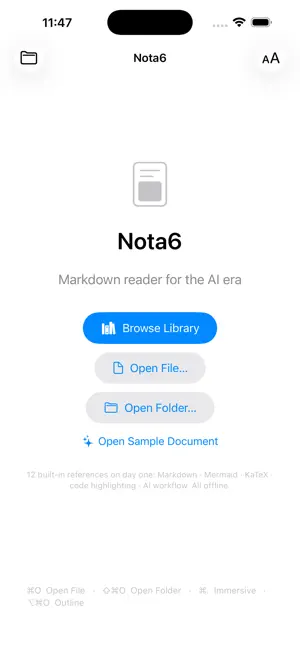
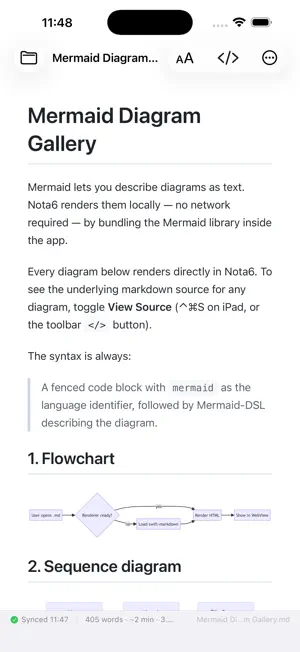
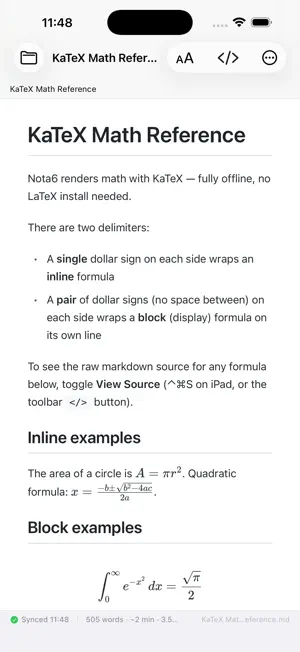
Reader-first Markdown app for the AI era — with a built-in Reference Library so it's useful the moment you open it. BUILT-IN LIBRARY (12 references, all offline) The welcome screen has a "Browse Library" button. Tap it and you have 12 curated documents available immediately, in English and Simplified Chinese: • Markdown / GFM syntax references • Mermaid Diagram Gallery — 10 diagram types (flowchart, sequence, class, state, ER, gantt, pie, mindmap, timeline, git graph), each with source + rendered output • KaTeX Math Reference — symbols, operators, matrices, common formulas • Code Highlighting Gallery — Swift, Python, TypeScript, Go, Rust, SQL, and more (190+ languages bundled) • Reading AI-Generated Markdown — four shapes of agent output and how to read each • CLAUDE.md & AGENTS.md spec — how AI-instruction files work • README Patterns, Design Doc & RFC Patterns • Nota6 Tips & Tricks, iPad Keyboard Shortcuts, Themes Showcase These aren't placeholders — they're useful reading material for anyone who works with AI coding assistants and the .md files they produce. WHAT MAKES IT DIFFERENT FROM A BROWSER • Mermaid diagrams, KaTeX math, syntax-highlighted code, all rendered offline. No network requests during rendering. Safari Reader can't do Mermaid; Nota6 can. • Auto-refresh on file change with smart scroll anchoring: when an external editor rewrites the file, the preview re-renders in place and stays at the same heading even if the document length shifts. • Open files from anywhere via the system share sheet, Files, iCloud Drive, or the "Open in Nota6" action. iOS-NATIVE INTEGRATIONS • Shortcuts / App Intents: "Open Markdown File" and "Export Markdown as HTML" are first-class Shortcuts actions. Automate from Siri or your iPad keyboard. • iCloud sync: your theme, font, width, and Custom-theme colors follow you across iPhone, iPad, and Mac. • Workspace full-text search (⌘⇧F) across an entire folder of .md files. • Bookmark self-heal: if AI tooling renames or moves files in your workspace, Nota6 reattaches by content fingerprint instead of breaking. READING EXPERIENCE • Quick Edit: switch to Source, correct raw Markdown, and save with Command-S on a hardware keyboard. Nota6 preserves the original encoding, BOM, and line endings, and warns before overwriting external changes. • 5 themes: GitHub · Paper · Notion · Terminal · Custom. Custom lets you pick body + monospace fonts and 4 colors (background, text, heading, code block) right inside the app. • 4 font sizes, 3 reading widths, Light / Dark / Auto appearance. • Outline panel with live filter and scroll-synced active heading; floating breadcrumb when the outline is closed. • Per-file reading-progress dots in the workspace sidebar. • Click-to-zoom for Mermaid diagrams and images; long-press to Copy or Save as PNG. iPAD HARDWARE KEYBOARD Full shortcut set: ⌘O · ⇧⌘O · ⌘F · ⌘P · ⌥⌘O · ⌘R · ⌘[ / ⌘] · ⌘W. Press-and-hold ⌘ for the discoverability HUD. EXPORT PDF or self-contained HTML via the system share sheet — straight to Files, Mail, Slack, Notion, or any other destination. PRIVACY No analytics. No third-party SDKs. No network requests unless the document itself references remote images. Rendering libraries (KaTeX, Mermaid, highlight.js) are bundled offline. English + Simplified Chinese.
What’s new
Version 1.7.1 · Updated October 13, 2026
Improved the compact iPhone toolbar with direct access to Source and a clearer More menu. Added bounded preview recovery when web content is interrupted. Improved PDF export reliability, timeout handling, and error reporting.
App privacy
The developer, 笑天 刘, reported these privacy practices to Apple.
Data Not Collected
The developer does not collect any data from this app.
Alternatives to Nota6
Looking for apps like Nota6? Here are 6 similar apps on the App Store. The highest rated is Boot Up Focus (5.0/5), and all 6 are free to download.
-
 Boot Up Focus
5.0
Boot Up Focus
5.0
-
 Eagle Browser: AdGuard
-
 PL NetTools
-
 TextTuck: Snippets & Templates
-
 OnBoardAI
-
 Bestcrypt Explorer
| App | Rating | Price | Last updated | Compare |
|---|---|---|---|---|
| Nota6 | – | Free | October 13, 2026 | |
| Boot Up Focus | 5.0 / 5 (2) | Free | Jul 17, 2026 | Compare |
| Eagle Browser: AdGuard | – | Free | Jul 15, 2026 | Compare |
| PL NetTools | – | Free | Aug 6, 2026 | Compare |
| TextTuck: Snippets & Templates | – | Free | Aug 5, 2026 | Compare |
| OnBoardAI | – | Free | May 31, 2026 | Compare |
| Bestcrypt Explorer | – | Free | May 20, 2026 | Compare |
Compare Nota6 with the top alternatives: ratings, updates, ASO score and keyword gaps →