

PDFPager - Reorder Combine PDF
Life Utility Apps, LLC Utilities iPhoneiPadiPod touch
PDFPager - Reorder Combine PDF is a free Utilities app for iPhone and iPad by Life Utility Apps, LLC. Rated 5.0/5 from 1 ratings. Requires iOS 26.2.
- Rating
- 5.0
- 1 ratings
- Price
- Free
- on the App Store
- Size
- 16 MB
- Age 4+
- Updated
- Apr 14
- 2026 · v1.0
Screenshots


About PDFPager - Reorder Combine PDF
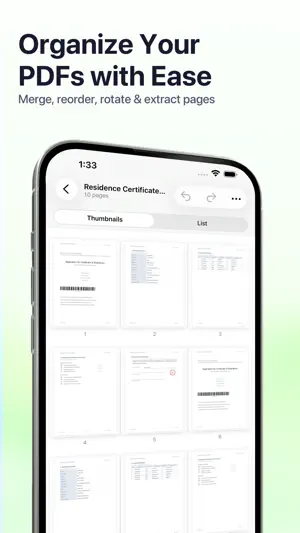
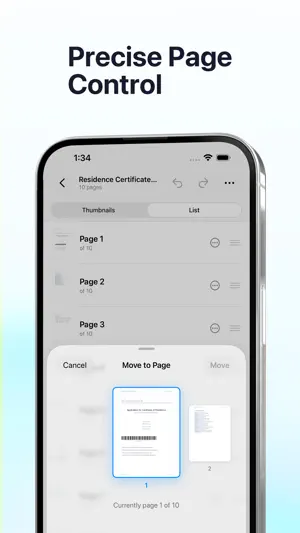
PDFPager is the fastest way to rearrange, merge, and clean up PDFs on your iPhone and iPad. Drag pages into the order you want, combine multiple files into one, and export — no account, no sign-up, no uploads. CORE FEATURES • Merge PDFs — combine any number of files into a single document • Reorder pages — drag and drop in a visual thumbnail grid, or switch to List mode for large documents with 100+ pages • Rotate pages — fix sideways scans with 90°, 180°, or 270° rotation • Extract pages — pull a range into a new standalone PDF • Delete pages — remove blanks and unwanted sheets in a tap • Edit PDF metadata — title, author, subject, keywords, creation and modification dates • Full undo and redo for every edit • Revert to Original — roll back to the untouched source file at any time • Draft auto-save — pick up right where you left off if you get interrupted • Password-protected PDFs — unlock and merge secured files without leaving the app PRIVATE BY DESIGN PDFPager runs entirely on your device. Nothing is sent to a server, nothing is uploaded to the cloud, and no account is ever required. Your original files are never modified — every export creates a new file, so the source stays safe. Optional Face ID or Touch ID can lock the app when you're not using it. BUILT FOR REAL WORK • Open PDFs directly from the Files app • Receive files through the Share Sheet from Mail, Messages, Safari, and other apps • Save finished documents back to Files, or share them by AirDrop, Messages, or email • Universal app for both iPhone and iPad • Clean, native interface with no ads and no tracking PRICING Start free with 4 exports every 24 hours. Unlock unlimited exports with a single one-time Lifetime Access purchase — no subscription, no recurring fees. Whether you're putting together a report, trimming a scanned document, or just fixing the order of a few pages, PDFPager keeps the whole workflow fast, private, and on your device. Terms of Use (EULA): https://www.apple.com/legal/internet-services/itunes/dev/stdeula/
App privacy
The developer, Life Utility Apps, LLC, reported these privacy practices to Apple.
Data Not Collected
The developer does not collect any data from this app.
Alternatives to PDFPager - Reorder Combine PDF
Looking for apps like PDFPager - Reorder Combine PDF? Here are 6 similar apps on the App Store. The highest rated is pdfxpress (5.0/5), and all 6 are free to download.
-
 pdfxpress
5.0
pdfxpress
5.0
-
 PDF Pages Editor
1.0
PDF Pages Editor
1.0
-
 SketchCastPad
-
 PinShot - GPS Photo Geotagger
-
 TLK SmartLock
-
 TV Remote: Samsung, LG, Roku
5.0
TV Remote: Samsung, LG, Roku
5.0
| App | Rating | Price | Last updated | Compare |
|---|---|---|---|---|
| PDFPager - Reorder Combine PDF | 5.0 / 5 (1 rating) | Free | April 14, 2026 | |
| pdfxpress | 5.0 / 5 (1) | Free | Feb 26, 2026 | Compare |
| PDF Pages Editor | 1.0 / 5 (1) | Free | May 8, 2025 | Compare |
| SketchCastPad | – | Free | Apr 7, 2026 | Compare |
| PinShot - GPS Photo Geotagger | – | Free | Oct 7, 2026 | Compare |
| TLK SmartLock | – | Free | Jun 11, 2025 | Compare |
| TV Remote: Samsung, LG, Roku | 5.0 / 5 (1) | Free | Oct 12, 2026 | Compare |