

PixelCrop
Marinus Podt Photo & Video iPhoneiPadiPod touch
PixelCrop is a free Photo & Video app for iPhone and iPad by Marinus Podt. Requires iOS 17.0. Updated November 12, 2026.
- Price
- Free
- on the App Store
- Size
- 2 MB
- Age 4+
- Updated
- Nov 12
- 2026 · v1.1.1
Screenshots
Save to Pinterest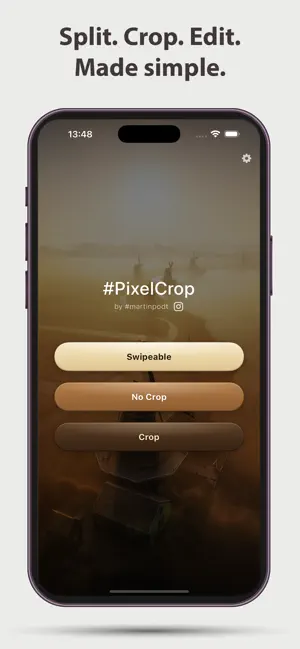
About PixelCrop
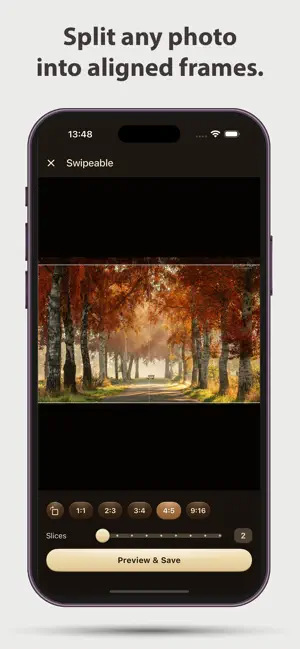
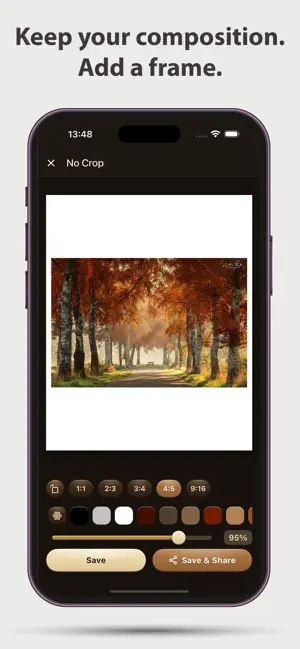
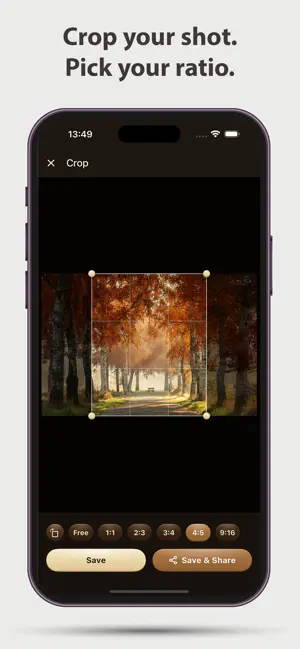
Built by landscape photographer Martin Podt, PixelCrop brings the same framing and editing tools he uses in his own workflow, designed for photographers who value precision, simplicity, and privacy. PixelCrop gives you precise control over how your photos are framed, split, and presented, with a built-in editor for fine-tuning every detail. Fast, clean, no ads. Free to use. Upgrade to Pro for all features. No ads, no tracking, no data collection. Just your photos, exactly as you want them. MULTI-FRAME SPLIT - Split any wide photo into precisely aligned frames - Preview each frame before saving - Choose aspect ratio: 1:1, 3:2, 4:3, 5:4, or 16:9 - Files saved with original filename and frame number - Free: up to 3 frames | Pro: up to 10 frames FLEXIBLE FRAMING (Pro) - Fit portrait or landscape photos into any aspect ratio without losing content - Add a solid color background or a blurred extension of the photo - Scale and adjust positioning freely - Preserve full compositions without forced cropping CROP - Crop your photo and save it directly to your photo library - Free: 4:5 portrait ratio - Pro: all aspect ratios - 1:1, 3:2, 4:3, 5:4, 16:9, and free crop EDIT (Pro) - Fine-tune your photo before you crop or export - Adjust light: exposure, contrast, highlights, shadows, whites, blacks - Color grading and white balance - HSL: control hue, saturation, and luminance per color channel - Tone curves for precise control - Split toning: apply color tints to shadows and highlights separately - Dodge & Burn: lighten or darken specific areas with a brush - Vignette effect - Spot light: add a bright, moveable light spot with adjustable color - Orton effect: add a dreamy, glowing look - Resize to 1500px for web-ready output - Before/after preview with one tap - Reset adjustments per category or all at once - Optional: hide the Edit button if you don't need it PIXELCROP PRO Unlock all features with a one-time purchase: - Flexible Framing mode - Edit mode - Multi-frame split up to 10 frames - All aspect ratios in Crop mode - All future Pro features Try Pro free for 14 days - no commitment required. SETTINGS - Remember your last-used settings per mode - Pick photos from your photo library or from the Files app - Light, dark, or system theme PRIVACY Your privacy matters. PixelCrop: - Does NOT collect any personal data - Does NOT use analytics or ads - All processing happens on your device - No internet connection required to use the app Privacy Policy: https://pixelcrop-ios-6d0c5b.gitlab.io/ Terms of Use (EULA): https://www.apple.com/legal/internet-services/itunes/dev/stdeula/ Built with care by photographer Martin Podt - www.martinpodt.com
What’s new
Version 1.1.1 · Updated November 12, 2026
- Crop: pinch to zoom in and crop even small parts of a photo - Crop: drag with two fingers to move the zoomed photo, double-tap to zoom out again
App privacy
The developer, Marinus Podt, reported these privacy practices to Apple.
Data Not Collected
The developer does not collect any data from this app.
Alternatives to PixelCrop
Looking for apps like PixelCrop? Here are 6 similar apps on the App Store. The highest rated is Neutral - Photo Enhancer (5.0/5), and all 6 are free to download.
-
 Fit Photos
-
 SnapTag! - EXIF Data Editor
-
 Neutral - Photo Enhancer
5.0
-
 AI Image Generator & Photo AI
-
 AI Photo Enhancer: Clarova
-
 Pocket Editor
5.0
| App | Rating | Price | Last updated | Compare |
|---|---|---|---|---|
| PixelCrop | – | Free | November 12, 2026 | |
| Fit Photos | – | Free | Oct 24, 2026 | Compare |
| SnapTag! - EXIF Data Editor | – | Free | Sep 15, 2026 | Compare |
| Neutral - Photo Enhancer | 5.0 / 5 (1) | Free | Oct 22, 2026 | Compare |
| AI Image Generator & Photo AI | – | Free | Nov 14, 2026 | Compare |
| AI Photo Enhancer: Clarova | – | Free | Aug 24, 2026 | Compare |
| Pocket Editor | 5.0 / 5 (1) | Free | Jun 5, 2026 | Compare |
Compare PixelCrop with the top alternatives: ratings, updates, ASO score and keyword gaps →