

Scanqy: PDF Document Scanner
Gihan De Silva Productivity iPhoneiPadiPod touch
Scanqy: PDF Document Scanner is a free Productivity app for iPhone and iPad by Gihan De Silva. Requires iOS 17.0. Updated October 17, 2026.
- Price
- Free
- on the App Store
- Size
- 14 MB
- Age 17+
- Updated
- Oct 17
- 2026 · v1.6.2
Screenshots



About Scanqy: PDF Document Scanner
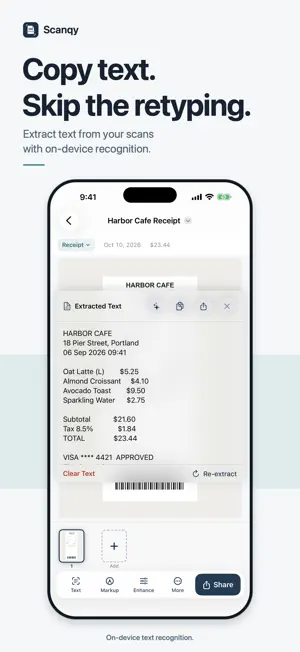
Scan anything. Keep everything private. Scanqy turns your iPhone into a pocket-sized document scanner. Smarter, faster, and built to respect your privacy. Every scan stays on your device. No account required, nothing uploaded. SCAN AND CAPTURE • Auto-crop that actually works • ID card mode: front & back in one file • Import photos and PDFs, keep everything in one place • A3, A4, A5, B5, Letter, Legal & more READ AND EDIT • On-device OCR: extract text in seconds • Markup & Sign: draw or sign directly on a page • Adjust brightness, contrast and sharpness • Title suggestions from the scanned text, entirely on your device ORGANIZE AND FIND • Folders and favorites keep your library tidy • Search inside your scans, not just titles • Find your scans from the iPhone home screen search • Recently Deleted: recover anything for 30 days SHARE AND PROTECT • Searchable PDFs, created entirely on your iPhone • Merge documents into one PDF, or convert a PDF to images • Password-protected PDFs • Multi-page PDFs, one tap to share or print • Face ID locking for sensitive documents Perfect for receipts, contracts, notes, IDs, and anything you'd rather not leave on paper. SCANQY PRO Unlock unlimited scans, unlimited exports, every page size, Face ID locking, password-protected PDFs, and an ad-free experience. Available as monthly or yearly auto-renewable subscriptions, or as a one-time Lifetime purchase. Subscription payments are charged to your Apple ID at confirmation of purchase and auto-renew unless cancelled at least 24 hours before the end of the current period. Manage or cancel anytime in your Apple ID Account Settings. The Lifetime option is a single charge and does not renew. Terms of Use (EULA): https://scanqy.gimsoft.io/terms Privacy Policy: https://scanqy.gimsoft.io/privacy Questions? [email protected]
What’s new
Version 1.6.2 · Updated October 17, 2026
• Settings now shows when a new version of Scanqy is available • Fixes and small improvements
App privacy
The developer, Gihan De Silva, reported these privacy practices to Apple.
Data Used to Track You
The following data may be used to track you across apps and websites owned by other companies:
- Identifiers: Device ID
Data Linked to You
The following data, which may be collected and linked to your identity, may be used for the following purposes:
- Location: Coarse Location
- Identifiers: Device ID
- Usage Data: Product Interaction, Advertising Data
Used for: Third-Party Advertising, Analytics
Data Not Linked to You
The following data, which may be collected but is not linked to your identity, may be used for the following purposes:
- Diagnostics: Performance Data, Other Diagnostic Data, Crash Data
- Identifiers: Device ID
Used for: Third-Party Advertising, Analytics, App Functionality
Alternatives to Scanqy: PDF Document Scanner
Looking for apps like Scanqy: PDF Document Scanner? Here are 6 similar apps on the App Store. The highest rated is Text to Speech: Listen AI (4.2/5), and all 6 are free to download.
-
 Scanry: PDF Scanner & OCR
-
 Rmote Control Air Conditioner
-
 Text to Speech: Listen AI
4.2
-
 choclift: Workflow Sweetener
4.2
-
 Hawaiian Electric Mobile
1.9
-
 Campus Print
| App | Rating | Price | Last updated | Compare |
|---|---|---|---|---|
| Scanqy: PDF Document Scanner | – | Free | October 17, 2026 | |
| Scanry: PDF Scanner & OCR | – | Free | Oct 7, 2026 | Compare |
| Rmote Control Air Conditioner | – | Free | Oct 14, 2024 | Compare |
| Text to Speech: Listen AI | 4.2 / 5 (9) | Free | Mar 4, 2026 | Compare |
| choclift: Workflow Sweetener | 4.2 / 5 (10) | Free | Oct 15, 2026 | Compare |
| Hawaiian Electric Mobile | 1.9 / 5 (95) | Free | Jul 10, 2025 | Compare |
| Campus Print | – | Free | Jul 9, 2026 | Compare |