

Crews: Body Doubling
Skye Strickler Productivity iPhoneiPadiPod touchApple Watch
Crews: Body Doubling is a free Productivity app for iPhone and iPad by Skye Strickler. Requires iOS 16.1. Updated October 1, 2026.
- Price
- Free
- on the App Store
- Size
- 67 MB
- Age 12+
- Updated
- Oct 1
- 2026 · v1.0.1
Screenshots


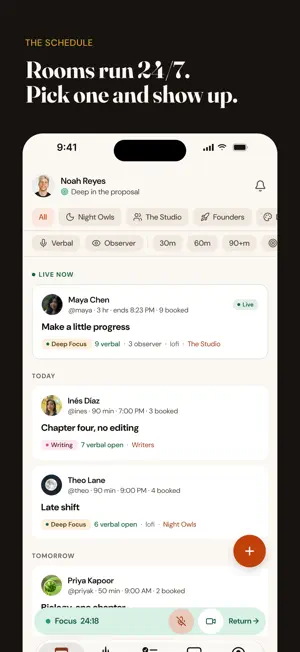

About Crews: Body Doubling
Crews is body doubling that doesn't stop at the timer. Join a live session, say what you're working on, and work next to people who show up at the same times you do. Camera on or off, voice or chat only. When the fifty minutes are up, the room doesn't empty out – and neither does the crew you found in it. WHAT A SESSION IS A timed room with real people in it. Check in with what you're doing, focus together, check out with what you finished. The phases are marked, so a change of pace is something you feel rather than discover. • Live video and mic, both optional – a chat-only session is a real choice, not a fallback • Session goals come from your own task list; tick one off and it posts as a win • Observer seats: when the verbal seats are gone, slip in quietly and still work alongside familiar faces. Never a hard no. • A short reflection at the end – how the room felt, what helped – that adds up into a picture of how you actually work CREWS, NOT STRANGERS This is the part that never got better anywhere else. You meet someone who makes your Tuesday work, and then you never see them again. • Crews are groups that persist: chat, members, a schedule, pages worth reading • The conversation outlives the timer — crew chat between sessions, session chat open after it • Regulars you recognize, follows, profiles, and a feed of what your people finished • Boost a crew you're part of and the whole crew gets more: its own banner and color, more pages, more seats YOUR WORK, IN THE ROOM • Projects and tasks that live where the sessions are, not in a second app • Every list in one view, or one list at a time — fold away what isn't today • Unfinished work carries into the next session instead of quietly disappearing MUSIC AND PRESENCE • Hear the room's music, with the level in your hands — voices always come first • A status your crew can see: what you're working on, what you're listening to, whether you're heads-down ON YOUR WRIST AND YOUR LOCK SCREEN • Apple Watch: the timer, mute, and leave, without picking up your phone • Live Activities: the session phase on your lock screen • Minimize the app and the audio keeps running WHY IT EXISTS Crews came out of 15,000 hours spent inside body-doubling tools by someone who loved them and watched them stay frozen: the chat that died with the timer, the great co-worker you never saw again, the "room full" wall in front of a host worth showing up for. Free to join, with five sessions a month. Membership adds unlimited sessions, hosting your own, bigger task lists, and boosts to spend on your crews. Crews runs on the web and the Mac too, and your sessions, crews and tasks stay in sync wherever you sign in. Terms of Use (EULA): https://www.apple.com/legal/internet-services/itunes/dev/stdeula/ Terms of Service: https://www.withcrews.com/terms Privacy Policy: https://withcrews.com/privacy
What’s new
Version 1.0.1 · Updated October 1, 2026
What's new in 1.0.1 Works better with your other devices - Keep the room open on your phone and your computer at the same time, without one kicking the other out. - Move your mic and camera to your phone without the host's music stopping for everyone. - Coming back to a session after locking your phone or switching networks now drops you straight back into the room. Sound - Room music stays on when you turn your mic on, and plays in higher quality. - The room's song now shows on your Lock Screen and in the Dynamic Island. In the room - React to what's happening with reactions that float over the video. - See when someone is in Deep focus, on a BRB or at lunch. - Double-tap a video tile to spotlight that person. - The screen stays bright for a moment when you first walk in, before dimming for focus. Chat - Get notified about new messages in your session and crew chats. - Edit or delete a message you just sent. - Bold, italics and lists, GIFs, and your crew's own emoji. Tasks - Bring your unfinished tasks into a new session in one tap. - Choose what happens when you finish a task: keep it with a strike-through, or hide it. Plus lots of smaller fixes throughout.
App privacy
The developer, Skye Strickler, reported these privacy practices to Apple.
Data Linked to You
The following data, which may be collected and linked to your identity, may be used for the following purposes:
- Purchases: Purchase History
- Usage Data: Product Interaction
- Contact Info: Name, Email Address
- User Content: Photos or Videos, Other User Content
- Identifiers: User ID
Used for: Analytics, Product Personalization, App Functionality
Alternatives to Crews: Body Doubling
Looking for apps like Crews: Body Doubling? Here are 6 similar apps on the App Store. The highest rated is DaysAgo: Last Done (5.0/5), and all 6 are free to download.
-
 BesideMe: Body Double & ADHD
-
 Momo: ADHD Body Doubling
-
 Time Blind Timer
4.3
Time Blind Timer
4.3
-
 DaysAgo: Last Done
5.0
DaysAgo: Last Done
5.0
-
 Waddle: Walk More, Scroll Less
5.0
Waddle: Walk More, Scroll Less
5.0
-
 Beside: Body Doubling Focus
5.0
Beside: Body Doubling Focus
5.0
| App | Rating | Price | Last updated | Compare |
|---|---|---|---|---|
| Crews: Body Doubling | – | Free | October 1, 2026 | |
| BesideMe: Body Double & ADHD | – | Free | Oct 13, 2026 | Compare |
| Momo: ADHD Body Doubling | – | Free | Oct 7, 2026 | Compare |
| Time Blind Timer | 4.3 / 5 (6) | Free | Jul 24, 2026 | Compare |
| DaysAgo: Last Done | 5.0 / 5 (2) | Free | Jul 8, 2026 | Compare |
| Waddle: Walk More, Scroll Less | 5.0 / 5 (6) | Free | Oct 6, 2026 | Compare |
| Beside: Body Doubling Focus | 5.0 / 5 (3) | Free | Oct 6, 2026 | Compare |