

unClick
Ground Glass Technologies LLC Photo & Video iPhoneiPadiPod touch
unClick is a free Photo & Video app for iPhone and iPad by Ground Glass Technologies LLC. Rated 5.0/5 from 4 ratings. Requires iOS 18.0.
- Rating
- 5.0
- 4 ratings
- Price
- Free
- on the App Store
- Size
- 14 MB
- Age 4+
- Updated
- Oct 10
- 2026 · v2.0.1
Screenshots


About unClick
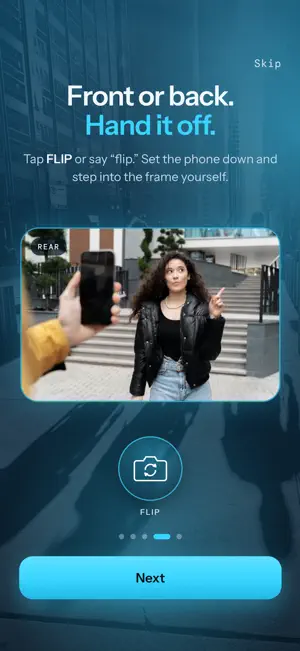
Frame your shot. unClick takes it. unClick is an iPhone camera that watches the scene and takes the photo itself at the right moment. No modes. No settings. No shutter button. HOW IT WORKS Open unClick. It starts watching on its own. Frame the shot and hold steady for a moment. unClick waits for a sharp, steady frame with a clear subject, then takes the photo and saves it to Photos. BUILT FOR THE SHOTS YOU MISS Kids and pets that won't hold still. Group photos where you're in the frame too. Candid moments, sports and travel. A phone propped on a table or set on a tripod. START IT YOUR WAY Say "Hey Siri, start unClick." Assign it to the Action Button. Or find it in Spotlight and Shortcuts. SAY IT, DON'T TAP IT "Take it" or "click" takes a photo. "Zoom" steps in one level. "Zoom zoom" goes all the way in. "Wide" goes all the way out. "Flip" switches cameras. "Start" begins watching. "Stop" ends the session. MORE Front and rear cameras. Zoom from ultra wide to 4x on supported iPhones. Photos go straight to your Photos library. No account. No ads. PRIVATE BY DESIGN unClick analyzes the scene on your iPhone. Speech recognition for voice commands runs on your iPhone. SUBSCRIPTION Try unClick free for 3 days. Then choose weekly ($1.99), monthly ($5.99) or annual ($29.99). Payment is charged to your Apple Account at confirmation of purchase. The subscription renews automatically unless it is canceled at least 24 hours before the end of the current period. Manage or cancel any time in Settings > Apple Account > Subscriptions. If you subscribed before 2.0, you keep access. Terms of Use: https://unclickapp.com/terms.html Privacy Policy: https://unclickapp.com/privacy.html
What’s new
Version 2.0.1 · Updated October 10, 2026
Version 2.0.1 Now optimized for iPhone 18 and iPhone Duo support and updated App Store screenshots. Works on previous versions iPhone 15 and up as well! unClick now takes the photo for you. - This app uses your iPhone camera, but simply automates capture. - Starts on its own. After your first START, unClick begins watching as soon as you open the app. - START and STOP. Frame your shot, tap START, and unClick takes the photo when it's sharp and steady. - Voice control. Say "take it," "zoom," "wide," or "flip" to run the camera hands-free. - Siri and the Action Button. Say "Hey Siri, start unClick," or set it to launch from the Action Button. - Front or rear camera, with zoom from 0.5x to 4x. - Photos save straight to your Photos library. - A new look and a short animated walkthrough when you first open the app. - No account. No ads. Try unClick free for 3 days.
App privacy
The developer, Ground Glass Technologies LLC, reported these privacy practices to Apple.
Data Not Collected
The developer does not collect any data from this app.
Alternatives to unClick
Looking for apps like unClick? Here are 6 similar apps on the App Store. The highest rated is Hush Hush Snap Snap (5.0/5), and all 6 are free to download.
-
 AutoFocus - Camera Coach
-
 Snappy - Interactive Camera
-
 Rokkaku Camera Pro (DSSC-1)
-
 Viddycom: Voice Camera
4.0
Viddycom: Voice Camera
4.0
-
 Lumen - AI Camera
-
 Hush Hush Snap Snap
5.0
Hush Hush Snap Snap
5.0
| App | Rating | Price | Last updated | Compare |
|---|---|---|---|---|
| unClick | 5.0 / 5 (4 ratings) | Free | October 10, 2026 | |
| AutoFocus - Camera Coach | – | Free | Aug 26, 2026 | Compare |
| Snappy - Interactive Camera | – | Free | Sep 21, 2026 | Compare |
| Rokkaku Camera Pro (DSSC-1) | – | Free | Oct 17, 2026 | Compare |
| Viddycom: Voice Camera | 4.0 / 5 (1) | Free | Oct 20, 2026 | Compare |
| Lumen - AI Camera | – | Free | Oct 30, 2026 | Compare |
| Hush Hush Snap Snap | 5.0 / 5 (1) | Free | Oct 22, 2026 | Compare |
Compare unClick with the top alternatives: ratings, updates, ASO score and keyword gaps →