

MenoLog: HRT & Menopause Log
Aleksei Bukhalov Health & Fitness iPhoneiPadiPod touch
MenoLog: HRT & Menopause Log is a free Health & Fitness app for iPhone and iPad by Aleksei Bukhalov. Requires iOS 17.0. Updated September 10, 2026.
- Price
- Free
- on the App Store
- Size
- 2 MB
- Age 4+
- Updated
- Sep 10
- 2026 · v1.3.0
Screenshots


About MenoLog: HRT & Menopause Log
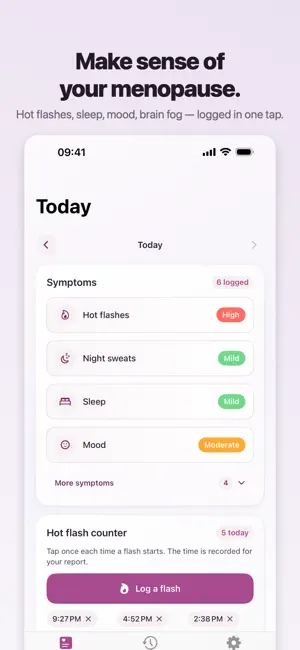
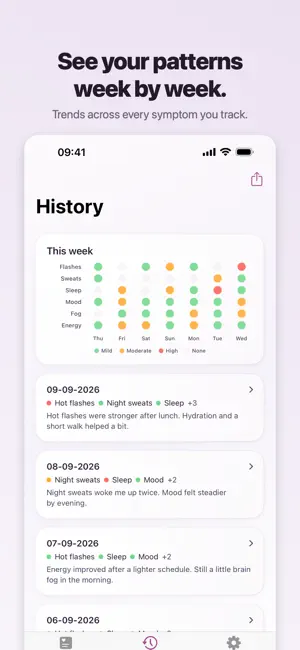
MenoLog is a menopause and perimenopause symptom log with optional HRT notes, kept on your iPhone. Count hot flashes as they happen, review your own history, and bring a clearer summary to doctor visits. There is no account. Nothing to sign up for, no password to reset, no e-mail to hand over before you can log anything: you open it and it works, and what you write stays on your phone. You can also lock it. Switch on "Require Face ID or your passcode" in Settings and the diary asks for you whenever the app comes back to the foreground, so what you have written is not on screen for whoever picks up the phone. It is off until you turn it on. Daily logging, full history, HRT notes, trends, and reminders are free. The doctor-ready PDF report is a single one-time purchase — no subscription, no account. - Quick daily symptom logging - Private by default - Your data stays on your iPhone - Simple setup, ready in seconds Track what matters - Hot flashes - Night sweats - Sleep - Mood - Anxiety - Brain fog - Energy - Dryness - Optional HRT notes - Any symptom you add yourself Not limited to a fixed list Add your own symptoms in Settings and they appear everywhere the built-in ones do: on Today, in your history, in the weekly view, and in the PDF report. Count hot flashes as they happen One tap records a flash with its time. Your report then shows how many you had each day and at what hours, which is far more useful to a doctor than trying to remember a number at the end of the week. Count one without unlocking the phone A flash rarely waits for a convenient moment. Add "Log a hot flash" to Control Center and one tap records it with its time — nothing to open, nothing to read on screen. Siri does the same thing if your hands are busy: "Log a hot flash in MenoLog." The count reaches your history and your report either way. Keep a copy that survives the phone Save a backup: one file holding every day you logged, your own symptoms, the hot-flash times and the HRT notes, which you can restore on another iPhone. Nothing here is kept on a server, so that file is the copy that outlives a lost or replaced phone. It is free whether or not you buy the PDF. Use MenoLog to - Keep personal notes - Review symptom history over time - See clearer patterns - Prepare a doctor-ready PDF summary MenoLog is for personal tracking and doctor-visit preparation. It does not diagnose, treat, or replace professional medical care.
What’s new
Version 1.3.0 · Updated September 10, 2026
You can now lock MenoLog. Switch on "Require Face ID or your passcode" in Settings and the diary asks for you whenever the app comes back to the foreground, so what you have written is not on screen for whoever picks up the phone. It is off until you turn it on, and with no Face ID or passcode set up on your iPhone the app opens as before. Daily logging, custom symptoms, the one-tap hot flash counter, history, trends, reminders, the backup and the doctor-ready PDF are unchanged, and everything still stays on your iPhone.
App privacy
The developer, Aleksei Bukhalov, reported these privacy practices to Apple.
Data Not Collected
The developer does not collect any data from this app.
Alternatives to MenoLog: HRT & Menopause Log
Looking for apps like MenoLog: HRT & Menopause Log? Here are 6 similar apps on the App Store.
-
 MenoLog
-
 Perika: Menopause HRT Tracker
-
 Going Foward
-
 Nutrinity - Calorie Tracker
-
 MeNoPause Discover
-
 Juicy Grief
| App | Rating | Price | Last updated | Compare |
|---|---|---|---|---|
| MenoLog: HRT & Menopause Log | – | Free | September 10, 2026 | |
| MenoLog | – | Free | Jul 14, 2026 | Compare |
| Perika: Menopause HRT Tracker | – | Free | Aug 8, 2026 | Compare |
| Going Foward | – | Free | May 22, 2026 | Compare |
| Nutrinity - Calorie Tracker | – | Free | Apr 5, 2026 | Compare |
| MeNoPause Discover | – | Free | Sep 7, 2026 | Compare |
| Juicy Grief | – | Free | Feb 26, 2026 | Compare |