

PrintForge – AI 3D Models
Cloudify LLC Productivity iPhoneiPadiPod touch
PrintForge – AI 3D Models is a free Productivity app for iPhone and iPad by Cloudify LLC. Rated 1.0/5 from 1 ratings. Requires iOS 16.0.
- Rating
- 1.0
- 1 ratings
- Price
- Free
- on the App Store
- Size
- 6 MB
- Age 4+
- Updated
- Apr 16
- 2026 · v1.1
Screenshots


About PrintForge – AI 3D Models
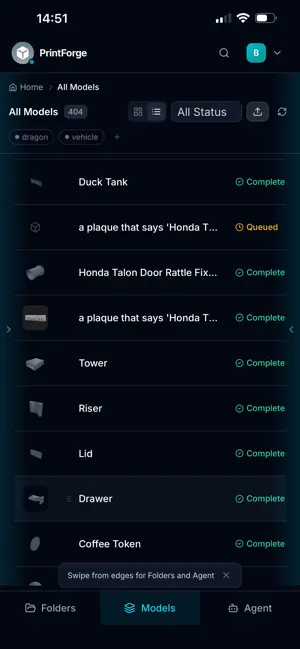
PrintForge puts AI-powered 3D model creation in your hands. Describe any object in plain English or snap a photo, and PrintForge generates a print-ready 3D model in minutes — no CAD skills required. GENERATE 3D MODELS WITH AI • Text-to-3D: Type a description like "a low-poly medieval castle" and get a full 3D model. • Image-to-3D: Upload a photo or sketch and let AI turn it into a printable model. • Multi-provider AI: Powered by Meshy and Tripo3D for the best results across styles. • Quality control: Choose from Draft, Balanced, High, or Ultra quality presets. • Style options: Realistic, Stylized, Low-Poly, Anime, Voxel, and Sculpture modes. ORGANIZE YOUR LIBRARY • Nested folders with color labels to keep projects tidy. • Tags and multi-tag filtering across your entire model gallery. • Tile or list view with search and status filters. • Drag-and-drop bulk folder upload — preserves your directory structure. ITERATE & REFINE • Refine any model with text feedback — "make the wings larger" — and AI regenerates it. • Full version history for every model. Restore any previous version with one tap. • Auto-generated preview thumbnails for uploaded STL, GLB, and OBJ files. VIEW & EXPORT • Built-in 3D viewer with orbit, zoom, and pan — powered by Three.js and WebGL. • Export to GLB, STL, or OBJ for your slicer or 3D printer. • Works with all major 3D printing slicers: Cura, PrusaSlicer, Bambu Studio, and more. COLLABORATE & SHARE • Share folders with teammates via email — with view, edit, or admin permissions. • Generate secure share links (one-time use or expiring) for external collaborators. • Threaded comments on any model for design feedback. SMART AI ASSISTANT • Conversational sidebar agent understands plain English commands. • Generate, refine, rename, export, delete, or list models — just by asking. • "Export Dragon as STL", "Rename Castle to Fortress", "List my recent models". SECURE & PRIVATE • Email/password authentication with automatic token refresh. • Row-level security — your data is visible only to you and your collaborators. • Wipe all data or delete your account at any time from Settings. PrintForge is free to try. Start creating print-ready 3D models today — no design experience needed.
What’s new
Version 1.1 · Updated April 16, 2026
Performance enhancements
App privacy
The developer, Cloudify LLC, reported these privacy practices to Apple.
Data Not Linked to You
The following data, which may be collected but is not linked to your identity, may be used for the following purposes:
- User Content: Photos or Videos
Used for: App Functionality
Alternatives to PrintForge – AI 3D Models
Looking for apps like PrintForge – AI 3D Models? Here are 6 similar apps on the App Store. The highest rated is AutoDiag AI Mechanic (3.0/5), and all 6 are free to download.
-
 AI PDF Reader: Chat & Ask
-
 3D Model - AI Model Generator
2.3
3D Model - AI Model Generator
2.3
-
 TaskFlow: AI Planner
-
 CareerLeap: AI Job Coach
-
 LexAI — AI Legal Assistant
-
 AutoDiag AI Mechanic
3.0
AutoDiag AI Mechanic
3.0
| App | Rating | Price | Last updated | Compare |
|---|---|---|---|---|
| PrintForge – AI 3D Models | 1.0 / 5 (1 rating) | Free | April 16, 2026 | |
| AI PDF Reader: Chat & Ask | – | Free | Apr 1, 2026 | Compare |
| 3D Model - AI Model Generator | 2.3 / 5 (3) | Free | Aug 31, 2026 | Compare |
| TaskFlow: AI Planner | – | Free | May 20, 2026 | Compare |
| CareerLeap: AI Job Coach | – | Free | Jun 10, 2026 | Compare |
| LexAI — AI Legal Assistant | – | Free | Apr 7, 2026 | Compare |
| AutoDiag AI Mechanic | 3.0 / 5 (1) | Free | Oct 18, 2026 | Compare |