

Typelet: Template Keyboard
慧慧 高 Utilities iPhoneiPadiPod touch
Typelet: Template Keyboard is a free Utilities app for iPhone and iPad by 慧慧 高. Rated 3.7/5 from 3 ratings. Requires iOS 17.0. Updated August 19, 2026.
- Rating
- 3.7
- 3 ratings
- Price
- Free
- on the App Store
- Size
- 4 MB
- Age 4+
- Updated
- Aug 19
- 2026 · v1.2.2
Screenshots


About Typelet: Template Keyboard
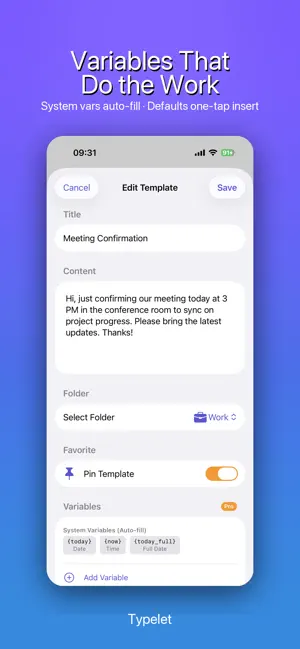
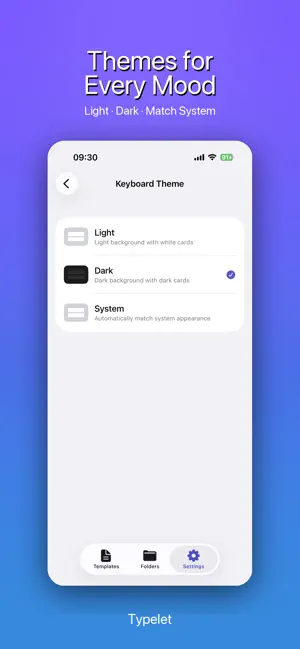
Stop retyping the same messages. Typelet puts saved replies, signatures, addresses, prompts, and other reusable text directly inside a custom keyboard, ready to insert in any app with one tap. Save it once. Organize it your way. Use it wherever you type, without switching apps or searching through Notes. SAVE REUSABLE TEXT - Create quick replies, canned responses, email templates, signatures, addresses, links, prompts, and frequently used phrases - Organize templates into folders with custom icons and colors - Search, edit, pin, and manually arrange templates in the main app - Select multiple templates to move or delete them together INSERT FROM THE TYPELET KEYBOARD - Open Typelet from any text field that supports third-party keyboards - Browse templates by folder and tap once to insert - Keep pinned templates at the top and use the same custom order in the app and keyboard - Choose a keyboard theme that fits your style DYNAMIC VARIABLES - Automatically insert the current date, time, long date, ISO date, tomorrow, or next week - Add weekday names and time-aware greetings in English, French, or Dutch - Create saved values for reusable details such as your name, email, company, or signature - Add custom variables with default values for templates that need changing details WIDGETS AND USAGE - View frequently used templates from small and medium Home Screen widgets - Tap a widget template to copy it for quick use - See total uses and weekly activity in the main app BACKUP AND RESTORE - Export your folders and templates as a JSON backup - Preview imports before changing your data - Merge matching data safely or replace everything when restoring a complete backup - Create a pre-import backup before major changes PRIVATE BY DESIGN - No account or cloud service is required - Templates are stored locally on your device - No third-party analytics or advertising SDKs - The Typelet keyboard uses Allow Full Access only to share your locally stored templates and usage records with the main app through Apple's App Group container - The keyboard makes no network requests, does not read the clipboard, and never records or uploads what you type HOW TO ENABLE THE KEYBOARD 1. Open Settings, then General, Keyboard, and Keyboards 2. Tap Add New Keyboard 3. Select Typelet 4. Tap Typelet and enable Allow Full Access for on-device template and usage synchronization 5. In any text field, long press the globe key and select Typelet FREE AND PRO The free version includes up to 10 templates and three starter folders. Typelet Pro unlocks: - Unlimited templates - Unlimited custom folders with icons and colors - Dynamic and saved variables - Template pinning and manual ordering - Keyboard themes - Import and export - Batch operations Choose a monthly or yearly auto-renewing subscription, or a one-time Lifetime purchase. Eligible users can try the yearly plan free for 7 days. The price shown on Apple's purchase sheet is the amount that will be charged. Subscriptions renew automatically unless canceled at least 24 hours before the end of the current period. You can manage or cancel a subscription in your App Store account settings. Pro access remains available until the end of the paid subscription period. Contact: [email protected] Privacy Policy: https://app-legal-pages.vercel.app/typelet/privacy Terms of Service: https://app-legal-pages.vercel.app/typelet/terms
What’s new
Version 1.2.2 · Updated August 19, 2026
• Fixed crashes and stale folder tabs that could occur after creating or deleting templates and folders • Added clear confirmation before deletion, with destination choices shown only when templates need to be moved • Improved batch Move to Folder so folders that are already the common source are not offered as no-op destinations • Refined folder spacing, editing, ordering, and multi-select management • Strengthened backup imports, recovery, and privacy-safe diagnostics for more reliable local data handling
App privacy
The developer, 慧慧 高, reported these privacy practices to Apple.
Data Not Collected
The developer does not collect any data from this app.
Alternatives to Typelet: Template Keyboard
Looking for apps like Typelet: Template Keyboard? Here are 6 similar apps on the App Store. The highest rated is Lux Light Meter: Illuminance (5.0/5), and 4 of the 6 are free to download.
-
 Lux Light Meter: Illuminance
5.0
Lux Light Meter: Illuminance
5.0
-
 TicketMe
5.0
TicketMe
5.0
-
 Tire Size Calculator
-
 DocWeave: PDF Document Scanner
5.0
DocWeave: PDF Document Scanner
5.0
-
 Cakes: Birthday Calendar
-
 PicEasy - Private Photo Tool
5.0
PicEasy - Private Photo Tool
5.0
| App | Rating | Price | Last updated | Compare |
|---|---|---|---|---|
| Typelet: Template Keyboard | 3.7 / 5 (3 ratings) | Free | August 19, 2026 | |
| Lux Light Meter: Illuminance | 5.0 / 5 (5) | Free | Oct 10, 2026 | Compare |
| TicketMe | 5.0 / 5 (2) | Free | Sep 8, 2026 | Compare |
| Tire Size Calculator | – | 3.99 USD | Jul 28, 2026 | Compare |
| DocWeave: PDF Document Scanner | 5.0 / 5 (2) | Free | Aug 18, 2026 | Compare |
| Cakes: Birthday Calendar | – | Free | Aug 11, 2026 | Compare |
| PicEasy - Private Photo Tool | 5.0 / 5 (1) | 5.99 USD | Aug 26, 2026 | Compare |