

PicEasy - Private Photo Tool
雪婷 齐 Utilities iPhoneiPadiPod touch
PicEasy - Private Photo Tool is a paid Utilities app for iPhone and iPad by 雪婷 齐. Rated 5.0/5 from 1 ratings. Requires iOS 17.6. Updated August 26, 2026.
- Rating
- 5.0
- 1 ratings
- Price
- 5.99 USD
- on the App Store
- Size
- 8 MB
- Age 4+
- Updated
- Aug 26
- 2026 · v1.1.3
Screenshots

About PicEasy - Private Photo Tool
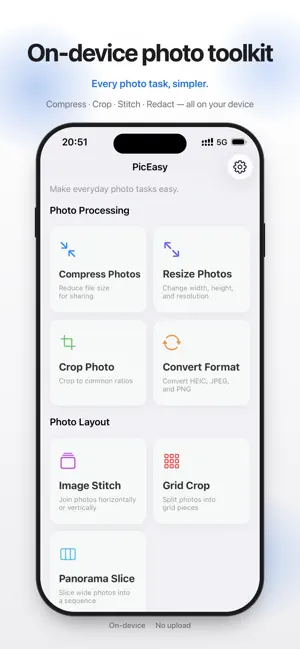
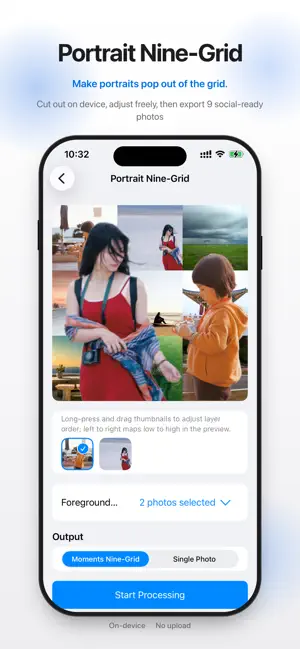
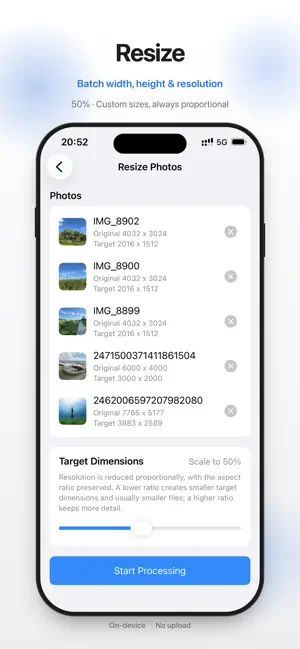
PicEasy is a private, on-device photo toolkit for iPhone. It is made for photos, screenshots, long images, collages, and images that contain private information. Core processing runs on this device: no photo uploads, no account, and no ads. Exports create new images and never overwrite originals. Main features: Workflow Processing: choose a batch first, then combine compression, resizing, format conversion, and metadata cleanup for the same set of photos. The list shows previews, dimensions, file size, and format so you can process many images with confidence. Compress, Resize, and Convert: reduce file size with a quality slider, scale photos by percentage while keeping the original aspect ratio, and export as JPEG, PNG, or HEIC. Photos already in the target format are skipped to avoid duplicates. Crop: crop with 1:1, 4:5, 16:9, 9:16, and Original ratios. Drag the crop frame, rotate, and flip with a live preview. Photo Layout: stitch up to 9 photos horizontally or vertically, or create 3, 4, 5, 6, 8, and 9-grid layouts. Adjust each photo's scale and position, and reorder the list by dragging. Portrait Nine-Grid detects portraits on device and layers them over a social nine-grid composition. Grid Crop splits one photo into 2, 3, 4, 6, or 9 pieces. Panorama Slice turns wide images into 2 to 8 continuous horizontal slices, with optional 4% overlap. Playful Tools: Fuse Bead Pattern turns a photo into a bead chart with generic 48, 72, or 96 color sets, custom grid sizes, live preview, and a material list. Liquid Glass Watermark reads device, capture time, focal length, aperture, shutter speed, ISO, and coordinates from photos, then creates camera-style metadata glass watermarks. This feature requires iOS 26 or later. Privacy Tools: Metadata Cleanup removes GPS location, capture time, camera model, lens, software, and common camera settings. Privacy Mask detects faces and text on device, supports face, text, or all-region masking, and also lets you add mask areas manually. QR Code Generator: create QR codes for text, URLs, and Wi-Fi. URL input starts with https:// by default; Wi-Fi supports WEP, WPA, and open networks. PicEasy is useful for everyday sharing, album cleanup, social posts, privacy handling, and lightweight creative work.
What’s new
Version 1.1.3 · Updated August 26, 2026
This update adds a new Playful Tools section and moves Fuse Bead Pattern into it. New Liquid Glass Watermark: select up to 9 photos, read device, capture time, focal length, aperture, shutter speed, ISO, and coordinate metadata, then create camera-style glass watermarks near the bottom of each image. Exports are saved as new JPEG photos and never overwrite originals. The feature does not request your current location. Liquid Glass Watermark requires iOS 26 or later.
App privacy
The developer, 雪婷 齐, reported these privacy practices to Apple.
Data Not Collected
The developer does not collect any data from this app.
Alternatives to PicEasy - Private Photo Tool
Looking for apps like PicEasy - Private Photo Tool? Here are 6 similar apps on the App Store. The highest rated is TicketMe (5.0/5), and 5 of the 6 are free to download.
-
 StampOut: Photo Stamp Camera
4.0
StampOut: Photo Stamp Camera
4.0
-
 TicketMe
5.0
TicketMe
5.0
-
 Expirify
-
 Lux Light Meter: Illuminance
5.0
Lux Light Meter: Illuminance
5.0
-
 Tire Size Calculator
-
 Finger Chooser – OneChoose
5.0
Finger Chooser – OneChoose
5.0
| App | Rating | Price | Last updated | Compare |
|---|---|---|---|---|
| PicEasy - Private Photo Tool | 5.0 / 5 (1 rating) | 5.99 USD | August 26, 2026 | |
| StampOut: Photo Stamp Camera | 4.0 / 5 (15) | Free | Aug 20, 2026 | Compare |
| TicketMe | 5.0 / 5 (2) | Free | Sep 8, 2026 | Compare |
| Expirify | – | Free | Oct 7, 2026 | Compare |
| Lux Light Meter: Illuminance | 5.0 / 5 (5) | Free | Oct 10, 2026 | Compare |
| Tire Size Calculator | – | 3.99 USD | Jul 28, 2026 | Compare |
| Finger Chooser – OneChoose | 5.0 / 5 (3) | Free | Sep 6, 2026 | Compare |