

Trimmi: Clean Storage Space
Ramin Abakov Utilities iPhoneiPadiPod touch
Trimmi: Clean Storage Space is a free Utilities app for iPhone and iPad by Ramin Abakov. Requires iOS 17.0. Updated September 30, 2026.
- Price
- Free
- on the App Store
- Size
- 28 MB
- Age 4+
- Updated
- Sep 30
- 2026 · v1.1.0
Screenshots


About Trimmi: Clean Storage Space
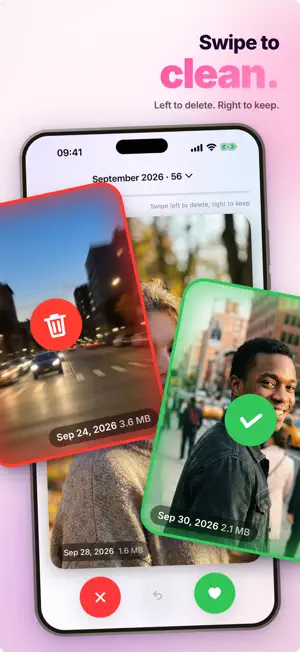
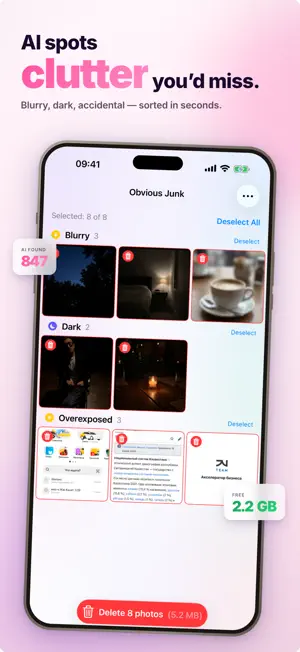
Storage full? Trimmi clears your iPhone in minutes — not hours. Stop scrolling through thousands of photos one by one. Trimmi finds what's eating your storage and helps you delete it with a single swipe. Duplicates, near-identical shots, blurry photos, heavy videos, old screenshots — gone. WHAT TRIMMI FINDS • Duplicate photos — exact copies, even resaved or edited • Similar photos — burst shots and near-duplicates grouped together, with the best one suggested • Screenshots & screen recordings — clean them all in one tap • Heavy videos — sort by size and free up gigabytes fast • Short videos — delete those accidental 1-second clips • Duplicate & similar videos — find video copies you forgot about • Obvious junk — AI detects blurry, dark and low-quality shots automatically • Messenger cache — clear photos and videos saved by WhatsApp, Telegram and others • Files — sort large files by size and remove what you don't need SMART COMPRESSION Don't want to delete? Compress photos and videos without visible quality loss and keep all your memories using a fraction of the space. WHY TRIMMI • Lightning fast — scans thousands of photos in seconds • 100% private — everything happens on your device, nothing is uploaded • Safe by design — review before delete, restore from Recently Deleted • Beautiful, simple interface — no clutter, no learning curve • Works fully offline TRIMMI PRO Upgrade to Pro to unlock unlimited cleanup, advanced AI detection, video tools and compression. Choose what fits you: • Monthly subscription • Yearly subscription with 3-day free trial • Lifetime — one-time purchase, all features forever Free up gigabytes today and stop paying for iCloud storage you don't need. — — — Privacy Policy: https://steely333.github.io/Privacy/trimmi-privacy.html Terms of Use: https://steely333.github.io/Privacy/trimmi-terms.html Subscription auto-renews unless cancelled at least 24 hours before the end of the current period. Payment is charged to your Apple ID account. Manage or cancel anytime in your Apple ID settings. Any unused portion of a free trial is forfeited when purchasing a subscription.
What’s new
Version 1.1.0 · Updated September 30, 2026
• Monthly and yearly recaps: stories about your photos — places, best shots, space you can free up. Share the final card in one tap • Swipe cleanup: go through a month of photos — left to delete, right to keep • Smart cleanup: describe what to remove, like "screenshots older than a year" • Home Screen widget showing how much space you can free up • Redesigned Home with Photos, Videos and Files tabs • Photo and video compression keeps going when you leave the app • Press and hold a thumbnail to open it full screen • Report a problem from Settings • More accurate similar, junk and screenshot detection, no more stuck scans, bug fixes
App privacy
The developer, Ramin Abakov, reported these privacy practices to Apple.
Data Not Linked to You
The following data, which may be collected but is not linked to your identity, may be used for the following purposes:
- Purchases: Purchase History
- Identifiers: User ID
- Diagnostics: Crash Data, Other Diagnostic Data
Used for: Analytics, App Functionality
Alternatives to Trimmi: Clean Storage Space
Looking for apps like Trimmi: Clean Storage Space? Here are 6 similar apps on the App Store.
-
 CleanerSmart - Photo Cleaner
-
 CleanUp - Duplicate Cleaner
-
 Storage Cleaner: Clean Phone
-
 NovaClean: Phone Cleaner
-
 Slidr: Swipe Photo Cleaner
-
 CleanStorage: Phone Clean Up
| App | Rating | Price | Last updated | Compare |
|---|---|---|---|---|
| Trimmi: Clean Storage Space | – | Free | September 30, 2026 | |
| CleanerSmart - Photo Cleaner | – | Free | Jun 18, 2026 | Compare |
| CleanUp - Duplicate Cleaner | – | Free | May 25, 2026 | Compare |
| Storage Cleaner: Clean Phone | – | Free | May 13, 2026 | Compare |
| NovaClean: Phone Cleaner | – | Free | May 29, 2026 | Compare |
| Slidr: Swipe Photo Cleaner | – | Free | Jun 24, 2026 | Compare |
| CleanStorage: Phone Clean Up | – | Free | Jul 15, 2026 | Compare |