

Slidr: Swipe Photo Cleaner
Saul Porras Utilities iPhoneiPadiPod touch
Slidr: Swipe Photo Cleaner is a free Utilities app for iPhone and iPad by Saul Porras. Requires iOS 15.1. Updated June 24, 2026.
- Price
- Free
- on the App Store
- Size
- 38 MB
- Age 4+
- Updated
- Jun 24
- 2026 · v1.1.1
Screenshots



About Slidr: Swipe Photo Cleaner
Slidr — Swipe to Clean Your Photo Library Is your iPhone storage full? Slidr makes cleaning your camera roll fast, fun, and effortless. Swipe through photos by month, delete duplicates, remove blurry shots, and reclaim gigabytes of space — in minutes. No subscription. One-time purchase. Yours forever. --- WHY SLIDR? Swipe to Delete or Keep Review photos one by one with a simple swipe interface. Swipe left to delete, right to keep. Power through your camera roll faster than ever. Smart Photo Detection - Automatically find duplicate photos - Detect blurry and low-quality images - Identify screenshots cluttering your library - Organized by month for easy review Safe Deletion — No Accidents Everything goes to a trash review before permanent deletion. Changed your mind? Remove any photo from trash before it's gone. Free Up iPhone Storage Delete duplicates, blurry photos, and unwanted shots. Reclaim gigabytes of space, speed up your iCloud backups, and make room for new memories. Your Privacy, Always Protected Slidr works 100% offline. Your photos never leave your device. No data collection, no tracking, no ads. English & Spanish supported, automatically detected from your device. --- HOW IT WORKS 1. Grant photo library access 2. Choose what to review: all photos, duplicates, low-quality, screenshots, or videos 3. Swipe through photos month by month 4. Review your trash before deleting 5. Permanently delete and reclaim your storage --- FEATURES - Intuitive swipe interface (left to delete, right to keep) - Automatic duplicate photo detection - Blurry & low-quality photo scanner - Screenshot and video review - Month-by-month organization - Trash review before permanent deletion - Undo button — go back anytime - Dark theme - No ads, no subscription, no tracking - Works completely offline --- PERFECT FOR - Anyone whose iPhone says "Storage Almost Full" - People with thousands of photos they've never sorted - Anyone taking multiple shots of the same scene - Photography enthusiasts who want a clean library --- Questions or feedback? [email protected]
What’s new
Version 1.1.1 · Updated June 24, 2026
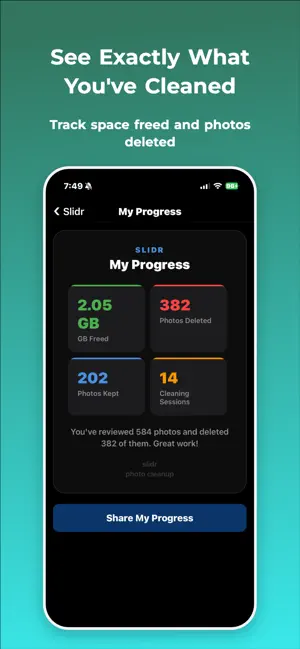
Slidr just got a major upgrade — now with on-device AI. Everything runs privately on your iPhone using the Neural Engine. Your photos never leave your device. • Find Low Quality Photos — on-device AI spots blurry and low-detail shots so you can clear them fast • Find Burst Photos — automatically groups your rapid-fire shots so you keep the best and delete the rest, with pinch-to-zoom to compare • Find Screenshots — round up every screenshot in one place • My Progress — see exactly how much space you've freed, with accurate storage stats • Faster, smarter scanning and a redesigned, more polished review experience • Bug fixes and performance improvements
App privacy
The developer, Saul Porras, reported these privacy practices to Apple.
Data Not Collected
The developer does not collect any data from this app.
Alternatives to Slidr: Swipe Photo Cleaner
Looking for apps like Slidr: Swipe Photo Cleaner? Here are 6 similar apps on the App Store. The highest rated is Sweep: Easy Storage Cleaner (5.0/5), and all 6 are free to download.
-
 Trimmi: Clean Storage Space
-
 CleanUp - Duplicate Cleaner
-
 CleanStorage: Phone Clean Up
-
 CleanBee: Compress & Clean
-
 CleanIA: Free up your storage
-
 Sweep: Easy Storage Cleaner
5.0
| App | Rating | Price | Last updated | Compare |
|---|---|---|---|---|
| Slidr: Swipe Photo Cleaner | – | Free | June 24, 2026 | |
| Trimmi: Clean Storage Space | – | Free | Sep 30, 2026 | Compare |
| CleanUp - Duplicate Cleaner | – | Free | May 25, 2026 | Compare |
| CleanStorage: Phone Clean Up | – | Free | Jul 15, 2026 | Compare |
| CleanBee: Compress & Clean | – | Free | Sep 28, 2026 | Compare |
| CleanIA: Free up your storage | – | Free | Jun 28, 2026 | Compare |
| Sweep: Easy Storage Cleaner | 5.0 / 5 (1) | Free | Sep 7, 2026 | Compare |