

SlideForge PPT Slides AI
Commercium Graphics & Design iPhoneiPadiPod touch
SlideForge PPT Slides AI is a free Graphics & Design app for iPhone and iPad by Commercium. Requires iOS 15.0. Updated October 19, 2026.
- Price
- Free
- on the App Store
- Size
- 58 MB
- Age 4+
- Updated
- Oct 19
- 2026 · v2.0.1
Screenshots


About SlideForge PPT Slides AI
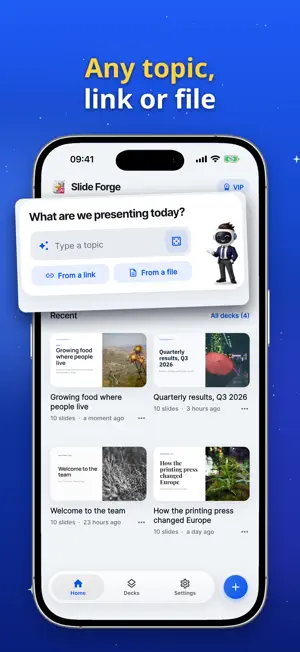
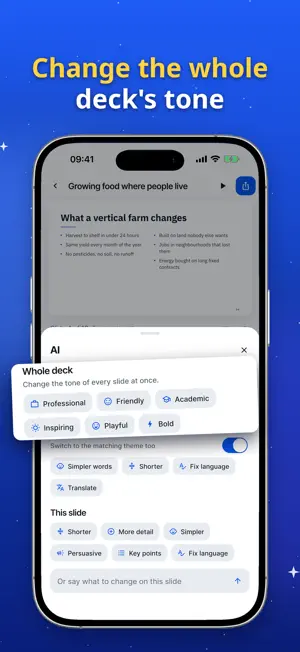
Slide Forge turns a topic, a web link or a document into a finished, designed presentation in about a minute. Kai, your presentation assistant, plans the story, writes every slide and finds the right photos. A REAL STORY, NOT A PILE OF SLIDES • Kai plans the whole deck first, then writes each slide for its place in the story. • 12 designer themes and 10 smart layouts: covers, key points, columns, big numbers, quotes, full-screen photos and more. • Start from anything: type a topic, paste a link, or upload a PDF, Word or PowerPoint file. Your facts stay your facts. MAKE IT YOURS • Tap any text to edit it, right on the slide. • Switch the layout or the whole theme with one tap. Everything stays perfectly laid out. • AI rewrite: change the tone of the whole deck, use simpler words, make it shorter, or translate it. • Free stock photos, speaker notes, undo and redo. IMPORT AND RESTYLE Bring an existing deck from PowerPoint, Keynote, Google Slides, Canva or PDF. Slide Forge keeps your slides, order, facts and photos, and rebuilds every slide in a clean new design. PRESENT LIVE Share a link and your audience follows your slides on their own phones and laptops as you present. They can react, ask questions and vote in polls. Your iPhone becomes the remote. SHARE AND KNOW Export to PowerPoint (.pptx) or PDF, or share a web link anyone can open without an app. Link stats show views, time on each slide and how far people got. MADE FOR IPHONE AND IPAD A full canvas with floating tools on iPad, light and dark mode, iCloud sync between your devices, and 14 languages. SLIDE FORGE VIP Your first deck is free. VIP unlocks unlimited decks, editing and AI rewrite, PowerPoint export, live presenting, link stats and exports without the Slide Forge line. Payment is charged to your Apple ID. Subscriptions renew automatically unless cancelled at least 24 hours before the end of the current period. Manage or cancel any time in your App Store account settings. Terms: https://slideforge.cloud/terms-and-conditions Privacy: https://slideforge.cloud/privacy-policy
What’s new
Version 2.0.1 · Updated October 19, 2026
Creating a deck is more reliable. When a file or link can't be used, Slide Forge now tells you why and lets you go back to change it. A dropped connection also recovers faster.
App privacy
The developer, Commercium, reported these privacy practices to Apple.
Data Used to Track You
The following data may be used to track you across apps and websites owned by other companies:
- Identifiers: User ID
Data Not Linked to You
The following data, which may be collected but is not linked to your identity, may be used for the following purposes:
- Identifiers: User ID, Device ID
- Usage Data: Product Interaction, Other Usage Data
- Diagnostics: Crash Data, Performance Data, Other Diagnostic Data
- Purchases: Purchase History
- User Content: Other User Content
Used for: Analytics, App Functionality
Alternatives to SlideForge PPT Slides AI
Looking for apps like SlideForge PPT Slides AI? Here are 6 similar apps on the App Store. The highest rated is Presentation Maker: Powerpoint (5.0/5), and all 6 are free to download.
-
 Slidesy: AI PPT Slides Maker
-
 Presentation Maker: Powerpoint
5.0
Presentation Maker: Powerpoint
5.0
-
 MyHome: AI Interior Design
-
 Buff: AI Gaming Logo Maker
-
 Axio | AI Logo Maker
5.0
Axio | AI Logo Maker
5.0
-
 PetAI: AI Avatar Photo Maker
1.0
PetAI: AI Avatar Photo Maker
1.0
| App | Rating | Price | Last updated | Compare |
|---|---|---|---|---|
| SlideForge PPT Slides AI | – | Free | October 19, 2026 | |
| Slidesy: AI PPT Slides Maker | – | Free | Jun 2, 2026 | Compare |
| Presentation Maker: Powerpoint | 5.0 / 5 (5) | Free | Oct 17, 2026 | Compare |
| MyHome: AI Interior Design | – | Free | Mar 19, 2026 | Compare |
| Buff: AI Gaming Logo Maker | – | Free | Nov 28, 2024 | Compare |
| Axio | AI Logo Maker | 5.0 / 5 (1) | Free | Sep 7, 2026 | Compare |
| PetAI: AI Avatar Photo Maker | 1.0 / 5 (5) | Free | Nov 14, 2024 | Compare |